 Domain SearchInstantly check and register your preferred domain name
 Web Hosting
 cPanel HostingHosting powered by cPanel (Most user friendly)
 WordPress HostingHost your WordPress website with fast, secure, and affordable WordPress hosting in Kenya.
 KE Domains
 Reseller HostingStart your own hosting business without tech hustles
 Windows HostingOptimized for Windows-based applications and sites.
 Free Domain
 Affiliate ProgramEarn commissions by referring customers to our platforms
 Free HostingTest our SSD Hosting for free, for life (1GB storage)
 Domain TransferMove your domain to us with zero downtime and full control
 All DomainsBrowse and register domain extensions from around the world
 .Com Domain
 WhoisLook up domain ownership, expiry dates, and registrar information
 VPS Hosting
 Managed VPSNon techy? Opt for fully managed VPS server
 Dedicated ServersEnjoy unmatched power and control with your own physical server.
 Website Builder
 Online Store BuilderLaunch a professional e-commerce store without writing code.
 Web Design ServiceGet a custom-designed website tailored to your brand and goals. From just KES 15,600
 BlogRead our guides on web hosting, online business, digital marketing, and more
 SupportOur support guides cover everything you need to know about our services
 ContactContact us via chat or email

Before you buy a .ke domain, having a clear checklist of KE domain requirements is crucial to avoid wasting time or money or ending up with a rejected application.
Let’s be honest, most people only discover the rules after they’ve already chosen a name.
That’s where things start to go wrong.
- You choose a perfect domain, only to find out the extension is restricted
- You submit your application, but it gets delayed due to missing or incorrect details
- You miss a verification email because it was sent to an inactive address
- You apply for something like
.ac.ke, only to realize it requires official institutional documents
These are common issues, and they slow everything down.
In some cases, while you’re fixing paperwork or resubmitting details, someone else registers the exact domain you wanted.
Our goal here is to avoid all that early enough.
In this article, I’ll give you a clear, practical checklist of KE domain requirements, based on official KENIC guidelines and real-world experience from registrars like us at Truehost.
We’ll start with the general rules that apply to all .ke domains, then walk through the specific requirements for each extension, so you know exactly what’s needed before you begin.
General KE Domain Requirements
Before getting into specific extensions, there are a few basic rules that apply across the board.
These are set by KENIC, and every registrar, including Truehost, follows them.
If you get these right from the start, the rest of the process becomes much easier.
1) Length and Characters
Let’s start with the domain name itself, the part before .ke.
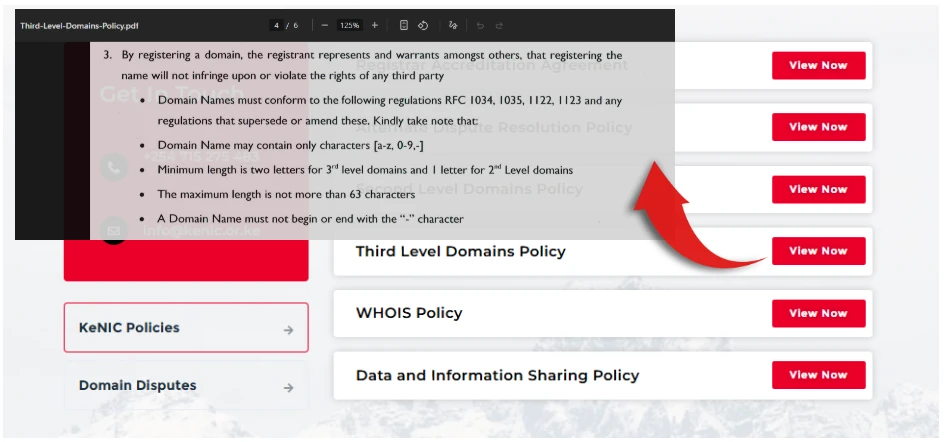
- It must be between 1-2 (depending on whether 2nd level domains or 3rd level domains) and 63 characters
- You can only use:
- Lowercase letters (a–z)
- Numbers (0–9)
- Hyphens (-)
There are a few things you can’t use:
- Uppercase letters
- Special symbols like @, #, or !
- Spaces
- A hyphen at the beginning or end of the name
It’s a simple rule, but it catches people off guard more often than you’d expect, especially when trying to match brand names exactly.
2) Contact Information
This is where many applications run into trouble.
You’re required to provide details for three contacts:
- Registrant – the actual owner of the domain
- Administrative contact – handles approvals and decisions
- Technical contact – manages technical setup (usually your host or developer)
For each, you’ll need:
- Full name
- A valid, active email address (this is important for verification)
- Phone number (Kenyan or international format)
- Physical or postal address
KENIC does verify this information. If anything is inaccurate or outdated, your domain can be delayed, flagged, or even suspended later.
3) Registration Term
A .ke domain must be registered for at least 1 year.
Most registrars allow you to go longer, typically up to 5 years. If you already know you’ll be using the domain long-term, locking it in for several years can save you from renewal stress.
Auto-renewal is also worth enabling. It prevents situations where a domain expires quietly and someone else picks it up.
4) Residency / Eligibility
This is one of the easiest parts.
For most extensions, especially .co.ke and .ke, there are no restrictions based on location.
- You don’t need to be a Kenyan citizen
- You don’t need a Kenyan business registration
- You can register from anywhere in the world
This makes .ke domains accessible whether you’re targeting a local or global audience.
5) Accuracy and Legal Warranty
When you register a domain, yes, you’re filling out a form, but most importantly, you’re making a declaration.
You’re confirming that:
- All the information you’ve provided is true and accurate
- The domain name does not infringe on trademarks or someone else’s rights
- You agree to resolve disputes through the proper arbitration channels if needed
It’s easy to overlook this part, but it matters, especially if you’re registering a brand name or something close to an existing business.
6) Domains That Don’t Require Documentation
The good news is that many popular .ke extensions are straightforward.
Options like .co.ke (businesses and general use), .or.ke (organizations), and .ne.ke (network services) typically do not require supporting documents during registration.
That means you can secure your domain quickly, as long as you meet the general requirements above.
Special Requirements by .ke Extension
Once you move past the general KE domain requirements, the main difference comes down to the extension you choose.
Each one serves a specific purpose, and for some, you’ll need official approval before your domain is registered.
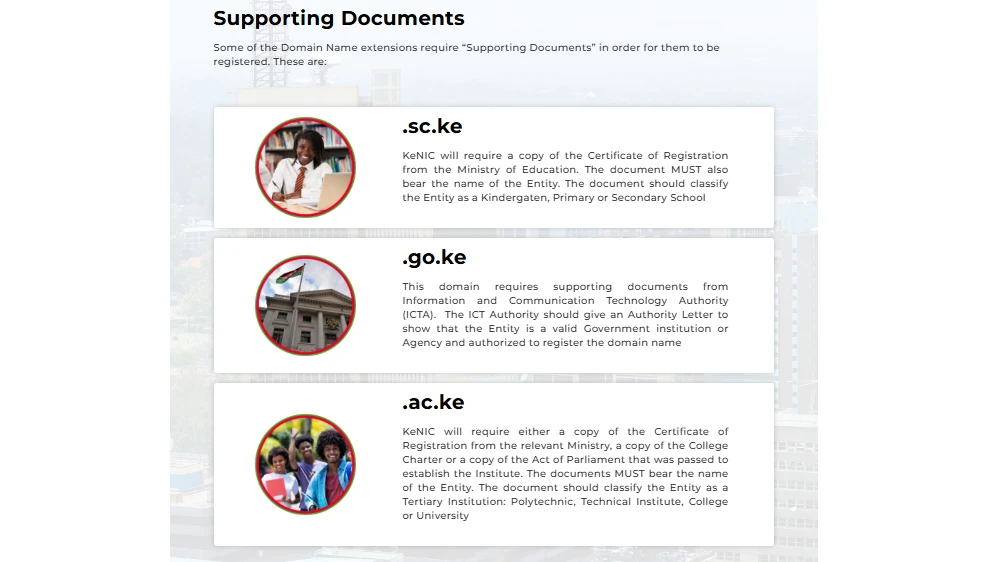
Here are the key restricted extensions and what you’ll need for each.
.ac.ke Requirements (Higher Education Institutions)
This extension is strictly reserved for recognized institutions of higher learning like universities, colleges, and other tertiary institutions.
To register it, you’ll need to provide official proof of accreditation or registration from the Ministry of Education.
This could be a certificate, charter, or any formal document showing that the institution is legally recognized.
Your application is only processed after this verification, so having the document ready upfront makes a big difference.
Ministry of Education Contact (State Department of Science and Technology):
- P.O Box 9583-00200, Nairobi, Kenya
- Jogoo House B, Harambee Avenue
- Tel: +254-020-3318581
- Fax: +254-020-251991
- Email:
[email protected]
.sc.ke (Schools)
This one works in a similar way to .ac.ke, but it applies to schools at lower levels, like primary, secondary, and early learning institutions.
Registration depends on submitting a valid school registration certificate from the Ministry of Education.
Without that, the domain won’t be approved.
If you’re handling this for a school, it’s best to confirm the registration documents are up to date before starting the process.
Ministry of Education Contact (State Department of Education):
- P.O Box 30040-00100, Nairobi, Kenya
- Jogoo House B, Harambee Avenue
- Tel: +254-020-3318581
- Fax: +254-020-20214287
- Email:
[email protected]
.go.ke (Government Institutions)
This is one of the most tightly controlled extensions.
It’s used exclusively by government ministries, departments, agencies, and county offices.
Instead of general documentation, you’ll need an authorization letter from the Department of Government IT Services (GITS).
This letter must confirm that the institution is approved to use the domain, and it has to come through official government channels.
Without that authorization, registration won’t move forward at all.
GITS Contact Details:
- Treasury Building, Harambee Avenue, Nairobi
- P.O. Box 30007-00100
- Tel: +254 20 2252299
- Emails:
[email protected],[email protected]
What This Means for You
These extensions aren’t something you can register instantly like .co.ke.
They require verification from official institutions, and that process depends on having the right documents and sometimes reaching out to the right offices.
If you’re applying for one of these, it’s best to prepare everything in advance so your application doesn’t stall halfway through.
Important Additional Notes on KE Domain Requirements
By this point, you already know the core requirements.
But there are a few practical details that don’t always get talked about, yet they can make a big difference in how smooth your experience is.
a) Verification and Activation
Open extensions like .co.ke and .ke are usually activated almost instantly after payment and submitting your details.
For restricted domains, your documents have to be reviewed by your registrar and approved under the guidelines of KENIC.
If everything is correct and complete, the process typically takes 1–3 working days.
Missing or unclear documents can stretch this timeline further.
b) Renewal and Grace Periods
Normally, you need to renew a domain to keep ownership.
- If you renew before the expiry date, everything continues without interruption
- If you miss the deadline, most
.kedomains come with a grace period (about 90 days) where you can still renew without losing the name
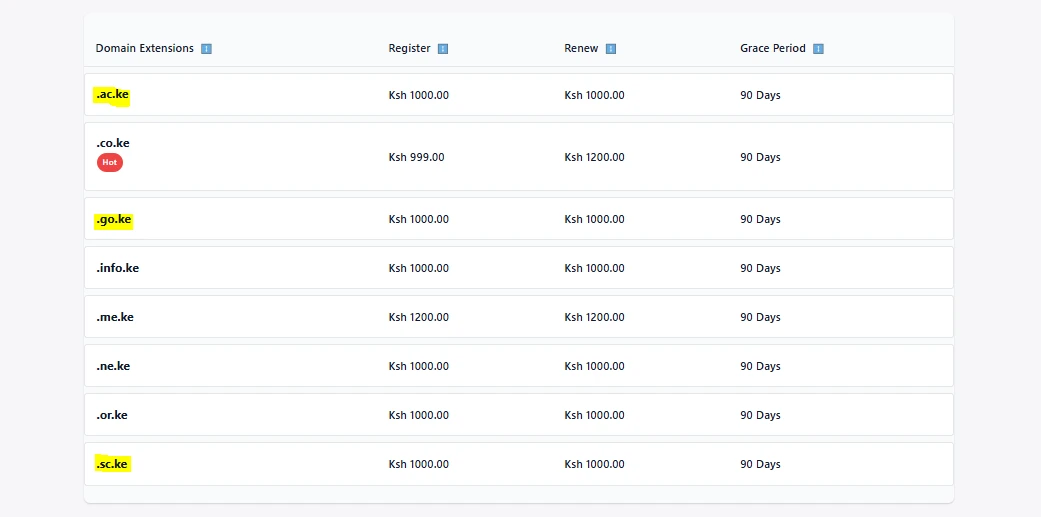
Once that window passes, the domain can be released back to the public, and someone else can register it.
c) Mobile-Friendly Tip
A large number of users in Kenya access websites through their phones. That has a direct impact on how your domain name performs.
Short, simple names have a clear advantage:
- Easier to type on a small keyboard
- Less chance of spelling errors
- Faster to remember and share
If your name is long or complicated, it becomes harder for people to reach your site, even if your content is great.
These additional points are based on current practices guided by KENIC and real-world experience from registrars like Truehost.
Getting them right helps you avoid small mistakes that can turn into bigger issues later.
Next Steps After the KE Domain Requirements Checklist
By now, you have a clear checklist of what’s required before registering a .ke domain.
Taking a few minutes to prepare these details upfront can save you delays, rejected applications, or even losing the domain name you had in mind.
So now, if ready to check off your list and register, we exist to make it simple with M-PESA payments, local support, and hands-on help with document uploads for restricted extensions, all aligned with guidelines from KENIC.
All you need to do is search your .ke domain now and start registering right away.
If you’re unsure about documents or which extension fits best, the team at Truehost is available 24/7 to chat anytime in English or Kiswahili.
Let’s get your domain secured today.






