Domain SearchInstantly check and register your preferred domain name
 Web Hosting
 cPanel HostingHosting powered by cPanel (Most user friendly)
 WordPress HostingHost your WordPress website with fast, secure, and affordable WordPress hosting in Kenya.
 KE Domains
 Reseller HostingStart your own hosting business without tech hustles
 Windows HostingOptimized for Windows-based applications and sites.
 Free Domain
 Affiliate ProgramEarn commissions by referring customers to our platforms
 Free HostingTest our SSD Hosting for free, for life (1GB storage)
 Domain TransferMove your domain to us with zero downtime and full control
 All DomainsBrowse and register domain extensions from around the world
 .Com Domain
 WhoisLook up domain ownership, expiry dates, and registrar information
 VPS Hosting
 Managed VPSNon techy? Opt for fully managed VPS server
 Dedicated ServersEnjoy unmatched power and control with your own physical server.
 Website Builder
 Online Store BuilderLaunch a professional e-commerce store without writing code.
 Web Design ServiceGet a custom-designed website tailored to your brand and goals. From just KES 15,600
 BlogRead our guides on web hosting, online business, digital marketing, and more
 SupportOur support guides cover everything you need to know about our services
 ContactContact us via chat or email
Want to launch a website, but feel overwhelmed by the design process?
You’re not alone.
Many people think you need to be a tech expert or hire a pricey agency. But the truth is, you can design a website yourself, even with little to no experience.
In this guide, we’ll walk you through how to design a website in 9 simple steps. These steps are beginner-friendly and perfect if you’re building your first business, blog, or portfolio site in Kenya.
Why Design a Website?
In 2025, a website is no longer a luxury. It’s a necessity.
Whether you’re a freelancer in Nakuru, a shop owner in Nairobi, or an NGO working in rural Kenya, a well-designed website can be the difference between staying invisible and getting noticed.
Here’s why designing a website, not just having one, truly matters.
1) First Impressions Are Made Online
Think about this: When someone hears about your business, the first thing they’ll likely do is Google you.
If they find a poorly designed, slow-loading site, or worse, no site at all, they may assume:
- You’re not professional
- You’re not serious about your work
- You can’t be trusted
On the other hand, a clean, well-structured website builds instant credibility.
2) Your Website Works 24/7
Unlike a physical shop or office, a website never closes.
It can:
- Showcase your services
- Answer common questions
- Generate leads through forms
- Close sales via eCommerce
- Collect email subscribers
Even at 2 AM, your website can be converting visitors into customers.
3) People Judge You Based on Your Design
Yes, design matters.
Studies show that 94% of first impressions are design-related.
If your layout is messy, your fonts are hard to read, or your site isn’t mobile-friendly, most people won’t stay.
A well-designed website:
- Keeps people engaged
- Guides them to take action (like calling, buying, or signing up)
- Makes your brand memorable
And in Kenya, where smartphone users dominate, responsive design is no longer optional — it’s expected.
4) You Control the Narrative
Social media is great, but it’s rented land. You don’t own your Facebook or Instagram page.
With a website, you own everything:
- The message
- The design
- The layout
- The branding
- The customer experience
This gives you full control over how you tell your story, sell your products, or share your vision.
5) A Good Website Helps You Rank on Google
Search engines love organized, easy-to-use websites.
When you design your site with SEO (Search Engine Optimization) in mind, using proper headings, keywords, fast loading speed, and a clear structure, you boost your chances of ranking on Google.
This means more organic traffic and more potential customers, without paying for ads.
🔗 Want to learn more?
👉 See our SEO Starter Guide for Beginners in Kenya
6) Your Competitors Already Have One
Let’s be honest, if you don’t have a website, someone else will get your customer.
Consumers in Kenya are increasingly comparing businesses online before making decisions.
If your competitor has a polished website and you don’t, you’ve already lost the sale.
7) It Builds Long-Term Trust
A great website builds long-term relationships.
By providing helpful content (like blog posts or FAQs), showcasing real testimonials, and making it easy for users to reach you, you build trust that leads to repeat business, referrals, and loyalty.
This is especially important for:
- Coaches and consultants
- Service-based businesses
- NGOs seeking donor confidence
- Startups building authority
How to design a website
Designing a website might seem like something only tech experts or big businesses can do.
But in reality, anyone can design a website, even with no background in web development. The steps below will help you get started.
1) Know Your Website’s Purpose and Audience
Before you open any design tool or pick a template, you need to answer two critical questions:
- What do I want this website to do?
- Who am I building it for?
This is the foundation of everything that follows. If you’re a small business owner, your website might need to help customers contact you, view services, or request quotes.
If you’re a creative or freelancer, your website may serve as a portfolio to showcase your work. Bloggers typically aim to educate, inspire, or grow a community through content.
Knowing your target audience, their needs, habits, and preferences, will guide your tone, visuals, structure, and even your content.
A purpose-driven website is easier to design, easier to use, and far more effective.
2) Choose a Domain Name and Hosting Plan
Once you know your purpose, it’s time to get your website online.
A domain name is your website’s address, for example, www.mybrand.co.ke. Choose a name that is simple, relevant to your brand, and easy to remember.
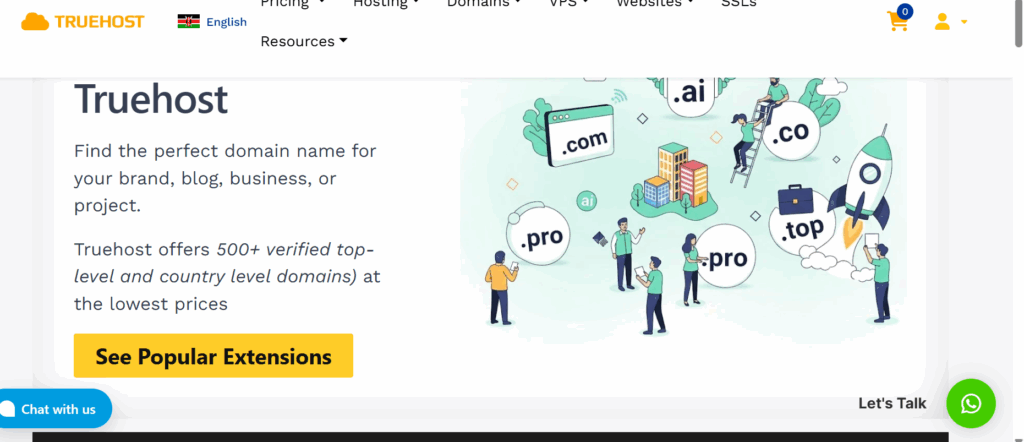
If your market is primarily Kenyan, consider using a .co.ke domain extension to appear more local and trustworthy.
Next, you need a reliable hosting service. This is the engine that powers your website and makes it available online. Without good hosting, your site might load slowly, crash, or be vulnerable to attacks.
At Truehost KE, we offer beginner-friendly plans that come with free SSL certificates, fast load speeds, and 24/7 support, everything you need to get started.

If you’re not sure which plan to pick, shared hosting is ideal for beginners. If you’re planning to use WordPress, consider our managed WordPress hosting.
For larger projects or eCommerce sites, VPS hosting offers more power and control.
3) Pick the Right Website Builder or CMS
Now that you’ve secured your domain and hosting, the next step is choosing the platform to build your website on.
You don’t need to learn how to code. Website builders and CMS platforms allow you to create pages using drag-and-drop tools or simple editors.
WordPress is one of the most popular and beginner-friendly platforms in Kenya. It powers over 40% of websites globally, and for good reason. It’s free, flexible, and has thousands of themes and plugins you can use to customize your site.
Other tools like Wix, Squarespace, or Shopify (for online stores) also offer easy setup.
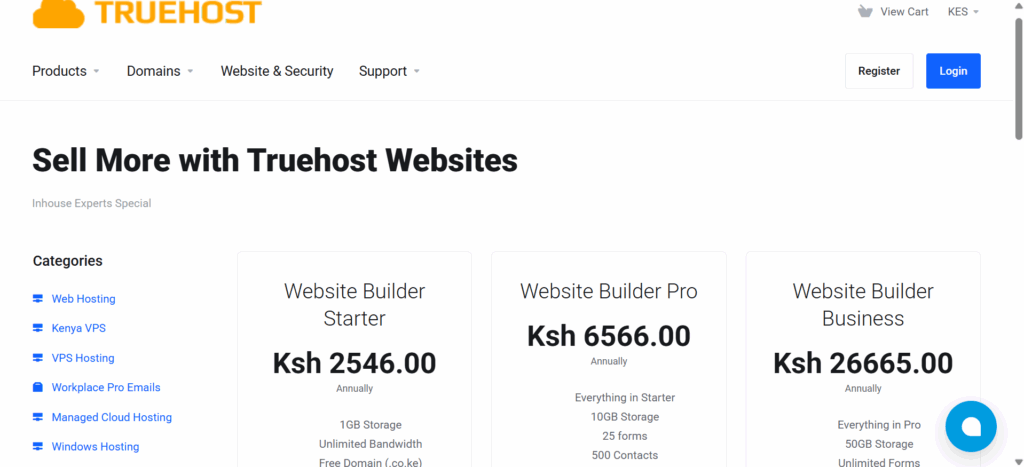
However, WordPress gives you more control and is often cheaper in the long run, especially when paired with Truehost KE’s optimized hosting plans.
4) Plan Your Website Structure
Now it’s time to think about what pages your site needs and how they will be organized.
At the very least, you’ll want to include the following:
- Home page – This is the first thing visitors see. It should clearly explain who you are and what you do.
- About page – Share your story, background, or mission. Build trust.
- Services or Products page – Describe what you offer, how it works, and how people can take the next step.
- Contact page – Make it easy for people to reach you. Include your phone, email, and WhatsApp number.
- Blog – This helps with SEO and positions you as an authority in your space. You can use it to share tips, updates, or helpful resources.
- Testimonials or reviews – If you have satisfied customers or clients, show their feedback here.
Planning your structure helps your design flow better and makes it easier for visitors to find what they need.
5) Select a Theme or Template
Your website’s look and feel will depend on the theme you choose. A theme controls the layout, color scheme, fonts, and how your content is displayed.
Instead of starting from scratch, pick a pre-built theme that matches your industry and style. Look for one that is modern, clean, mobile-responsive, and easy to customize.
If you’re using WordPress, some great themes for beginners include Astra, Kadence, and Neve. These work well with popular page builders like Elementor or Gutenberg
Avoid themes that look outdated, have poor reviews, or don’t load quickly. A lightweight, well-coded theme improves user experience and helps your site perform better in search engines.
6) Customize Your Design and Branding
Once your theme is installed, it’s time to make your site truly yours.
Start by uploading your logo, choosing your brand colors, and selecting fonts that are clean and easy to read. If you don’t have a logo yet, you can create one quickly using tools like Canva.
Use a consistent design across all pages. That means:
- Same font pairings
- Consistent spacing
- Aligned buttons and headings
- A clear visual hierarchy
Keep your design simple and uncluttered. Every visual element should support your message. Don’t overwhelm visitors with too many animations, pop-ups, or flashy colors.
Think mobile-first, how will your design look on a smartphone? Many of your users will be browsing on their phones, especially in Kenya.
7) Add Engaging Content
Now it’s time to fill your pages with content, the actual words, images, and videos that people will interact with.
On your homepage, include a short intro about what you do, who you help, and a clear call-to-action (like “Contact Us” or “Get a Free Quote”).
Your About page should tell your story in a relatable way. Talk about why you started, what you believe in, and who you serve.
For your services or products, use simple language to describe what you offer. Include key features, benefits, and steps on how to buy or book.
Don’t forget the Contact page. This should include a form, your email, phone number, and links to your social media accounts. You can even add a WhatsApp chat button for instant engagement.
Where possible, include photos of your team, products, workspace, or events. Avoid using generic stock photos unless necessary.
If you plan to blog, write posts that answer common questions your audience might have. This helps with SEO and keeps your site fresh.
8) Make It Mobile-Friendly and Fast
More than half of all internet traffic in Kenya comes from smartphones. If your website doesn’t work properly on mobile, you’ll lose visitors.
Here’s how to make sure your site works well on all devices:
- Test it on different screen sizes
- Use mobile-friendly fonts and layouts
- Ensure buttons are large enough to tap
- Avoid pop-ups that block important content
Site speed also matters. A slow website will frustrate users and hurt your Google rankings.
To improve speed:
- Compress your images before uploading
- Use lightweight themes and limit plugin use
- Choose quality hosting with good uptime and server response
Truehost KE provides optimized WordPress hosting and free tools like caching and SSL to help your site load faster and stay secure.
9) Launch and Continue Improving
Once you’ve added all your content and tested the layout, it’s time to go live.
But launching is not the end, it’s just the beginning.
After publishing your website, take these steps:
- Submit it to Google using Search Console
- Connect it to Google Analytics so you can track visitors
- Ask friends or customers to visit and give feedback
- Fix any broken links, typos, or bugs
Keep improving your website over time. Add new content, update your services, and track what people click on.
Look at bounce rates, page speed, and mobile usage to understand what’s working, and what needs adjusting.
The best websites evolve with their audience.
Conclusion
Designing a website may seem technical at first, but by following these 9 steps, anyone can build a beautiful, functional, and effective website, even without coding skills.
When you combine a clear goal, smart planning, reliable hosting, and the right tools, you set yourself up for success online.
At Truehost KE, we’ve helped thousands of Kenyans build websites that work. Whether you’re launching a new idea or bringing an existing business online, we’re here to support you every step of the way.
👉 Ready to get started?
Explore our affordable hosting plans and launch your website today.