Domain SearchInstantly check and register your preferred domain name
 Web Hosting
 cPanel HostingHosting powered by cPanel (Most user friendly)
 WordPress HostingHost your WordPress website with fast, secure, and affordable WordPress hosting in Kenya.
 KE Domains
 Reseller HostingStart your own hosting business without tech hustles
 Windows HostingOptimized for Windows-based applications and sites.
 Free Domain
 Affiliate ProgramEarn commissions by referring customers to our platforms
 Free HostingTest our SSD Hosting for free, for life (1GB storage)
 Domain TransferMove your domain to us with zero downtime and full control
 All DomainsBrowse and register domain extensions from around the world
 .Com Domain
 WhoisLook up domain ownership, expiry dates, and registrar information
 VPS Hosting
 Managed VPSNon techy? Opt for fully managed VPS server
 Dedicated ServersEnjoy unmatched power and control with your own physical server.
 Website Builder
 Online Store BuilderLaunch a professional e-commerce store without writing code.
 Web Design ServiceGet a custom-designed website tailored to your brand and goals. From just KES 15,600
 BlogRead our guides on web hosting, online business, digital marketing, and more
 SupportOur support guides cover everything you need to know about our services
 ContactContact us via chat or email
Your website is under constant threat, whether you realize it or not.
The moment your site goes live, it becomes visible to automated bots, malicious scripts, and attackers actively searching for vulnerabilities. In today’s always-connected online world, securing your website and your data is no longer optional. It’s a core part of running any serious online presence.
Cyber threats don’t stand still. They evolve, adapt, and find new ways to break in.
A small security oversight can quickly turn into stolen data, website downtime, or lost customer trust. And most of the time, businesses aren’t hacked because they were reckless; they’re hacked because security was underestimated.
This guide is here to change that. You’ll discover the most common web hosting security threats and, more importantly, the practical steps to protect your site from Online Threats.
What Is Web Hosting Security?
Web hosting security is the protection that keeps your website safe while it lives on a server connected to the internet. It shields your site from hackers, malware, bots, and other malicious activity that tries to gain unauthorized access.
This protection comes in many forms. It includes firewalls that block suspicious traffic, encryption that keeps data private, and backups that help you recover in the event of an issue.
Without these safeguards, sensitive information such as customer details, emails, and payment data can be exposed, and your hard-earned reputation can suffer a serious blow.
And this isn’t a rare problem. Over 30,000 websites are hacked every single day. In Kenya, where more businesses are moving online and digital transactions are growing fast, ignoring web hosting security is risky. It’s the equivalent of leaving your business unprotected in a busy marketplace and hoping nothing happens.
Why Web Hosting Security Matters
Your website lives on a server, which connects to the internet.
That connection is what makes your site accessible to customers, but it’s also what exposes it to attacks. Without proper web hosting security, your site becomes an easy target for automated bots and cybercriminals looking for weaknesses.
Here’s what can happen when security is overlooked:
- Your content can be stolen or changed
Hackers can deface your pages, replace your content, or add links you didn’t approve. - Malware can be injected silently
Your site may start spreading malicious files to visitors without you even knowing. - Your website can be taken offline
Attacks can overload your server and cause downtime, costing you traffic and sales. - Visitor data can be hijacked
Personal details, login credentials, or payment information may be exposed. - Your brand trust can be damaged
Once users lose confidence in your site, it’s hard to win them back.
Common Online Threats to Your Website
Online threats are like thieves in the night. They come in many forms, and knowing them helps you spot trouble early.
Here’s a quick rundown of the big ones:
- Phishing Attacks: Fake emails or sites trick you into sharing passwords. One click, and hackers steal your login details.
- Malware and Viruses: These sneaky programs infect your site, stealing data or slowing it down. Remember the WannaCry attack? It hit millions worldwide.
- DDoS Attacks: Flood your site with traffic until it crashes. It’s like a traffic jam that blocks all visitors.
- SQL Injection and XSS: Hackers exploit code weaknesses to insert harmful scripts. This can expose user data or deface your site.
- Ransomware: Locks your files and demands payment. Small businesses in Kenya have lost thousands to this
Best Practices to Secure Your Site
You hold the keys to your site’s safety. Start with these easy steps. They’re like daily habits that build a strong defense.
1) Protect Your Site with SSL
SSL (Secure Sockets Layer) encrypts traffic between your site and your visitors.
You know you have SSL when your site shows https:// and a padlock icon.
Benefits:
- Visitor data stays private
- Search engines trust you more
- Browsers warn less about your site
Good news: SSL certificates are often included free with hosting plans.
2) Keep Everything Up to Date
A lot of attacks take advantage of outdated software.
Here’s what you must update:
- Website platform (e.g., WordPress, Joomla)
- Themes or templates
- Plugins and extensions
- Server software
Enable auto‑updates where possible.
3) Use Strong Accounts and Passwords
Weak passwords are one of the easiest ways in for hackers.
Password Rules
- Minimum 12 characters
- Mix uppercase, lowercase, numbers, symbols
- No common words like “password123.”
Two‑Factor Authentication (2FA)
Add a second check, like a phone code, before login.
Limit Login Attempts
If someone fails too many times, block them temporarily.
4) Secure Your Website Files
A hacker doesn’t need to break in if your files are already exposed.
File Permissions
Set the right permissions so nobody can edit files without being logged in.
.htaccess Protection
On Apache servers, the .htaccess file controls access rules.
You can use it to:
- Block specific IP addresses
- Prevent script execution in upload folders
- Disable directory browsing
5) Monitor Your Site Regularly
You can’t protect what you don’t check.
Monitoring keeps you ahead of trouble.
What to Monitor
- Uptime (is your site down?)
- File changes
- Login attempts
- Traffic spikes
Tools You Can Use
| Tool Type | What It Does |
| Uptime Monitor | Alerts you if your site goes offline |
| Security Scan | Checks for malware or suspicious files |
| Log Analyzer | Shows who accessed your site and when |
Some tools are free, others are built into hosting dashboards.
6) Always Back Up Your Website
Backups are your safety net.
Even with good security, things can go wrong, such as hacks, bad updates, or accidental deletion.
Good Backup Habits
✔ Daily backups
✔ Store copies off the server
✔ Test restore regularly
Treat backups like insurance; you hope you never need them, but you’re glad they exist.
7) Limit Who Can Access Your Site
People can be the weakest link in your website’s security.
Only grant access to those who genuinely need it, and make sure each user has the minimum permissions necessary to do their job.
Remove accounts immediately when someone leaves your team or no longer requires access.
This simple step can prevent accidental breaches and keep your site much safer.
Access Control Tips
- Use separate accounts for each user
- Give the lowest access level needed
- Remove old users immediately
If someone leaves your team, revoke access right away.
8) Add a Web Application Firewall (WAF)
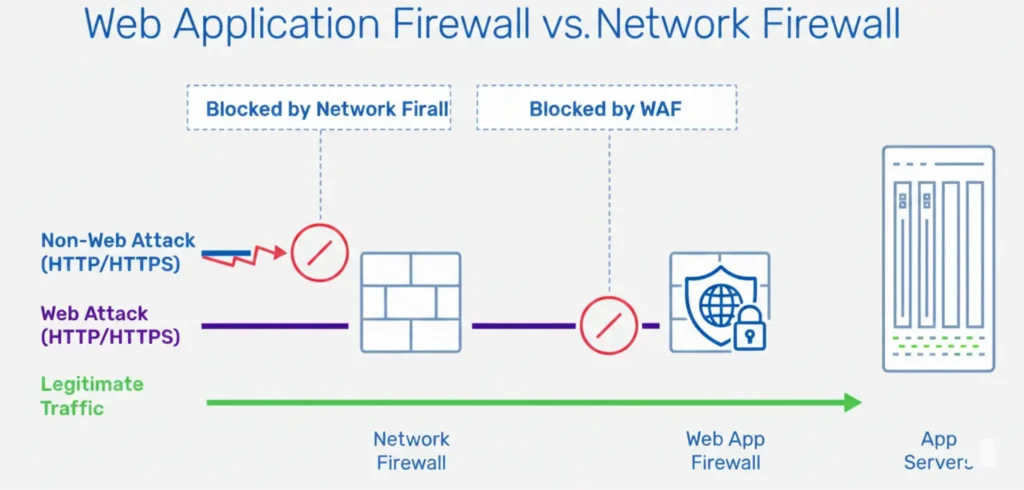
A WAF stands between your site and incoming traffic.
It blocks:
- SQL injection
- XSS attacks
- Bad bots
- Spam bots
Some hosting services include WAFs, others let you turn them on with a toggle.
9) Educate Your Team
Security isn’t just technology, it’s people too.
Teach your team:
- Not to share passwords
- To spot phishing emails
- To avoid suspicious links
Simple awareness goes a long way.
10) Respond Fast When Something Goes Wrong
Even with all precautions, breaches can happen.
Your security response should include:
- Identify the problem. What happened?
- Contain it. Block access, change passwords
- Clean up. Remove malware, fix vulnerabilities
- Restore. Bring the site back with a clean backup
- Review. Figure out how it happened
Document what you did and how to avoid it next time.
11) Extra Security Tools You Can Use
Security Plugins (for WordPress)
- Firewall protection
- Malware scanning
- Login lockdown
Bot Protection
Blocks fake bot attacks that waste bandwidth.
CAPTCHA on Forms
Stops spam bots from submitting forms.
12) Test Your Security Periodically
Just like you inspect your home locks, you should inspect your website.
Security Testing Checklist
- Scan for malware
- Review user accounts
- Check firewall settings
- Test backups
Some hosts offer weekly or monthly security reports.
13) Stay Informed on New Threats
Security changes fast, and new attacks appear every day.
Follow trusted sources for:
- New vulnerabilities
- Patch recommendations
- Best practices
You don’t need to be a security expert; just stay updated.
How to Choose a Secure Web Hosting Provider
Your hosting provider isn’t just a place where your website sits.
They are your first line of defense against online threats.
Choose the wrong host, and even a well-built website becomes vulnerable. Choose wisely, and you gain speed, stability, and peace of mind.
Here’s how to make the right decision.
i) Look for Proven Uptime
Uptime tells you how often your site stays online.
- Aim for 99.9% uptime or higher
- Downtime means lost visitors, lost sales, and lost trust
- This matters even more in fast-moving markets like Kenya
A secure site that’s always down is still a problem.
ii) Check the Built-In Security Features
Good security should come standard, not as an expensive add-on.
Make sure your host includes:
- Free SSL certificates to encrypt data
- Firewalls to block malicious traffic
- DDoS protection to stop traffic floods
- Malware scanning to catch threats early
If these are missing, your site is exposed from day one.
iii) Reliable Support Is Non-Negotiable
Security issues don’t wait for office hours.
Choose a host that offers:
- 24/7 customer support
- Live chat or phone assistance
- A team that understands security issues
When something goes wrong, fast help makes all the difference.
iv) Read Reviews from Real Users
Marketing promises are easy. Real experiences matter more.
- Look for feedback on reliability and support
- Pay attention to how hosts handle security incidents
- Avoid providers with frequent complaints about downtime or hacks
v) Balance Cost with Real Value
Cheap hosting can be tempting, but it often cuts corners.
- Low prices may mean weak security
- Poor backups
- Slow or outdated servers
Instead of choosing the cheapest option, choose the one that protects your business properly.
vi) Consider Local Hosting Advantages
In Kenya, local hosting providers understand the market better.
With Truehost, you get:
- Hosting plans designed for Kenyan businesses
- SSD storage for faster performance
- LiteSpeed servers that improve speed and security
- Local support that understands your needs
vii) Growth and Scalability
Your website won’t stay the same forever.
A good host should allow you to:
- Upgrade resources easily
- Move to VPS or cloud hosting when traffic grows
- Add security features as your site expands
If your host can’t grow with you, you’ll outgrow them fast.
viii) Backups and Easy Restores Are Critical
Security isn’t just about prevention; it’s also about recovery.
Ask these questions:
- Are backups done daily?
- Are restores free and easy?
- Can you recover your site quickly after an attack?
Free daily backups are a huge plus.
ix) Look for a Money-Back Guarantee
This shows confidence.
- It lets you test performance and security
- You can leave if the service doesn’t meet expectations
- No long-term risk upfront
Conclusion
Website security is the backbone of a successful online presence. Every visitor, every transaction, and every piece of data depends on it. From strong passwords and regular updates to firewalls and backups, taking proactive steps can save you from downtime, hacks, and lost trust.
The good news? You don’t have to do it alone. With the right web hosting partner, security becomes seamless, reliable, and stress-free.
At Truehost, we understand what Kenyan businesses need. Our hosting plans come with built-in security, daily backups, SSL certificates, and expert 24/7 support, all designed to keep your site safe and performing at its best.
Protect your website today. Explore our secure hosting plans and start with confidence.