Domain SearchInstantly check and register your preferred domain name
 Web Hosting
 cPanel HostingHosting powered by cPanel (Most user friendly)
 WordPress HostingHost your WordPress website with fast, secure, and affordable WordPress hosting in Kenya.
 KE Domains
 Reseller HostingStart your own hosting business without tech hustles
 Windows HostingOptimized for Windows-based applications and sites.
 Free Domain
 Affiliate ProgramEarn commissions by referring customers to our platforms
 Free HostingTest our SSD Hosting for free, for life (1GB storage)
 Domain TransferMove your domain to us with zero downtime and full control
 All DomainsBrowse and register domain extensions from around the world
 .Com Domain
 WhoisLook up domain ownership, expiry dates, and registrar information
 VPS Hosting
 Managed VPSNon techy? Opt for fully managed VPS server
 Dedicated ServersEnjoy unmatched power and control with your own physical server.
 Website Builder
 Online Store BuilderLaunch a professional e-commerce store without writing code.
 Web Design ServiceGet a custom-designed website tailored to your brand and goals. From just KES 15,600
 BlogRead our guides on web hosting, online business, digital marketing, and more
 SupportOur support guides cover everything you need to know about our services
 ContactContact us via chat or email
Google Ads’ Message Assets let a potential customer start a WhatsApp conversation directly from your ad.
Instead of visiting your website, finding the chat button and opening WhatsApp, they can move from Google Search to a conversation in one tap.
That does not mean the landing page is gone. Your headline still opens your website. The message button simply adds a second conversion path for people who would rather chat before buying.
For businesses in Kenya, where customers commonly ask about pricing, compatibility, delivery or setup through WhatsApp, that shorter journey could be valuable.
However, the feature is still in beta and is not available in every Google Ads account.
Quick answer: Google Ads Message Assets are native buttons that connect Search and Performance Max ads to WhatsApp, SMS, Facebook Messenger or Zalo.
Google supports conversion reporting and automatically makes a “Leads from Messages” goal available after an asset is added and approved.
What are Google Ads Message Assets?
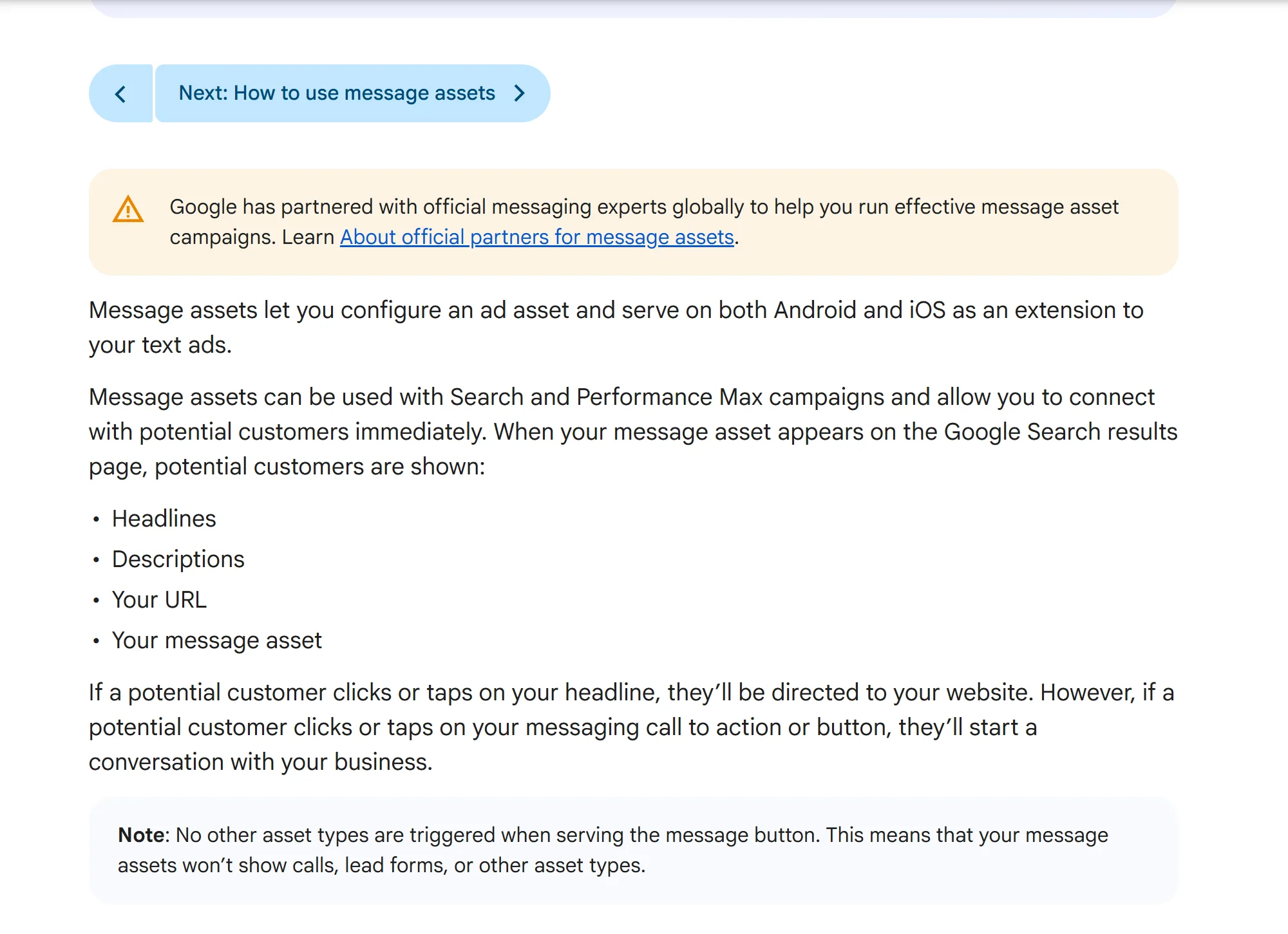
A Message Asset is an ad asset that appears with an eligible responsive search ad.
When someone selects the messaging call to action, Google sends them to the platform configured by the advertiser so they can start a conversation.
Google currently documents support for:
WhatsApp: an active WhatsApp Business number
SMS: an active phone number
Facebook Messenger: a Messenger URL such as
https://m.me/usernameZalo: an official account ID or custom Zalo URL
Message Assets can run with Search and Performance Max campaigns, according to Google’s overview of Message Assets.
What customers see on Google Search
The ad retains its normal headline, description and website address. Google can then show a messaging button beneath the ad.
The exact appearance may vary by device, platform and experiment.
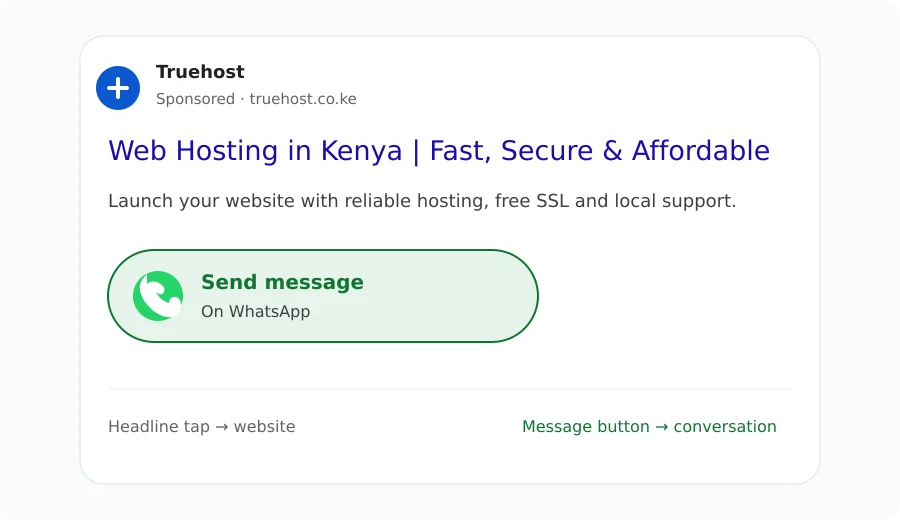
If the customer taps the headline, they go to your landing page. If they tap the message button, they begin a conversation with your business.
Google also says that call, lead-form and other asset types do not serve in the same instance when the message button appears.
What advertisers see in Google Ads
You can configure a Message Asset from the account-level Assets page or while creating a campaign. The setup asks for the messaging platform, destination, starter message and supporting call-to-action copy.
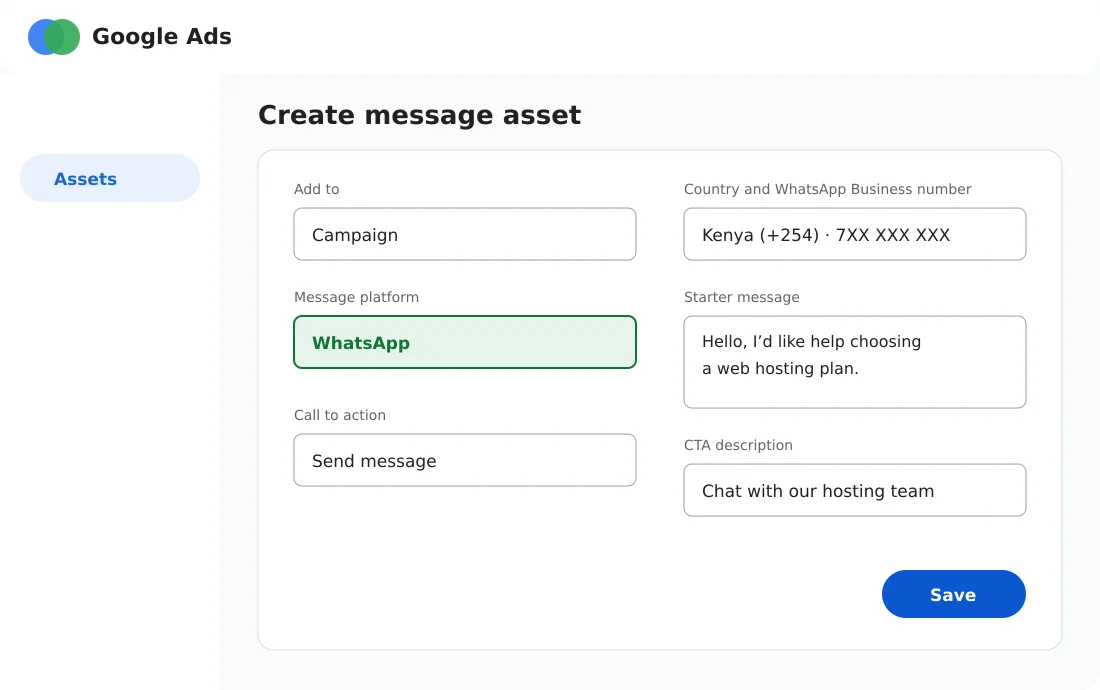
Original illustration: The main information used to create a WhatsApp Message Asset. Field names and layout may change while the feature remains in beta.
How to add a WhatsApp Message Asset
Option 1: Add it from the Assets page
Open Campaigns in your Google Ads account.
Select Assets.
Select the blue plus button, then choose Message.
Select WhatsApp as the platform.
Choose the country and enter an active WhatsApp Business number.
Add a compliant starter message and your call-to-action copy.
Save the asset and wait for Google’s review.
Option 2: Add it while creating a campaign
Create a campaign and select Leads as the objective.
Choose Search or Performance Max.
For Search, select Messages from your ads as the way you want to reach the goal.
Complete the campaign settings.
Under Ads, open Messages and select + Message.
Enter your WhatsApp Business number and starter message.
Watch the setup process
The following videos remain hosted by their creators on YouTube. Embedding them lets readers watch the walkthroughs without copying or republishing the video files.
This detailed walkthrough covers setup, eligibility, conversion tracking, reporting and scheduling.
The second video provides a shorter look at adding a WhatsApp button to a Search campaign.
How conversion tracking works
Once the Message Asset is added and approved, Google makes a Leads from Messages conversion goal available in the account.
This lets you evaluate the asset as a lead channel instead of treating every click as equally valuable.
Google says standard reporting can include:
Impressions
Clicks
Cost
Click-through rate
Cost per click
Conversions
View-through conversions
Eligible offline measurements, including store visits and store sales
Use these figures with CRM or sales data. A message is not automatically a qualified lead, and a qualified conversation is not automatically a sale.
The most useful business metric will usually be cost per qualified conversation or cost per completed purchase.
Who is eligible?
Having a WhatsApp Business number does not guarantee access. Google states that an advertiser must have:
A good history of policy compliance
An account in an eligible vertical or sub-vertical
Completed advertiser verification
A messaging account that Google can verify as belonging to the advertised business
New advertisers may initially receive limited impressions while Google assesses account quality.
Sensitive verticals, including campaigns and elections, are not eligible.
How Google verifies your WhatsApp number
Your message destination must relate to the business in the ad. Google provides two main verification routes:
Show the messaging link on your website or social profile. The verification URL should use the same domain as the ad’s display URL.
Placing the WhatsApp link on a frequently visited landing page can make it easier to detect.Verify domain ownership. Link Google Search Console with Google Ads, or install the account’s Google Ads conversion or remarketing tag on the website.
Google may disapprove a Message Asset if it cannot verify the number, username or destination.
The starter message must also meet standard editorial rules. Review the official Message Asset requirements before submitting it.
Will Message Assets work in Kenya?
Yes on eligible Android traffic, but there is an iOS limitation.
Google says Message Ads are available globally on Android. Its current iOS country list includes South Africa, the United Kingdom, India, Pakistan and several other markets, but Kenya is not listed.
That makes Android the realistic starting point for a Kenyan campaign.
Why Message Assets?
Message Assets reduce friction for purchases that often begin with a question.
They could be especially useful for web hosting, domains, property, travel, education, professional services and other products where customers want reassurance before paying.
For example, someone searching for “web hosting Kenya” may want to know whether a plan supports WordPress, email, M-Pesa or website migration.
A well-prepared support or sales team can answer those questions in the same channel the prospect already uses daily.
The speed benefit can disappear, however, if messages go unanswered. Before enabling the asset, define:
Who owns new conversations
Expected response times
Business hours and after-hours replies
Qualification questions
How sales are attributed back to the campaign
Or just consider a powerful AI chatbot that you can finetune with your own docs
Message Asset versus a landing-page WhatsApp button
Factor | Google Message Asset | Landing-page WhatsApp button |
|---|---|---|
Customer journey | Search ad to conversation | Search ad to page to conversation |
Website context | Limited before the chat begins | Customer can review prices, proof and FAQs first |
Google Ads reporting | Native asset and conversion reporting | Requires website event and conversion setup |
Eligibility | Beta access, verification and policy history required | Available to any site that can link to WhatsApp |
Best use | High-intent queries that frequently need human help | Products where customers benefit from researching first |
These routes should be tested against each other, not treated as automatic replacements.
A landing page can pre-qualify users and answer common questions. A direct message can capture impatient or uncertain prospects before they leave.
How to test Message Assets properly
Choose a narrow campaign. Start with high-intent keywords where customers often ask questions before purchasing.
Prepare the conversation. Use a starter message that reveals intent, such as “Hello, I need help choosing a web hosting plan.”
Define a qualified lead. Separate accidental taps and vague enquiries from prospects who match your offer.
Track completed sales. Connect message conversations to orders or import offline conversions where appropriate.
Compare outcomes. Measure qualified conversations, response time, conversion rate, acquisition cost and revenue—not CTR alone.
Common mistakes to avoid
Putting “WhatsApp” in the ad headline: Google warns against naming the platform in the headline because headline clicks still open the website.
Using an unverified number: Display the same messaging link on the advertised site or verify domain ownership.
Optimising for clicks only: A cheap conversation that never becomes a sale is not necessarily a good lead.
Running outside staffed hours: Schedule the asset around the times your team can respond promptly.
Replacing the landing page without testing: Some customers need pricing, reviews and specifications before they are ready to talk.
Frequently asked questions
Are Google Ads Message Assets the same as the old message extensions?
No. This is Google’s current beta Message Asset format for Search and Performance Max campaigns, with documented support for third-party messaging platforms and native reporting.
Can I use a normal WhatsApp number?
Google’s instructions specify an active WhatsApp Business number. The destination must also be verified as belonging to the business in the ad.
Does the WhatsApp button replace my landing page?
No. The ad headline still directs customers to your website. The message button provides an additional path into a conversation.
Can I use Message Assets with Performance Max?
Yes. Google documents support for both Search and Performance Max campaigns, although access remains account-dependent while the feature is in beta.
Are Message Assets available to all advertisers?
No. You need an eligible account, advertiser verification and a good policy history. The feature may also be absent from your account because it is still in beta.
Should you test Google Ads Message Assets?
If your customers already use WhatsApp to ask questions before buying, Message Assets deserve a controlled test. They shorten the route from search intent to human assistance and bring the interaction into Google Ads reporting.
Do not judge the experiment by message volume alone. Compare the cost and quality of those conversations with leads from your normal landing-page campaign. The winning route is the one that creates more qualified customers and profitable sales — not simply more taps.
Last updated: 21 September 2026. Message Assets remain in beta, so availability, interface labels and supported platforms may change.