 Domain SearchInstantly check and register your preferred domain name
 Web Hosting
 cPanel HostingHosting powered by cPanel (Most user friendly)
 WordPress HostingHost your WordPress website with fast, secure, and affordable WordPress hosting in Kenya.
 KE Domains
 Reseller HostingStart your own hosting business without tech hustles
 Windows HostingOptimized for Windows-based applications and sites.
 Free Domain
 Affiliate ProgramEarn commissions by referring customers to our platforms
 Free HostingTest our SSD Hosting for free, for life (1GB storage)
 Domain TransferMove your domain to us with zero downtime and full control
 All DomainsBrowse and register domain extensions from around the world
 .Com Domain
 WhoisLook up domain ownership, expiry dates, and registrar information
 VPS Hosting
 Managed VPSNon techy? Opt for fully managed VPS server
 Dedicated ServersEnjoy unmatched power and control with your own physical server.
 Website Builder
 Online Store BuilderLaunch a professional e-commerce store without writing code.
 Web Design ServiceGet a custom-designed website tailored to your brand and goals. From just KES 15,600
 BlogRead our guides on web hosting, online business, digital marketing, and more
 SupportOur support guides cover everything you need to know about our services
 ContactContact us via chat or email
Ready to stake your claim on the web?
You can quickly verify domain registration details using specialized lookup tools like Who.is to gain instant transparency into any URL’s administrative background.
These platforms reveal exactly who registered the domain, the initial registration date, and the upcoming expiration deadline.
Additionally, they provide essential technical data, including public contact details and name server configurations.
This information is vital for verifying ownership, researching competitors, or timing your next strategic digital acquisition.
Whether you’re securing a fresh brand identity or seeking high-performance hosting with 99.9% uptime, finding the right provider is the first step toward building a professional, high-traffic online presence.
Navigating the digital landscape requires precision and reliable data to ensure your infrastructure remains secure, scalable, and fully optimized for global visibility.
Why You Must Check Domain History
If you’re buying a domain for your brand or blog, you want to start on a clean slate. But if the domain you choose comes with baggage, you risk:
- Struggling to rank on Google
- Getting flagged as spam
- Hurting your brand reputation
- Wasting time fixing past issues
You wouldn’t want to buy the house without checking that it’s on a land with a valid land title, and it meets all legal construction requirements.
You don’t want to inherit someone else’s legal or structural mess.
Checking domain history gives you facts about a domain’s past ownership, registration changes, and any updates made over the years.
This kind of information can protect you from buying a domain with a bad past or one that was used for spam.
While this is a critical step when buying a domain name, many still overlook it. Don’t make the same mistake.
What is Domain History?
Domain history is the record of everything that’s happened to a domain name since it was first registered.
It includes:
- Past ownership: Who owned it before you?
- Hosted content: What kind of website was running on it?
- Backlink profile: Did it attract bad SEO?
- Blacklist records: Has it ever been marked as dangerous or spammy?
- Registrar history: Has it changed hands multiple times?
This data helps you avoid domains that:
- Were used for illegal or spammy activities
- Had malware or phishing content
- Are deindexed or penalized by Google
Domains Evolve, Over Time
Domain names evolve throughout their lifetime, often changing hands multiple times. When you research a domain’s history, you can see how it developed from its initial registration to its current state.
Historical WHOIS records show all previous owners and when changes occurred. These records are like a timeline of the domain’s life.
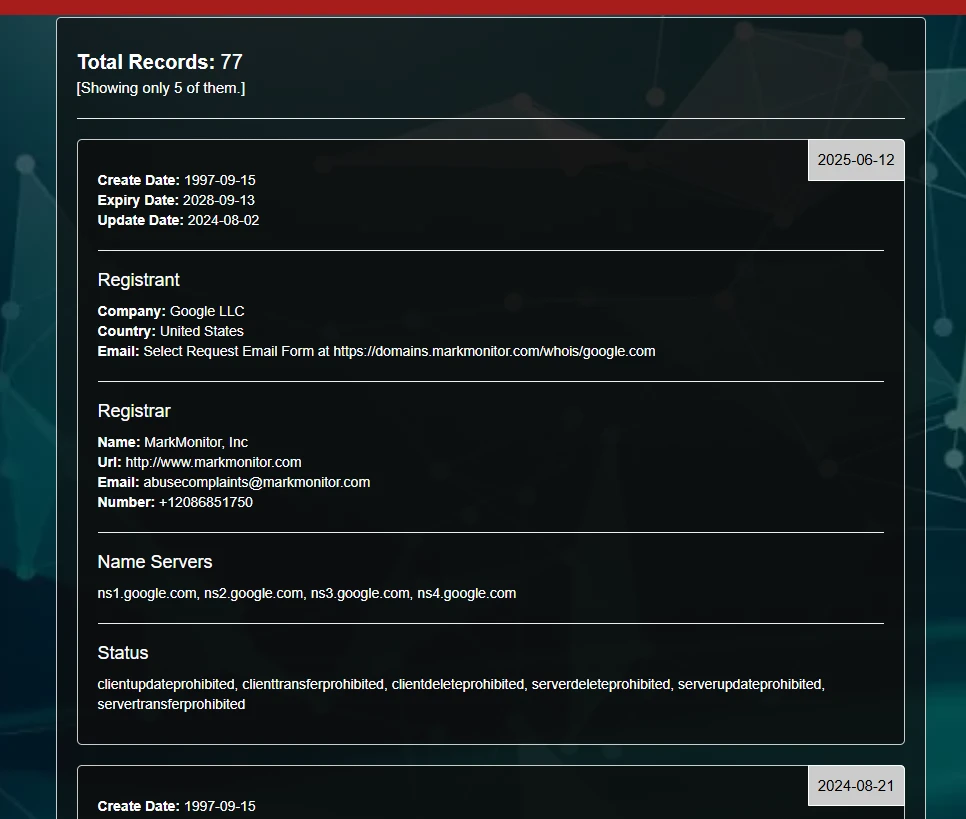
Domain evolution might include:
- Changes in purpose (business website to blog)
- Different hosting providers
- Various content types
- Multiple design iterations
You can view past versions of websites using the Wayback Machine, which archives web pages. This tool helps you see how a site changed visually and functionally over time
Domain Registration and Registrars
Domain registration is the process of reserving a domain name through official registrars. These companies manage the database of domain names and handle the technical aspects of making them work.
Popular registrars include:
- Truehost
- Olitt
- GoDaddy
- Namecheap
- Google Domains
- Network Solutions
Each time a domain changes hands, the registration information updates. Registrars maintain these records, which become part of the domain’s history.
Registration details typically include:
- Registration date
- Expiration date
- Registrar information
- Name servers
Understanding registrar changes helps you verify a domain’s legitimacy. Multiple registrar changes in a short period might indicate suspicious activity or domain flipping for profit.
How to Check Domain History
1) Use the Wayback Machine to See Past Websites
Tool: https://web.archive.org/
The Wayback Machine lets you see what the domain looked like in the past. It stores snapshots of websites going back years.
What to do:
- Enter your domain (like
mydomain.com) - Click on a year in the calendar
- Open several snapshots to see past versions
What to look for:
- Was it a real brand or just a parked page?
- Was it used for adult content, gambling, or shady downloads?
- Did it redirect to other domains?
- Does it look trustworthy?
If the site hosted real content with a brand voice, good. If it was full of popups, nonsense text, or foreign scripts? Avoid.
2) UsE Domain History Checker Tools
A domain history checker is an online tool that helps you see the background of any domain name quickly.
You just type in the domain name, and the tool pulls up all kinds of details — old owners, dates when the site changed hands, and important updates.
Most sites make it simple to start. You enter a domain name, press a button, and the results show up within seconds. Some tools offer a free trial, letting you check a few domains at no cost.
This is helpful if you need to research several domains without paying right away.
Websites like WhoisFreaks offer a full record of any domain’s history, including every change in registration details.
DomainTools claims to keep records dating back to 1995. These records can help spot patterns of risky ownership.
Look for key features:
- Full change history: See every change, not just the current record.
- Export options: Tools may let you download reports.
- Easy interface: Good design makes checking fast and less confusing.
While some checkers are free, paid options offer more details or more history searches per month.
WHOIS shows who owns a domain and which company registered it. Historical WHOIS goes further — it shows previous owners, name servers, and registrar changes.
Where to check:
| Tool | Link |
|---|---|
| DomainTools | whois.domaintools.com |
| Whoxy | whoxy.com |
| WhoisXML | whois.whoisxmlapi.com |
| WhoisFreaks | WhoisFreaks History |
3) Run a Safety Check Using Transparency Tools
A clean design doesn’t mean a clean record. Some domains were previously flagged for malware, phishing, or scams.
Use these free tools to check if the domain has been listed as unsafe:
| Tool | Use |
|---|---|
| Google Transparency Report | See if Google flagged it as dangerous |
| Spamhaus | See if it’s blacklisted for spam |
| Norton Safe Web | Reputation check for malware |
| MXToolbox | See if the domain or its IP is blacklisted |
If any of these tools flag the domain, walk away or prepare to do heavy cleanup.
4) Analyze its SEO and Backlink History
Even if you’re not doing SEO right now, you’ll want a domain that isn’t toxic. That means no spammy backlinks, keyword stuffing, or link farms.
Use SEO tools to dig in:
- Ahrefs: Top-tier backlink and anchor text audit (paid)
- SEMRush: Full backlink profile
- Majestic: Trust flow and link history
- Ubersuggest: Basic free backlink checker
Look for:
- Hundreds of links from random countries? Red flag.
- Spammy looking anchor texts
- Spammy blogs or directories linking to it? Pass.
5) Use Expired Domain Databases and Auctions
If the domain recently expired, you can often find its drop status, bid history, or whether it was picked up by domain flippers.
Try:
You’ll learn:
- How old the domain is
- If it sold in the past (and for how much)
- If it’s part of a domain farm or flipping scheme
If it’s been flipped multiple times with no real project behind it, be cautious.
6) Search Mentions and Use Reverse IP Lookups
Sometimes, the domain is mentioned in blogs, forums, or even scam databases. Use Google to search and discover what others might’ve seen.
Try:
site:example.comto check what’s indexed on Google"example.com"(in quotes) to find mentions
This uncovers:
- Contextual use of the domain (legit or scam?)
- Networks of other domains that could be related
- Potential legal or reputation issues
7) Reverse WHOIS and Tracking Registrants
Reverse WHOIS is a special tool that lets you search for all domains connected to the same name, email, or company.
If someone controls multiple domains linked to spam or cyberattacks, you can find them by tracing their contact info.
This has real value for:
- Cybercrime investigations
- Brand protection
- Avoiding bad business partners
For example, if you see a domain was owned in the past by a group linked to spamming, reverse WHOIS helps you spot all their other domains.
You get a broader view, revealing patterns you might miss with standard tools.
Leveraging APIs for Automated Checks
If you want to automate the process or check many domains often, a whois history API offers a reliable option.
This tool connects directly to a huge database and fetches historic records instantly.
To use an API, you usually need to sign up for an account and get an API key. This unique code lets your scripts or software connect with the API. Popular tools like WhoisFreaks provide an API for historical domain data, showing all changes made on a domain from its registration up to now.
APIs are a good fit if you:
- Check large batches of domains for security or business reasons.
- Need data in a format your programs or software can use.
- Want to build automated alerts for changes in domain ownership.
Often, you can test out these services with a free trial, but continued use or high-volume requests usually require a paid plan. Pricing often depends on how many queries you make each month.
With an API, you can run daily, weekly, or monthly checks on important domains and act fast if anything changes.
Final Checklist Before You Buy
| ✅ Check | Why It Matters |
|---|---|
| Wayback snapshots | See what kind of content was hosted |
| WHOIS history | Know the previous owners |
| Safety reports | Make sure it’s not blacklisted |
| SEO backlinks | Avoid toxic link profiles |
| Expiry/auction history | Watch for domain flippers or aged spam |
| Search mentions | Uncover red flags or scams |
TL;DR: Never Buy a Domain Blind
A domain name’s history can work for you or against you. If it was used by a reputable brand, it might come with authority and backlinks. But if it’s been used for spam or scams, you’ll pay the price later.
Check everything. Start clean. Build with confidence.
Let me know the domain you’re considering, and I can walk you through the full background check.







