Domain SearchInstantly check and register your preferred domain name
 Web Hosting
 cPanel HostingHosting powered by cPanel (Most user friendly)
 WordPress HostingHost your WordPress website with fast, secure, and affordable WordPress hosting in Kenya.
 KE Domains
 Reseller HostingStart your own hosting business without tech hustles
 Windows HostingOptimized for Windows-based applications and sites.
 Free Domain
 Affiliate ProgramEarn commissions by referring customers to our platforms
 Free HostingTest our SSD Hosting for free, for life (1GB storage)
 Domain TransferMove your domain to us with zero downtime and full control
 All DomainsBrowse and register domain extensions from around the world
 .Com Domain
 WhoisLook up domain ownership, expiry dates, and registrar information
 VPS Hosting
 Managed VPSNon techy? Opt for fully managed VPS server
 Dedicated ServersEnjoy unmatched power and control with your own physical server.
 Website Builder
 Online Store BuilderLaunch a professional e-commerce store without writing code.
 Web Design ServiceGet a custom-designed website tailored to your brand and goals. From just KES 15,600
 BlogRead our guides on web hosting, online business, digital marketing, and more
 SupportOur support guides cover everything you need to know about our services
 ContactContact us via chat or email
Is WordPress a web host? It depends on which WordPress you mean.
WordPress.com can provide web hosting. The WordPress software from WordPress.org is not a web host.
WordPress.org gives you free, open-source software that you install with a hosting provider. WordPress.com is different.
It combines that software with hosting services, so you can publish a site without buying hosting separately.
That split is the whole story, and it trips up a lot of beginners. They hear WordPress and assume it’s one product.
It’s really two routes to the same kind of website.
This article walks through both, shows how WordPress and web hosting work together, and explains what you’d need to buy for each route.
Is WordPress a Web Host?
The short answer is sometimes.
When people say WordPress, they might mean the free software or the hosted service.
So before you can answer if WordPress is a web host, you have to ask which one is on the table.
The software is a content management system. The hosted service is a business that runs servers.
They share a name and a lot of code, but they do different jobs. Let’s take them one at a time.
1) WordPress.org Is Website Software, Not a Web Hosting Provider
WordPress.org distributes the free, open-source WordPress content management system, or CMS.
You use it to create and manage pages, posts, media and other website content. That’s all it does. It doesn’t run servers, and it doesn’t serve your pages to visitors.
To use it, you download the software and install it on a compatible hosting account. That hosting account is a separate thing, and it usually comes from a separate company.
So what does the hosting provider supply? Quite a lot.
It supplies the server resources, the storage and the infrastructure that makes your website reachable online. Without that, your WordPress files have nowhere to live.
The hosting environment also needs to support the software WordPress requires, including PHP and a compatible database such as MySQL or MariaDB. Most WordPress hosting providers configure these components for you, so you don’t have to set them up manually.
Your choice of hosting plan can also affect your website’s loading speed, storage capacity, available resources and ability to handle visitor traffic. A small personal blog may work comfortably on an entry-level plan, while a busy business website may need more resources.
One more point. Downloading WordPress doesn’t give you a hosting account. It doesn’t give you a custom domain either.
You get the software, nothing else. Think of it like downloading a word processor. The program is free, but you still need a computer to run it on.
2) WordPress.com Does Provide Web Hosting
WordPress.com is a hosted service operated by Automattic. It runs WordPress for you on its own servers. You sign up, pick a site address, choose a theme and start publishing.
That means you can build a site without buying a separate hosting account. The hosting is part of the service.
WordPress.com plans include hosting features such as storage, SSL and managed technical services, so the provider handles much of the server work.
You also don’t need to install WordPress manually or manage the underlying server software yourself. This makes WordPress.com an option for beginners who want to publish content without handling the technical side of running a website.
You can use it for blogs, portfolios, business websites and other types of online projects, depending on the features available on your plan.
Here’s the catch. Plan features and limits vary. Things like storage, plugin installation and customization options can depend on which plan you pick.
Some users may find these restrictions limiting as their websites grow or require more specialized functionality. Others may appreciate having fewer technical responsibilities to manage.
So check the current plan details on WordPress.com before you sign up. Don’t assume the features you saw in a blog post last year are still there.
How WordPress and Web Hosting Work Together
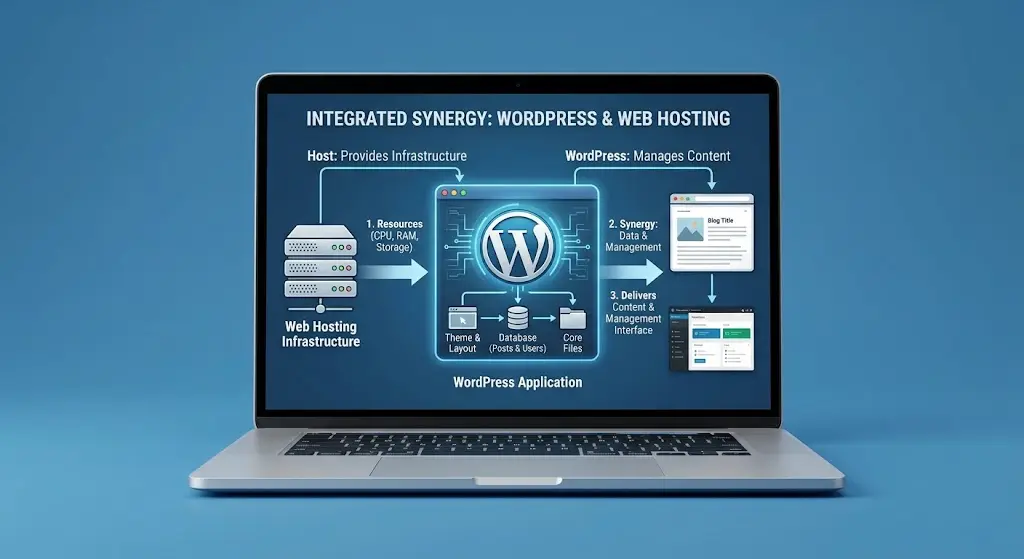
This is the part that clears up most of the confusion. There are two ways WordPress and hosting can fit together.
In the first, you bring the hosting.
In the second, the platform provides it.
Both end with a working website, but the steps and responsibilities differ.
1) Self-Hosted WordPress: WordPress.org Requires Web Hosting
Self-hosted WordPress is what most people mean when they talk about running their own WordPress site. Here’s how it works, from download to launch.
- WordPress provides the software. WordPress.org distributes the free, open-source CMS. You use it to create and manage your pages, posts, media and other content. It’s the engine of your site, but it can’t run on its own.
- A hosting provider supplies the server. You need a hosting account, or another compatible server environment, where WordPress can run. That’s where its files and database live. The server also stays online, so visitors can reach your site any time.
- The hosting environment must meet WordPress requirements. That includes supported PHP and database versions, plus HTTPS support. If you pick a plan that doesn’t meet these, WordPress may not install or may behave badly. Check the current requirements on WordPress.org before you buy.
- You install WordPress on the hosting account. Depending on the provider, you can use a one-click installer from the control panel. Or you can follow a manual process, where you upload the files and set up a database yourself. The one-click route is far easier for beginners.
- You connect your domain. Your domain’s DNS settings need to point to the right hosting service. Until that’s done, visitors typing your web address won’t find your site. Many hosts will walk you through this, and some sell domains too.
- You manage the website after launch. This is the part people forget. Depending on your hosting package, you may be responsible for updates, plugins, themes, backups, security and performance. Some hosts help with a few of these. Others leave all of it to you.
Here’s a simple example. Someone downloads WordPress from WordPress.org.
They buy a compatible hosting plan from Truehost. They install WordPress through the hosting control panel and connect their domain.
WordPress powers the website. Truehost supplies the hosting environment. Two products, two jobs, one working site.
One last thing about cost. WordPress itself is free.
But hosting, domain registration and some optional themes or plugins can cost money. So budget for those parts, even though the software costs nothing.
2) WordPress.com: WordPress Software and Hosting in One Service
WordPress.com works differently. It removes the need to buy a separate hosting account for a site published on its platform.
Here’s what that looks like in practice.
- The software is included. You don’t download or install WordPress by hand. It’s already set up for you.
- Hosting is built in. WordPress.com stores your website and serves its pages to visitors.
- The platform handles much of the infrastructure. You don’t normally configure your own web server or database. That’s a big relief if you find server settings confusing.
- A website address is provided. You can start with a WordPress.com subdomain. Custom domain options depend on the plan you choose.
- Features depend on the plan. Storage, plugin installation, customization options and other features can vary by subscription.
Here’s an example. Someone signs up for WordPress.com, picks a website address, selects a theme and publishes pages.
They don’t need to buy a hosting plan from Truehost or any other hosting company to make that site visible online.
But bundled hosting doesn’t mean every feature is free. Some features sit behind paid plans.
So read the plan terms before you sign up, and compare what you get with what you’d pay for a separate hosting plan.
What Does the Web Hosting Provider Supply That WordPress.org Does Not?
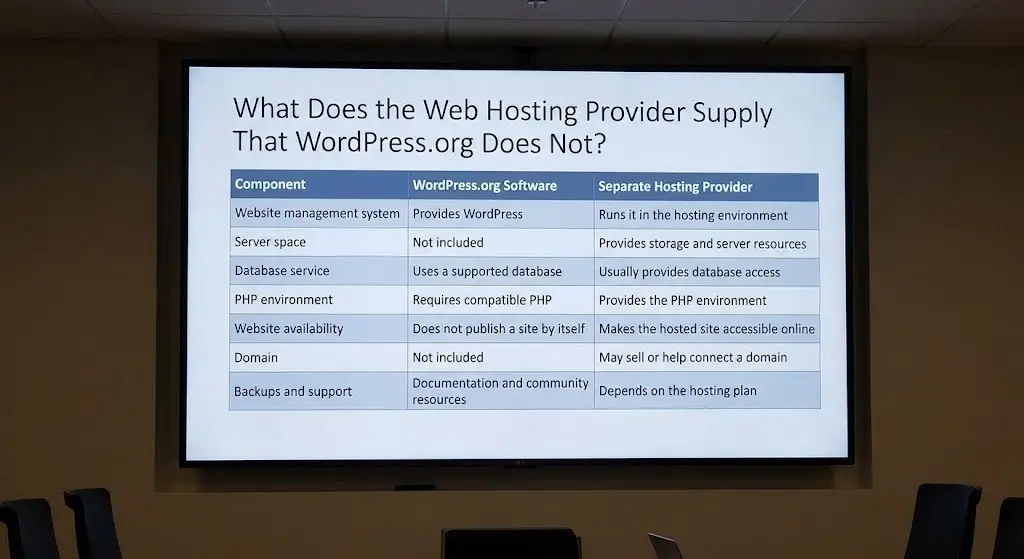
If you go the self-hosted route, it helps to see who does what.
This table splits the responsibilities between the WordPress.org software and a separate hosting provider.
| Component | WordPress.org software | Separate hosting provider |
| Website management system | Provides WordPress | Runs it in the hosting environment |
| Server space | Not included | Provides storage and server resources |
| Database service | Uses a supported database | Usually provides database access |
| PHP environment | Requires compatible PHP | Provides the PHP environment |
| Website availability | Does not publish a site by itself | Makes the hosted site accessible online |
| Domain | Not included | May sell or help connect a domain |
| Backups and support | Documentation and community resources | Depends on the hosting plan |
Look at the pattern. WordPress.org supplies the software and the documentation. The hosting provider supplies nearly everything else that makes a site work in public.
Some hosts also include WordPress installation, SSL certificates, backups, caching and technical support.
Those are hosting-plan features. They aren’t automatic features of every WordPress.org installation.
So if one host offers daily backups and another doesn’t, that’s a difference in the host, not in WordPress.
Can You Use WordPress.org Without Buying a Hosting Plan?
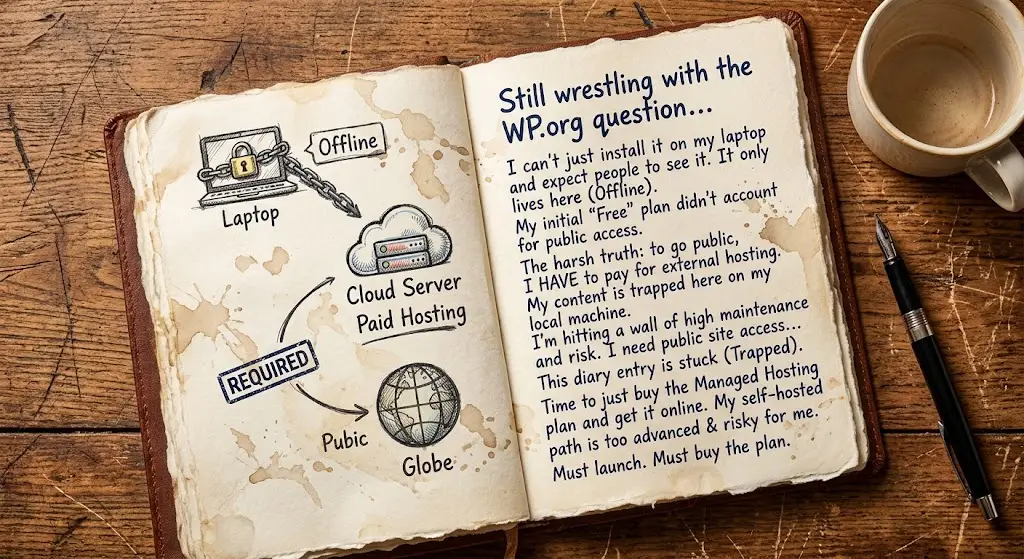
Carefully answered, yes and no. A publicly accessible website needs a hosting environment. But that doesn’t always mean paying a commercial hosting provider. Here are three scenarios.
- Local development. WordPress can run on your own computer using a local development environment. It’s a great way to learn, test themes or build a site before launch. But other people can’t reach it by default. It’s a private workspace, not a public website. You can make the site publicly accessible with additional networking tools, but that requires extra configuration and isn’t the usual setup for a live website.
- Self-managed server. Someone with the right technical setup can run WordPress on their own server. That means they handle the infrastructure, the security and the internet accessibility. It’s possible, but it’s a lot of work. It suits people with real server skills. They’ll also need to manage software updates, backups, domain configuration and server resources to keep the website running properly.
- Commercial web hosting. Most beginners and businesses buy hosting. The provider supplies the server environment and supporting services, so you can focus on your content. For most people, this is the simplest and safest route. Depending on the package, hosting may also include email accounts, SSL certificates, automatic backups and technical support, reducing the number of services you need to arrange separately.
The main point stays the same in all three. WordPress.org doesn’t bundle hosting with its downloadable software. You always need somewhere for it to run.
Hosting WordPress With Truehost
Let’s pull it together. WordPress.org supplies the software. A hosting provider supplies the environment where it runs.
WordPress.com combines both in one service. Which route you need depends on what you want.
Some people want a managed, hosted platform. Others want a separately hosted WordPress installation they control.
Truehost suits the second group. It offers hosting for people who want to install WordPress on their own hosting account.
According to Truehost, its shared plans include cPanel, a one-click installer for WordPress, Joomla and Drupal, free SSL and free daily backups.
The Starter plan also lists 30 GB of SSD storage and hosting for up to 10 websites. Truehost says all its plans come with 24/7 support, and its servers are based in South Africa.
Prices start from Kshs 188.00 per month on a three-year term, with other billing options available.
Plans and prices change, so check the current details on the Truehost before you buy.
So, is WordPress a web host? The software isn’t. WordPress.com can be. If you want your own hosting account, pick a provider that fits your site.
Explore Truehost’s web hosting plans if you want to run WordPress using your own hosting account.