Domain SearchInstantly check and register your preferred domain name
 Web Hosting
 cPanel HostingHosting powered by cPanel (Most user friendly)
 WordPress HostingHost your WordPress website with fast, secure, and affordable WordPress hosting in Kenya.
 KE Domains
 Reseller HostingStart your own hosting business without tech hustles
 Windows HostingOptimized for Windows-based applications and sites.
 Free Domain
 Affiliate ProgramEarn commissions by referring customers to our platforms
 Free HostingTest our SSD Hosting for free, for life (1GB storage)
 Domain TransferMove your domain to us with zero downtime and full control
 All DomainsBrowse and register domain extensions from around the world
 .Com Domain
 WhoisLook up domain ownership, expiry dates, and registrar information
 VPS Hosting
 Managed VPSNon techy? Opt for fully managed VPS server
 Dedicated ServersEnjoy unmatched power and control with your own physical server.
 Website Builder
 Online Store BuilderLaunch a professional e-commerce store without writing code.
 Web Design ServiceGet a custom-designed website tailored to your brand and goals. From just KES 15,600
 BlogRead our guides on web hosting, online business, digital marketing, and more
 SupportOur support guides cover everything you need to know about our services
 ContactContact us via chat or email
Email is still the backbone of business communication, but not all email is created equal. If you’re running a business, using a generic address like Gmail or Yahoo can quietly hold you back.
This is where many people get confused, email hosting vs free email services.
Free services (like Google’s Gmail or Yahoo Mail) give you a generic domain (@gmail.com). It works, but it doesn’t say much about your brand.
Email hosting, on the other hand, lets you use your own domain, like [email protected], which instantly looks more professional and credible.
That’s where email hosting comes in.
Email hosting is a service that allows you to create and manage custom email addresses tied to your domain name, giving your business a more polished and trustworthy image.
And this has a bigger impact than most people realize.
First impressions count. A branded email builds trust, improves communication, and gives you more control over your data and security, something free email services simply can’t fully offer.
Types of Email Hosting
There are several types of email hosting, each suited to different needs and technical comfort levels:
a) Shared Email Hosting
The most common and affordable option. Multiple users or domains share the same server resources.
It’s cost-effective and easy to manage via control panels like cPanel. Ideal for small businesses and startups with moderate email volume. Truehost’s Workplace plans fall into this accessible category.
b) Dedicated Email Hosting
You get an entire server (or significant dedicated resources) just for your email. This offers higher performance, better isolation, and more control.
It’s suitable for larger organizations with high email traffic or strict compliance needs, though it costs more.
c) Cloud-based Email Hosting
Emails are stored and managed on a scalable cloud infrastructure. Providers handle maintenance, updates, and security while offering high uptime and access from anywhere.
Modern cloud solutions often include collaboration tools and excellent deliverability thanks to global networks.
d) Self-hosted Email
You install and manage your own email server (e.g., on a VPS or physical server using software like Postfix or Dovecot).
This gives maximum control and privacy but requires strong technical expertise, ongoing maintenance, and careful handling of spam/blacklisting issues.
It’s not recommended for most beginners due to the complexity and delivery challenges.
e) IMAP (Internet Message Access Protocol)
A popular protocol for accessing email. IMAP keeps your emails on the server and synchronizes them across all your devices (phone, laptop, tablet).
Changes like read status or folders appear everywhere. Best for users who access email from multiple devices.
f) POP3 (Post Office Protocol 3)
This protocol downloads emails to your local device and (optionally) deletes them from the server. It’s useful if you want offline access and have limited server storage, but less ideal for multi-device use since synchronization is limited.
Most modern setups use IMAP combined with SMTP (for sending emails).
How Email Hosting Works
Here’s the simple flow of how email hosting operates:
Step 1: You send an email
Your email client or webmail uses SMTP (Simple Mail Transfer Protocol) to send the message to your hosting provider’s outgoing mail server.
Step 2: It travels across the internet
The sending server looks up the recipient’s domain using DNS (Domain Name System), specifically the MX (Mail Exchange) records. These records tell the world which server handles email for that domain.
Step 3: They receive it
The recipient’s mail server accepts the email, runs spam and security checks, and stores it in the appropriate mailbox.
Step 4: Incoming emails
When someone emails you, their server queries your domain’s MX records and delivers the message to your hosted mail server. You then access it via IMAP, POP3, or webmail.
Your domain is the key connector: Proper DNS configuration (especially MX, SPF, DKIM, and DMARC records) ensures emails reach the right place and avoid spam folders. Without a correct setup, even the best hosting won’t work reliably.
Benefits of Email Hosting
Professional email hosting delivers significant advantages that go far beyond what free email services can offer. Here are the key benefits:
i) Professional Brand Image
A custom email address like [email protected] or [email protected] instantly makes your business appear more legitimate and trustworthy.
Every email you send reinforces your brand identity instead of promoting someone else’s (like Gmail or Yahoo). This small detail can significantly influence how clients, partners, and suppliers perceive your professionalism, especially in competitive markets like Kenya.
It helps build credibility from the very first point of contact.
ii) Better Security & Privacy
Unlike free email providers that scan your emails for advertising purposes, professional email hosting prioritizes your privacy.
You get advanced protection tools, including powerful spam filtering, built-in antivirus scanning, email encryption (TLS), and two-factor authentication (2FA).
These features significantly reduce the risk of phishing attacks, malware, and unauthorized access. For businesses handling client contracts, financial details, or sensitive information, this added layer of security and data privacy is essential.
iii) Improved Email Deliverability
With free email services, your messages often struggle to reach the inbox due to shared IP reputation and strict sending limits.
Professional email hosts maintain clean server reputations and support important authentication protocols such as SPF, DKIM, and DMARC.
As a result, your emails are far more likely to land directly in your recipient’s inbox rather than the spam or promotions folder, improving response rates and communication efficiency.
iv) Reliability and Uptime
Business-grade email hosting typically guarantees 99.9% uptime or higher. This means your email remains accessible even during peak business hours.
Free services, on the other hand, can experience occasional outages or deliberately throttle your sending limits when usage is high.
Reliable email hosting ensures you never miss important client inquiries or business opportunities due to service disruptions.
v) Scalability for Growing Teams
As your business grows, professional email hosting makes it easy to add new team members, increase storage space, or unlock advanced features without switching providers.
From a solo entrepreneur to a growing team of 20 or more, your email solution can scale smoothly and cost-effectively.
vi) Data Ownership and Control
With professional email hosting, you retain full ownership of your emails and data. You are not locked into any platform’s ecosystem, and you can easily export or migrate your emails whenever needed.
This control gives you peace of mind and flexibility, especially important if you ever decide to change hosting providers or need to comply with data protection regulations.
How to Set Up Email Hosting
Setting up professional email hosting is easier than most people think. With a reliable provider, the entire process can be completed in under 30 minutes. Here’s a clear, step-by-step guide:
1) Purchase a Domain and Email Hosting Plan
Start by registering a domain name that matches your business (e.g., yourbusiness.co.ke). Choose an email hosting plan that suits your current needs and has room for growth.
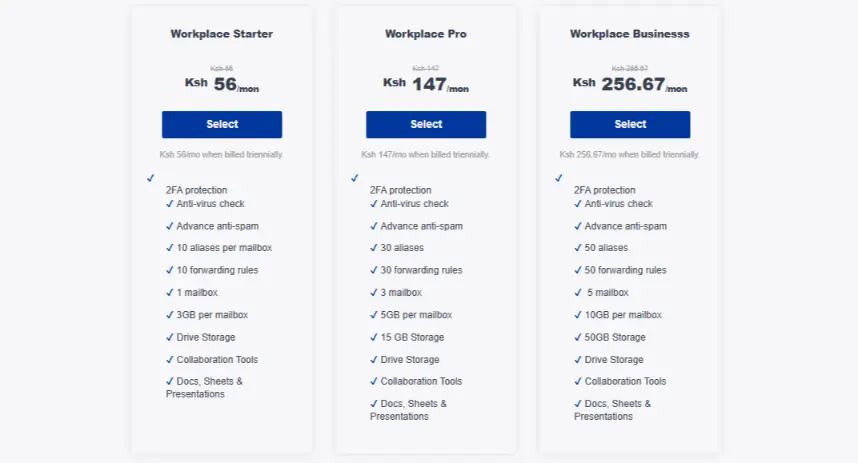
Providers like Truehost offer affordable plans that include both domain registration and email hosting, making it convenient to get everything in one place.
2) Log in to Your Hosting Dashboard
Once your plan is active, log in to your control panel. For shared hosting users, this is usually cPanel. For Truehost Workplace plans, access the Client Area. This is your central hub for managing emails, domains, and settings.
3) Create Email Accounts
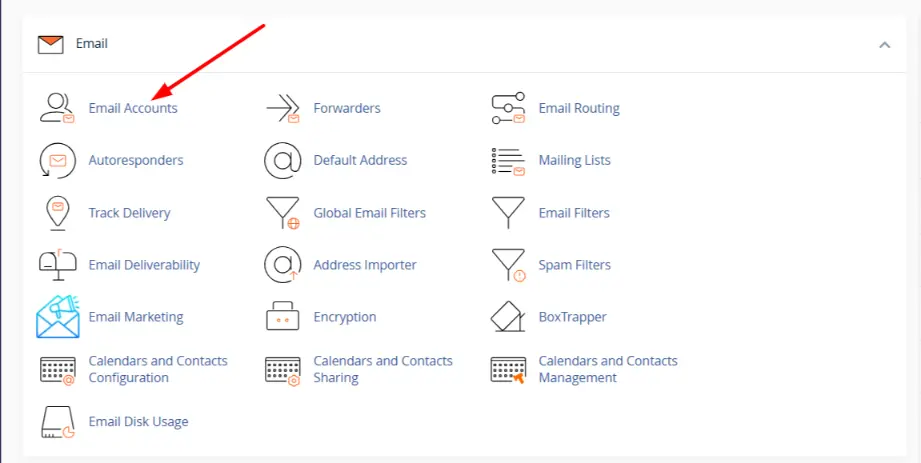
In cPanel, go to the Email section and click on Email Accounts. Create professional addresses such as [email protected], [email protected], or [email protected].
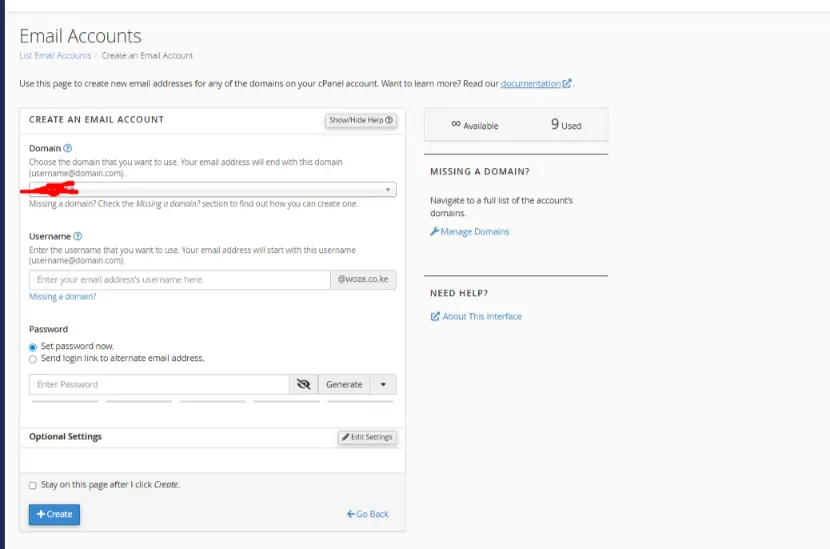
Set a strong password for each account and allocate appropriate storage space based on expected usage.
4) Configure DNS Records
This is the most important technical step. Update your domain’s MX records to point to your email hosting provider’s servers.
This tells the internet where to deliver incoming emails. For better security and deliverability, also add SPF, DKIM, and DMARC records.
Most good providers supply the exact values you need to copy and paste, making this step simple even for beginners.
5) Access Your Email
You can start using your new email immediately through the provider’s webmail interface via any browser.
Alternatively, configure your favorite email client (such as Outlook, Thunderbird, or the Gmail app) using IMAP or POP3 for incoming mail and SMTP for sending. IMAP is generally recommended as it keeps your emails synced across all devices.
6) Set Ulp Additional Features
Improve your email experience by configuring useful tools:
- Forwarders and Auto-responders: Set up email forwarding or automatic replies directly from the Email section in cPanel.
- Aliases: Create shortcuts (for example,
[email protected]that forwards to your maininfo@ address). - Security: Enable two-factor authentication (2FA), use strong, unique passwords, and fine-tune spam filters to protect your inbox.
- Migrate Old Emails: Transfer existing emails from Gmail, Outlook, or other providers using built-in migration tools or by requesting assistance from your host’s support team.
Truehost makes the entire setup process beginner-friendly with clear guides and responsive local support customised for Kenyan users, so you’re never stuck if you need help.
Cost of Email Hosting (as of April 2026)
Email hosting is very affordable, especially when billed triennially. Here are Truehost’s Workplace Email Hosting Plans (prices in KSh per month when billed triennially):
| Plan | Price (KSh / month) | Billing Cycle |
| Workplace Starter | 56 | Billed triennially |
| Workplace Pro | 147 | Billed triennially |
| Workplace Business | 256.67 | Billed triennially |
| Workplace Premium | 500 | Billed triennially |
| Workplace Enterprise | 1,000 | Billed triennially |
How to Choose the Right Email Hosting Provider
Choosing the right email hosting provider is crucial for smooth communication and long-term reliability. With many options available, focus on these key factors to make an informed decision:
1) Support and Reliability
Reliable customer support can save you significant time and frustration. Look for providers that offer responsive, 24/7 support, preferably with local agents who understand your needs.
For Kenyan users, providers like Truehost stand out because they offer fast, localized support in English and Swahili, making problem-solving much easier during critical moments.
2) Storage Space
Assess how much email storage you and your team will need. While individuals may manage with 10–25 GB, growing teams often require more.
Choose a plan that provides generous storage with the ability to upgrade easily as your business expands, so you don’t run out of space unexpectedly.
3) Security Features
Security should never be compromised. Prioritize providers that offer robust protection, including advanced spam and malware filtering, antivirus scanning, two-factor authentication (2FA), and email encryption.
These features help safeguard sensitive business information and protect your inbox from phishing and cyber threats.
4) Compare Pricing Models
Don’t just look at the headline price. Compare different billing cycles. Monthly plans are flexible but more expensive, while annual or triennial billing often gives substantial discounts.
Carefully check for any hidden fees such as setup charges, overage fees, or extra costs for additional users. Always calculate the real cost over 12–36 months.
5) Assess Scalability
Your email needs will likely grow as your business grows. Choose a provider whose plans allow you to easily add new users, increase storage, or upgrade features without migrating to a completely new service.
Smooth scalability prevents future headaches and unnecessary costs.
6) Evaluate Your Business Needs
Be honest about your current and future requirements. A solo freelancer or small startup may only need a basic plan with a few email accounts.
However, a growing team or enterprise may require higher storage, advanced collaboration tools, or compliance features.
Match the hosting plan to your specific business size, budget, and operational demands.
Finally, prioritize providers with a proven reputation for excellent email deliverability and high uptime.
A good server reputation ensures your emails reach inboxes reliably, while consistent uptime keeps your business connected at all times.
Why Email Hosting Is a Smart Move for Your Online Presence
Switching to professional email hosting is one of the simplest ways to improve your brand, protect your communications, and improve efficiency.
It shows customers and partners that you’re serious about your business while giving you better tools, security, and control than free alternatives ever could.
If you’re ready to get started, choose a reliable provider like Truehost, grab your domain, and set up your custom email today. Professional communication is a smart investment in your online presence.