Domain SearchInstantly check and register your preferred domain name
 Web Hosting
 cPanel HostingHosting powered by cPanel (Most user friendly)
 WordPress HostingHost your WordPress website with fast, secure, and affordable WordPress hosting in Kenya.
 KE Domains
 Reseller HostingStart your own hosting business without tech hustles
 Windows HostingOptimized for Windows-based applications and sites.
 Free Domain
 Affiliate ProgramEarn commissions by referring customers to our platforms
 Free HostingTest our SSD Hosting for free, for life (1GB storage)
 Domain TransferMove your domain to us with zero downtime and full control
 All DomainsBrowse and register domain extensions from around the world
 .Com Domain
 WhoisLook up domain ownership, expiry dates, and registrar information
 VPS Hosting
 Managed VPSNon techy? Opt for fully managed VPS server
 Dedicated ServersEnjoy unmatched power and control with your own physical server.
 Website Builder
 Online Store BuilderLaunch a professional e-commerce store without writing code.
 Web Design ServiceGet a custom-designed website tailored to your brand and goals. From just KES 15,600
 BlogRead our guides on web hosting, online business, digital marketing, and more
 SupportOur support guides cover everything you need to know about our services
 ContactContact us via chat or email
What is running your website behind the scenes? With web hosting, we think mostly about the plans but there is more to it.
Behind every high-performing website are the types of web hosting tools that manage servers, databases, deployments, security, and day-to-day operations.
These tools directly determine how fast your site loads, how simple it is to manage, and how reliably it performs under pressure.
In my experience, choosing the right tools is just as critical as choosing the hosting plan itself.
The best hosting infrastructure can still feel frustrating if the tools supporting it are outdated, complicated, or inefficient.
This guide explains the five essential categories every website owner should know:
- Control Panels: your server dashboard
- Web Servers: the engine delivering your pages
- Database Management Tools: where your data lives and breathes
- Deployment & Version Control Tools: how your code gets published safely
- Monitoring & Performance Tools: how you keep everything running smoothly
Let’s break each one down, what they are, what the top options look like, and which ones make the most sense for your situation.
1) Control Panels
A control panel gives you a clean graphical dashboard to handle domains, emails, files, databases, backups, and security without typing complex commands.
Without one, even a strong server feels intimidating. With the right panel, you complete daily tasks in minutes instead of hours.
Traditional options still dominate many shared plans:
- cPanel (with WHM for resellers) remains the most trusted industry standard.
- Plesk works well for Windows environments and agencies.
- DirectAdmin offers a lighter, more affordable paid choice.
Modern lightweight alternatives best VPS and Cloud hosting:
- aaPanel delivers rich features while staying free at its core.
- CyberPanel integrates tightly with LiteSpeed for excellent speed.
- CloudPanel stays ultra-light and optimized for PHP applications.
- hPanel provides a streamlined beginner experience.
On Reddit and hosting forums, the consensus is consistent: cPanel wins on familiarity and ecosystem, but the price hikes have pushed many users toward alternatives.
Here is a user’s viewpoint from Reddit:

For shared hosting users, cPanel still makes sense because it’s included in many plans and extremely well-supported.
For VPS and cloud users, modern panels like aaPanel, CyberPanel, or CloudPanel offer strong performance at zero licensing cost.
Check out our guide on the best Control Panel for VPS Hosting
Quick Comparison of Top Three Hosting Providers in Kenya
- Truehost includes free cPanel on shared and higher plans. You get familiar tools, local M-PESA payments, reliable uptime, and fast local servers perfect for Kenyan users who want simplicity without extra fees.
- HOSTAFRICA often uses DirectAdmin or similar cost-effective options. It delivers solid performance but may require adjustment if you prefer full cPanel familiarity.
- Other hosts using custom panels (like hPanel) feel more modern, but sometimes limit advanced customization.
Choose cPanel for proven reliability and ease, especially as a beginner or reseller. Go with aaPanel, CyberPanel, or CloudPanel on VPS/Cloud to save resources and gain speed.
Who should choose the Control Panels?
- Shared hosting users and complete beginners, cPanel or hPanel.
- Resellers cPanel + WHM.
- VPS/Cloud users have lightweight panels that conserve RAM and CPU.
We include free cPanel, so you manage everything confidently from day one.
2) Web Servers
The web server software receives visitor requests and serves your files and applications. It directly impacts speed, stability under traffic, and resource efficiency.
The three main players:
- Apache: offers unmatched flexibility with .htaccess support for custom rules.
- Nginx: handles high concurrency and static content with low memory usage.
- LiteSpeed: delivers outstanding WordPress performance through intelligent caching.
According to W3Techs, Nginx leads with roughly 32.5%, Apache sits around 23.4%, and LiteSpeed has climbed strongly to 15.3% range, especially among dynamic sites.
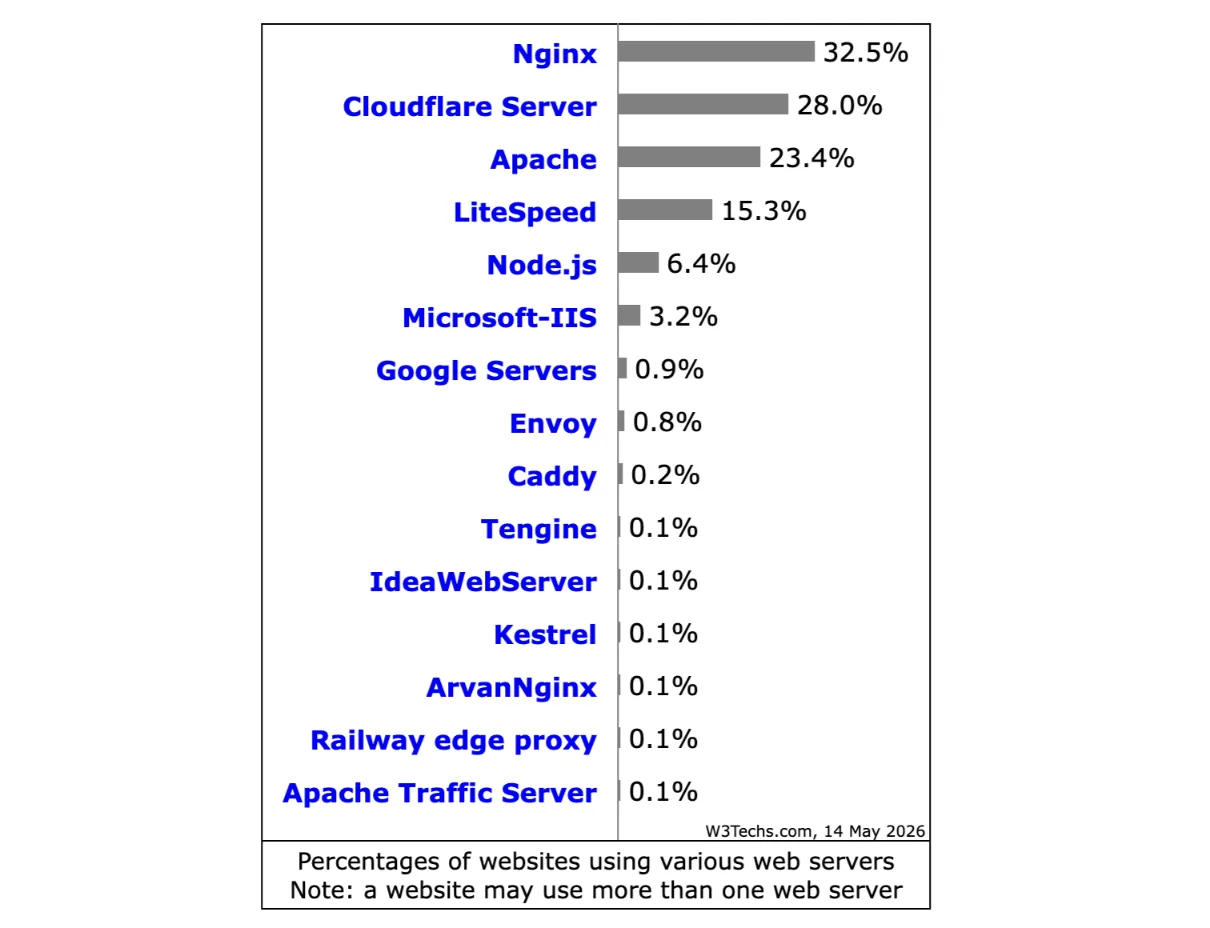
In practice, Nginx often feels snappier under heavy load. LiteSpeed gives WordPress sites dramatic speed gains out of the box.
Apache remains rock-solid for complex configurations, but can consume more resources if not optimized.
Who should choose which?
- Most shared hosting users don’t pick this is handled by the host.
- WordPress or WooCommerce sites → LiteSpeed.
- High-traffic or API-heavy applications → Nginx.
- Maximum configuration flexibility → Apache.
Modern hosts often combine them (e.g., Nginx as a reverse proxy). As Truehost, we optimize our servers for the best balance of speed and reliability, made for African users.
Do you know the difference between web hosting and a web server? Check our guide on Web Hosting vs Web Server.
3) Database Management Tools
Dynamic websites like WordPress, WooCommerce, or custom apps store content, users, products, and settings in databases. When issues arise, quick access saves your site.
Important Tools include:
- phpMyAdmin: a web-based classic for basic queries and imports.
- Adminer: lightweight single-file alternative that loads fast.
- TablePlus: a modern desktop app loved by developers for its clean interface.
- One-click installers like Softaculous or Installatron install apps in seconds.
- Advanced setups: Docker + Portainer for containerized management.
You’ll reach for these tools when a plugin update breaks something, you need to optimize slow queries, or you want to restore backups.
Beginners use them occasionally; as your site grows, basic familiarity pays off hugely.
User feedback shows phpMyAdmin feels familiar but dated. Adminer wins for speed, while TablePlus earns praise for modern usability.
One-click tools get strong marks for letting non-technical users launch fast.
WordPress sites, online stores, and any data-driven application. Pair these with reliable hosting so database tasks stay straightforward.
4) Deployment & Version Control Tools
Dragging files via FTP risks errors and makes rollbacks painful. Modern tools eliminate that stress.
Git forms the foundation. It tracks every change, enables collaboration, and lets you revert mistakes instantly.
Automation comes from GitHub Actions, DeployHQ, or simple webhooks.
For static or Jamstack sites, Vercel and Netlify handle builds, previews, and global delivery automatically.
Professionals push code to GitHub, run automated tests, and deploy smoothly.
Beginners start with basic Git commands or choose hosts with built-in Git support.
The learning curve exists, but free tutorials make it achievable.
Benefits include fewer mistakes, easier teamwork, and professional workflows even on smaller projects.
Check our guide on How to Host a Static Website on GitHub Pages
5) Monitoring & Performance Tools
You can’t improve what you don’t measure. Good monitoring catches issues before visitors notice.
- Uptime monitoring: Tools like Uptime Robot alert you quickly.
- Performance analysis: GTmetrix, Google PageSpeed Insights, or New Relic provide deeper insights.
- CDN & Security standout: Cloudflare transforms many sites. Its free tier delivers global CDN speed, strong DDoS protection, free SSL, and smart security rules. Users routinely report faster load times, fewer attacks, and better SEO after setup. Paid plans unlock even more power.
- Additional security: Sucuri, Imunify360, Wordfence (for WordPress), and LiteSpeed Cache.
Proactive monitoring protects your reputation and revenue. One slow or hacked site can cost real business.
Which Web Hosting Tool Is Best for You?
After all that, here’s the honest summary:
Beginners and shared hosting users start with cPanel (or hPanel). It’s familiar, well-documented, and supported everywhere.

Open your hosting with us at Truehost, and you’ll find cPanel included free, with no complicated setup.
Performance seekers on VPS or cloud: look at aaPanel, CyberPanel, or CloudPanel. Free, lightweight, and fast, especially if you’re running WordPress at scale.
Developers and teams building scalable apps: use Git as your foundation, automate with GitHub Actions or DeployHQ, and consider containerised setups with Docker if you need more control.
Everyone, regardless of plan, add Cloudflare. Free SSL, CDN, DDoS protection, and basic firewall in one setup that takes under 20 minutes to configure. There’s almost no reason not to.
The types of web hosting tools you choose will shape your day-to-day experience as a site owner more than almost anything else.
You don’t have to master all five categories at once. Pick the layer that’s causing you the most pain right now, maybe it’s database management, maybe it’s deployment headaches, and solve that first.
If you’re just starting or ready to upgrade your current setup, Truehost hosting plans are built for Kenyan businesses with cPanel included, M-PESA payment support, and local customer service that responds.