Domain SearchInstantly check and register your preferred domain name
 Web Hosting
 cPanel HostingHosting powered by cPanel (Most user friendly)
 WordPress HostingHost your WordPress website with fast, secure, and affordable WordPress hosting in Kenya.
 KE Domains
 Reseller HostingStart your own hosting business without tech hustles
 Windows HostingOptimized for Windows-based applications and sites.
 Free Domain
 Affiliate ProgramEarn commissions by referring customers to our platforms
 Free HostingTest our SSD Hosting for free, for life (1GB storage)
 Domain TransferMove your domain to us with zero downtime and full control
 All DomainsBrowse and register domain extensions from around the world
 .Com Domain
 WhoisLook up domain ownership, expiry dates, and registrar information
 VPS Hosting
 Managed VPSNon techy? Opt for fully managed VPS server
 Dedicated ServersEnjoy unmatched power and control with your own physical server.
 Website Builder
 Online Store BuilderLaunch a professional e-commerce store without writing code.
 Web Design ServiceGet a custom-designed website tailored to your brand and goals. From just KES 15,600
 BlogRead our guides on web hosting, online business, digital marketing, and more
 SupportOur support guides cover everything you need to know about our services
 ContactContact us via chat or email
Want to get a website online without paying for hosting or managing a server?
If your site is static, meaning it’s built with HTML, CSS, and JavaScript, GitHub Pages lets you do exactly that.
It’s a free web hosting GitHub that reads your files from a repository and publishes them as a live website, complete with HTTPS and a public URL.
GitHub Pages works best for portfolios, documentation sites, landing pages, and personal blogs.
Before you begin, you’ll need three things:
- An
index.htmlfile, your website saved as a single HTML file - A free GitHub account (sign up at
github.com) - Optionally, Git is installed locally if you prefer the command line
You can get your index.html by building it yourself in a text editor like VS Code, exporting it from a drag-and-drop website builder, or generating one instantly using an AI tool like Claude.ai. Just describe your site and download the result.
You’ll learn how to host a static website on GitHub Pages with screenshots to help you follow.
Let’s get into it.
Step-by-Step Guide
Step 1: Create a New GitHub Repository
1. Sign in to your GitHub account at github.com.
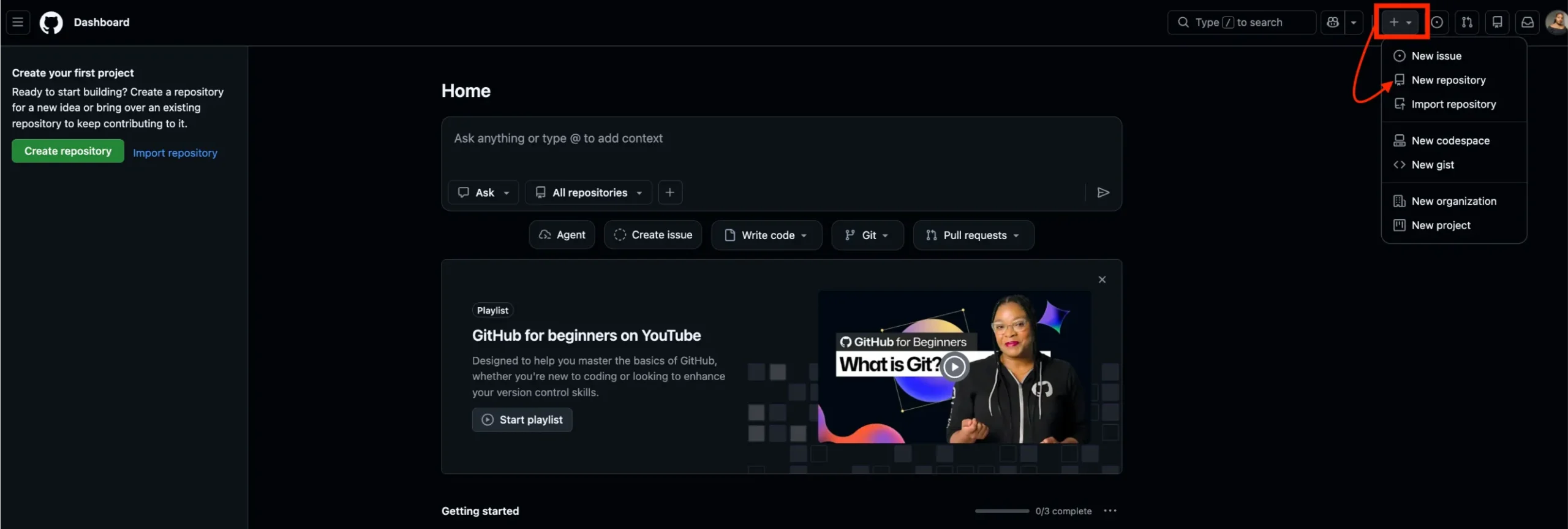
2. Click the + icon in the upper-right corner and select New repository.
3. Enter a repository name, something like my-static-site or portfolio.
4. Choose Public visibility. (Public is required for the free plan.)
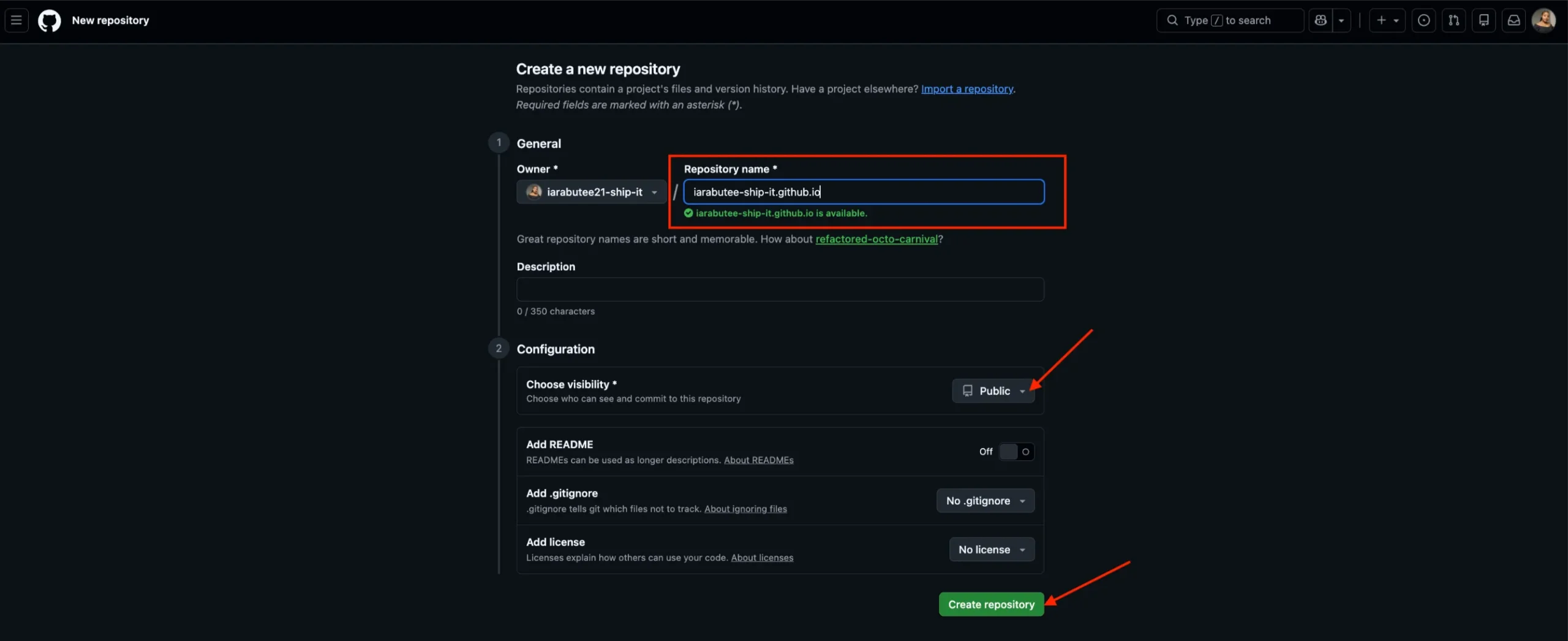
5. Click Create repository.
That’s your project home created. It’s like a folder on the internet that GitHub will read from to serve your site.
Step 2: Add Your Website Files
After creating the repository, you’ll land on a quick setup page.
1. Click on ‘uploading an existing file’.

2. Drag and drop your index.html file into the upload area.

3. Scroll down to the Commit changes section and click Commit changes.
Your file is now inside the repository. GitHub has it stored and ready.
Tip: If your site has additional files, such as a CSS stylesheet, images, or JavaScript, upload those too. Keep your folder structure the same as it is on your computer.
Step 3: Enable GitHub Pages
This is where your site goes live.
1. Go to your repository on GitHub.
2. Click the Settings tab (top menu, near the right).
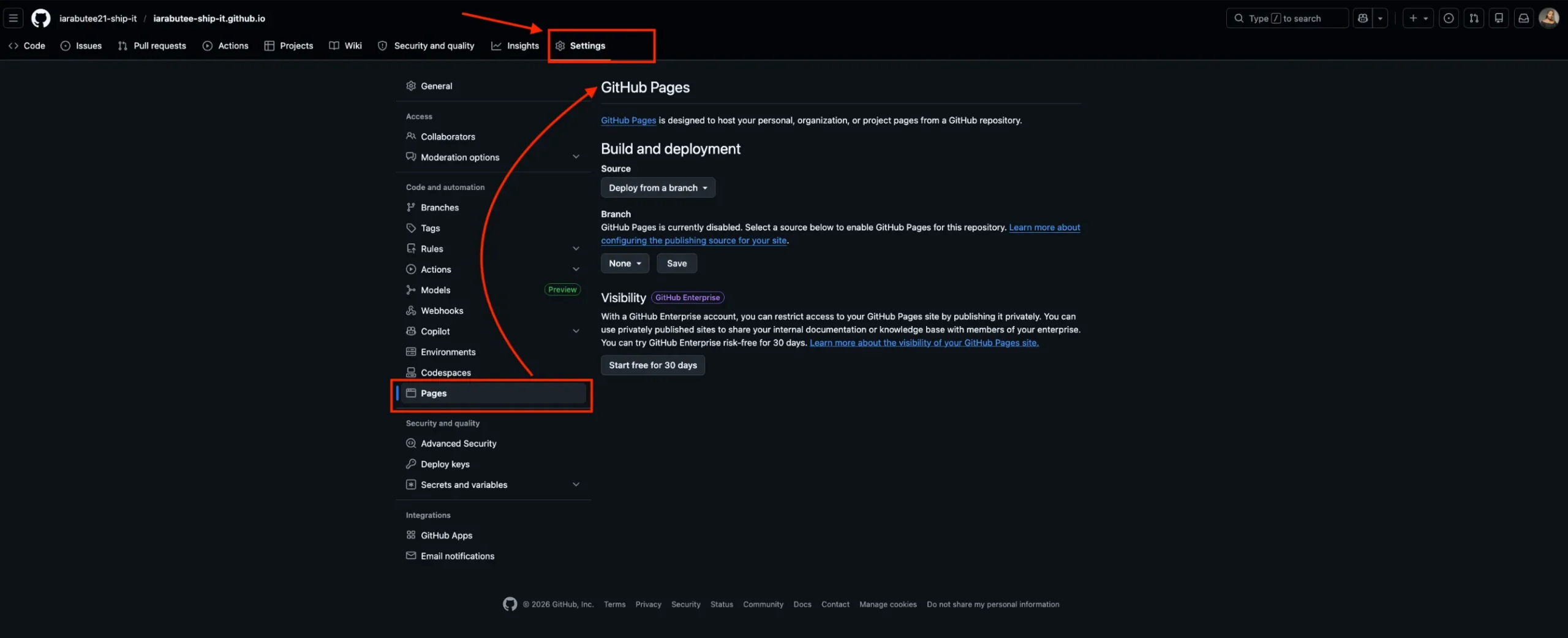
3. Scroll down to the Pages section in the left sidebar.
4. Under Source, make sure it says Deploy from a branch.

5. Under Branch, click the dropdown that currently says None and select main.
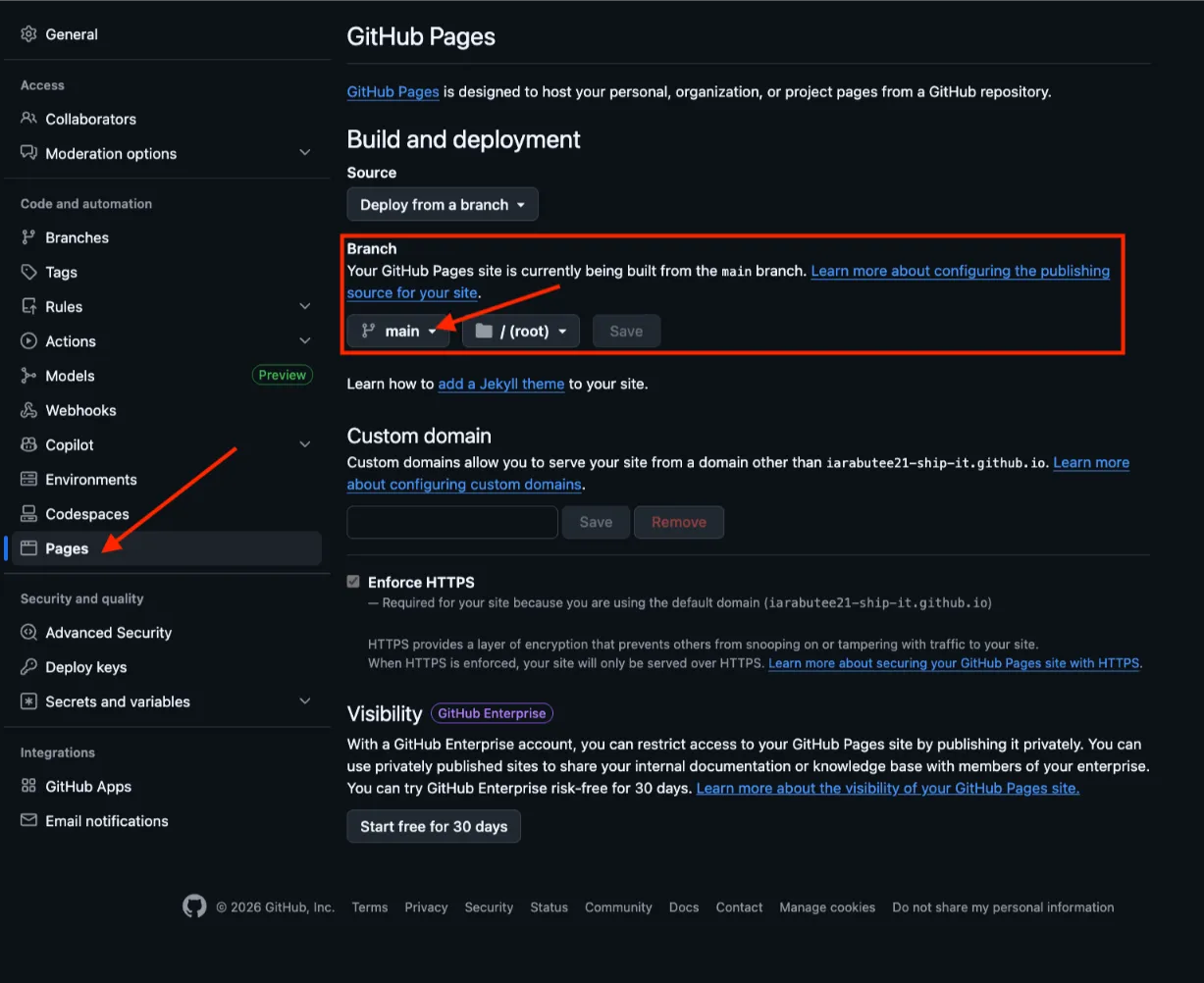
6. Click Save.
GitHub will start building your site immediately. It typically takes about 2 minutes.
If the Branch dropdown doesn’t appear, your index.html may not have finished uploading yet. Wait a moment and refresh the page.
Check out ways to get a free domain.
Step 4 (Optional): Connect a Custom Domain
By default, your site will be live at https://yourusername.github.io/repositoryname.
That works perfectly for testing and personal projects. But if you want a professional address like www.yourname.com, you can connect a custom domain.
1. In your repository’s Pages settings, scroll to the Custom domain section.
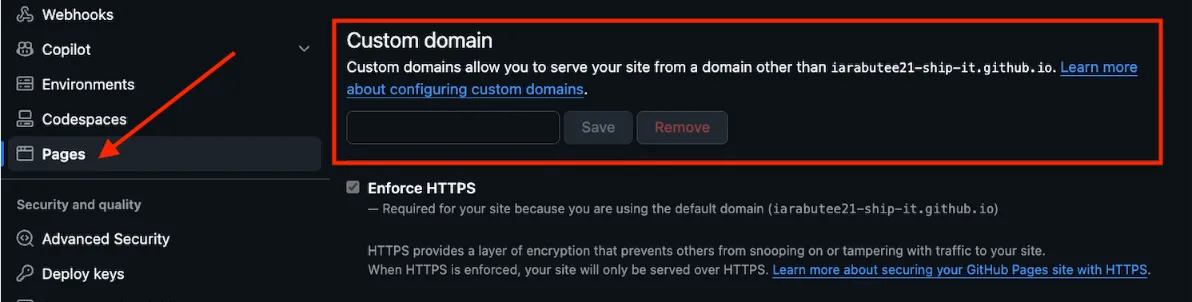
2. Enter your domain name (e.g., www.yoursite.com) and click Save.
3. Next, log in to your domain registrar and update your DNS settings to point to GitHub’s servers.
Don’t have a domain yet? You can register one quickly with us at Truehost, grab a domain here and pair it with GitHub Pages for a clean, professional URL at a very low cost.
Testing Your Website
GitHub Pages can take up to 5 minutes the first time it deploys.
While you wait:
- Go to Settings → Pages in your repository.
- Look for a green banner that says something like ‘Your site is live at
https://yourusername.github.io/repositoryname’. - Click Visit site and confirm your page loads correctly.
If the page is blank or shows a 404, double-check that your file is named exactly index.html (lowercase) and that the main branch is selected as the source.
Check out our article on how to create a static website.
Ready to Go Live?
GitHub Pages makes web hosting on GitHub genuinely simple. You get a free, fast, globally distributed website with HTTPS, all without touching a server.
The one thing it can’t give you is a custom domain. For that, you need to register one separately.
We at Truehost make it easy and affordable. You can register your preferred domain with us and have it connected to your GitHub Pages site in minutes.
Static Website on GitHub Pages: FAQs
Can GitHub Pages host a website?
Yes, absolutely. GitHub Pages is a static site hosting service that takes HTML, CSS, and JavaScript files straight from a repository on GitHub and publishes a website. It’s free to use on public repositories and gives every site a live URL under the github.io domain.
Are static websites good for SEO?
Yes, and often better than people expect. Static sites load fast, and page speed is a confirmed Google ranking factor. You can optimize your GitHub Pages site for search engines by adding a custom domain, meta tags, an XML sitemap, compressed images, and free HTTPS, all of which contribute to better rankings. The key limitation is that you need to handle SEO manually, since there’s no built-in CMS or plugin system.
Connecting a proper domain helps a lot here. A .ke, .com, or .co.za domain signals credibility to both search engines and visitors. Register yours with us at Truehost before pointing it to your GitHub Pages site.
What are the limitations of GitHub Pages?
A few important ones to know:
- Static only: GitHub Pages cannot execute server-side code such as PHP, Python, or Ruby, nor can it interact with a traditional database like MySQL. No user logins, no form submissions that save data, no real-time features.
- 1 GB site size limit: Published GitHub Pages sites may be no larger than 1 GB, with a soft bandwidth limit of 100 GB per month.
- Public repositories only on free accounts: GitHub Pages is only available for public repositories when using a free personal account. Private repositories require a paid plan.
- Build timeouts: Very large sites with thousands of pages may hit build time limits.
For most personal sites, portfolios, and landing pages, none of these limits will ever affect you.
What are some GitHub Pages alternatives?
If you need more features or flexibility, the top GitHub Pages alternatives in 2025 include Netlify, Vercel, Firebase Hosting, Cloudflare Pages, Render, and Surge, each with different strengths around automated builds, CI/CD workflows, and API integrations.
Netlify and Vercel are the most popular choices for developers who need build automation or want to deploy frameworks like Next.js or Gatsby. For simple HTML sites, though, GitHub Pages remains hard to beat on simplicity and cost.
What are the disadvantages of a static website?
Static sites are fast and secure, but they come with real trade-offs:
- No server-side logic, you can’t build user accounts, process payments natively, or run a database
- Every content change requires editing and re-uploading files (unless you automate deployment)
- Dynamic features like live search, comments, or personalized content need third-party services
- Not suited for e-commerce or web apps with complex user interactions
For brochure sites, portfolios, documentation, and landing pages, these limitations rarely matter.
Are GitHub Pages only for static sites?
Yes. GitHub Pages is a static site hosting service that takes HTML, CSS, and JavaScript files from your repository and publishes them as a website. It does not support server-side code or databases. If you need a dynamic site with a backend, you’ll need a different hosting solution.
How many sites can you have on GitHub Pages?
You can only create one user or organization site per account, but you can create one Pages site per repository, meaning one project site for each repository you own. In practice, you can run as many project sites as you have repositories, which is effectively unlimited for most use cases.