Domain SearchInstantly check and register your preferred domain name
 Web Hosting
 cPanel HostingHosting powered by cPanel (Most user friendly)
 WordPress HostingHost your WordPress website with fast, secure, and affordable WordPress hosting in Kenya.
 KE Domains
 Reseller HostingStart your own hosting business without tech hustles
 Windows HostingOptimized for Windows-based applications and sites.
 Free Domain
 Affiliate ProgramEarn commissions by referring customers to our platforms
 Free HostingTest our SSD Hosting for free, for life (1GB storage)
 Domain TransferMove your domain to us with zero downtime and full control
 All DomainsBrowse and register domain extensions from around the world
 .Com Domain
 WhoisLook up domain ownership, expiry dates, and registrar information
 VPS Hosting
 Managed VPSNon techy? Opt for fully managed VPS server
 Dedicated ServersEnjoy unmatched power and control with your own physical server.
 Website Builder
 Online Store BuilderLaunch a professional e-commerce store without writing code.
 Web Design ServiceGet a custom-designed website tailored to your brand and goals. From just KES 15,600
 BlogRead our guides on web hosting, online business, digital marketing, and more
 SupportOur support guides cover everything you need to know about our services
 ContactContact us via chat or email
If you have ever built a website or familiarized yourself with the means to create one for your Kenyan brand, you may have seen terms like web hosting or web server and couldn’t point out how they differ.
Knowing the difference between web hosting and web server is key to figuring out how your site actually works.
For now, simply get that one is a service you purchase, and the other is the machine that does the bold tasks.
This article will clearly explain what each one is, how they function differently, and how they work together to make your website accessible to the world.
You’ll also get to know other ways in which the two differ and how to get the best of both.
What is Web Hosting?
Before we get to know the difference in function of web hosting vs web server, let’s start with the basics of web hosting.
If you have a Kenyan website, it is basically a collection of files: text, images, code, and videos.
For people to see this website, these files need to be stored on a computer that is always turned on and always connected to the internet. This is what web hosting is.
Web hosting is a service that rents out space on these special, always-available computers.
So, when you pay for a web hosting plan, you are not buying a server; you are paying for the right to use a small part of one to store your website.
It works much like renting a physical storage unit. You pay a monthly or yearly fee to the storage company.

In return, they give you a secure space in their facility to keep your belongings. You don’t have to worry about building the facility, providing security, or fixing the roof; the company handles all of that.
You just use the space.
Similarly, when you get web hosting with Truehost, you pay a fee to store your website’s files in their secure, maintained facility.
This removes the cost and effort of owning and running your own internet-connected computer 24/7.
How Web Hosting Functions
A web hosting company, or provider, operates massive buildings called data centers.
These are not ordinary offices; they are specialized facilities designed for one purpose: to keep thousands of computers running without interruption.
When you sign up for a hosting plan, the provider does not give you a whole server.

Instead, they use special software to divide a single physical server into many smaller, virtual sections.
Your website lives in one of these sections. You are allocated a specific amount of that server’s resources, like a certain amount of storage space (like a 50GB hard drive), memory (RAM), and processing power (CPU).
Here is the step-by-step process when someone visits your hosted website:
- A user types your website address into their browser.
- Their computer connects to the internet and finds the specific server at your hosting provider’s data center where your files are stored.
- That server locates your website’s files and sends them back through the internet to the user’s computer.
- The user’s web browser receives these files and displays them as a complete webpage.
What Is a Web Server?
We have mentioned that web hosting is the service that rents out powerful computer spaces that hold files for a website.
Now, a web server is a dedicated computer that has one main job: to hold website files and hand them out whenever someone asks for them.
Let me break this down into two parts:
I) The Machine (The Hardware)
This is the physical computer. Unlike a regular laptop or desktop, a server is built for reliability and is designed to run constantly, without ever being turned off.
It has a powerful processor, a lot of memory, and large hard drives to store thousands of website files.
II) The Manager (The Software)
This is the program installed on the server computer. This software’s role is to be a traffic controller.
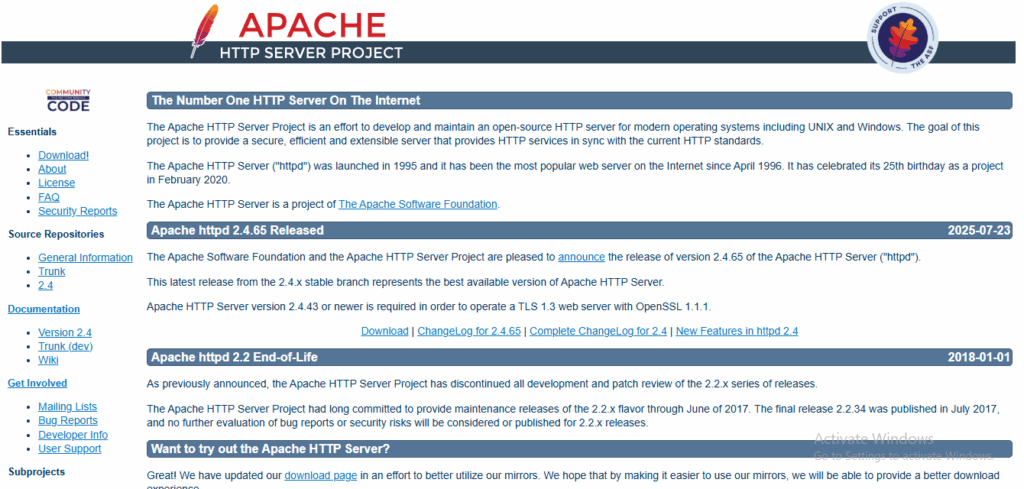
It constantly listens for incoming requests for websites, finds the correct files, and sends them out. Common examples of this software are Apache and Nginx.
When people say “web server,” they could be referring to the physical computer, the software running on it, or both working together as a single system.
How Does a Web Server Work?
The process is a fast, digital conversation between two parties: the server, which holds the website, and the client, which is usually a web browser like Chrome or Firefox on a user’s device.

This back-and-forth is called the client-server model.
Let’s walk through a request:
a) The Request:
When you type a website address into your browser and press Enter, your browser then translates your click into a formal request message and sends it across the internet.
This message travels through various connections until it arrives at the specific web server where the website is stored.
b) The Processing:
The web server software receives your request and immediately gets to work, analyzing the request to understand precisely which page or file you’re asking for.
- It then looks through its storage to find the correct files. These could be:
- The main document (an HTML file that structures the page).
- The design style (CSS files).
- Images, videos, or other media.
c) The Response:
Once the web server has gathered all the necessary files, it packages them up and sends them back as a response to your browser.
This response travels back through the internet, following a path to your computer.
If the server cannot find the page you requested, it will send back an error message instead, like “404 Not Found.”
d) The Display:
Your browser receives the package of files from the server. It doesn’t receive a finished picture of the website; it gets the instructions and components: the HTML, CSS, and images.
The browser’s final job is to interpret these instructions, assemble all the pieces correctly, and render the whole, visual webpage that you see on your screen.
Web Hosting vs Web Server: Functional Differences
You can probably point out some key differences between web hosting and web server from what I have highlighted in the definitions and functions of each.
Here’s a simplified breakdown:
| Feature | Web Hosting | Web Server |
| Core function | It is a service that provides storage, infrastructure, and maintenance. | It is a computer or software that stores and delivers web content. |
| Nature | A commercial solution or a rented space. | A physical piece of hardware or a specific software application. |
| Activities | Managing server resources, security, backups, and customer support. | Processing HTTP/HTTPS requests and sending responses. |
| Dependency | Requires a web server (hardware and software) to function. | It can exist independently but requires hosting to be accessible online. |
| User interaction | You interact with a control panel to manage files and settings. | It operates in the background, interacting directly with web browsers. |
The key distinction is that web hosting is a service, while a web server is a product.
Web hosting is the comprehensive solution you buy. It includes:
- The web server hardware
- The server software
- The data center facility
- The network infrastructure
- The technical support team.
Its function is to provide a reliable, maintained environment for your website.
A web server, in contrast, is a core component of that service. Its function is singular and technical: to listen for requests and serve web pages.
Without the hosting service around it, a web server sitting in an office would not be reliably accessible to the public internet.
How Web Hosting and Web Servers Work Together
While they differ in functions, a web hosting service and a web server are not alternatives; they are partners.
For example, when you purchase a web hosting plan from us, you are gaining access to our web servers.
So, Truehost manages the physical servers, installs and configures the web server software like Apache or Nginx, and ensures they are secure and running optimally.
We handle the complex backend, allowing you to focus on your website.
Your website files are stored on Truehost’s web servers. When someone wants to visit your site, their browser sends a request to that server.
The web server software on Truehost’s machine then fetches your files and delivers them to the user, making your website appear.
In essence, the web hosting service provides the home for your website, and the web server is the appliance inside that home that does the work of handing your content to visitors.
For a seamless experience where both elements work in harmony, choosing a dependable provider is key.
Truehost ensures that its web servers are high-performance and properly configured, offering a smooth experience for both website owners and their visitors.
The Differences in Types of Web Hosting and Web Servers
Web hosting and web servers do not just differ in function; they are also different in types.
Types of Web Hosting
Web hosting comes in different forms to fit various needs and budgets. The main difference is how much of the server’s power and space you get.
Shared Hosting
Your website shares a server with many other sites. It’s the most affordable option, perfect for new or small websites.
Truehost offers easy-to-use shared hosting, making it simple to get your first website online.
VPS Hosting
A physical server is split into virtual private servers. You get your own dedicated portion of resources, giving you more power and control than shared hosting.
It’s a good fit for growing websites.
Dedicated Hosting
You get a whole physical server all to yourself. This offers the best performance and security for very high-traffic websites.
Cloud Hosting
Your website runs on a network of servers. If one server has a problem, another takes over. This makes it very reliable and able to handle traffic spikes easily.
WordPress Hosting
This is hosting specially tuned for WordPress sites. It’s optimized for speed and security and often includes one-click installations.
Email Hosting
Email hosting lets you use an email address with your own website name. While many web hosting plans include email, dedicated email hosting provides more advanced features and storage.
Types of Web Servers
Remember that we highlighted that web servers can be software? Here are some of the software:
- Apache HTTP Server: It is an open-source software that is widely used and known for its flexibility.
- Nginx: Known for its high performance, especially in handling a large number of simultaneous connections. It is also used as a reverse proxy or load balancer.
- LiteSpeed: This is a commercial web server known for its speed and compatibility with Apache features.
- Microsoft IIS: A web server created by Microsoft for use with the Windows operating system.
Get the Best of Both
We mentioned that web hosting and web servers are partners; so you need the best of both for your website to thrive.
Truehost delivers a complete solution where powerful, optimized web servers are seamlessly integrated into simple hosting plans.
We get you online fast; our aim is within 30 minutes. With your competitors already established online, there’s no time to waste.
Our plans are designed for simplicity and power, featuring:
- Free Control Panels (cPanel) for easy website management.
- 1-Click Installer for WordPress and other applications.
- Free Automated SSL Certificates for security.
- Unlimited Email Accounts with your domain.
- 24/7 Experienced Customer Support.
Choose from our affordable plans, like the WebHosting Starter at only Ksh 188/month, which includes hosting for 10 websites, 30GB SSD storage, and free daily backups.
We also offer a Free Hosting Package perfect for testing our services or building simple websites.
With Truehost, you get the robust server infrastructure and the user-friendly hosting service working together, so you can focus on your website, not the technology.
Conclusion
To put it simply, web hosting is the complete service you pay for to keep your website online. A web server is the specific computer and software inside that service that does the work of delivering your site to visitors.
You cannot have one without the other for a functional website. The hosting provides a secure, maintained home, and the web server is the engine inside that makes everything run.
The goal is to have both working together seamlessly.
A good hosting provider, like Truehost, manages the complex relationship between the servers and the service for you.
This allows you to concentrate on your website’s content and growth, with the confidence that the technical foundation is reliable, secure, and built to perform.