Domain SearchInstantly check and register your preferred domain name
 Web Hosting
 cPanel HostingHosting powered by cPanel (Most user friendly)
 WordPress HostingHost your WordPress website with fast, secure, and affordable WordPress hosting in Kenya.
 KE Domains
 Reseller HostingStart your own hosting business without tech hustles
 Windows HostingOptimized for Windows-based applications and sites.
 Free Domain
 Affiliate ProgramEarn commissions by referring customers to our platforms
 Free HostingTest our SSD Hosting for free, for life (1GB storage)
 Domain TransferMove your domain to us with zero downtime and full control
 All DomainsBrowse and register domain extensions from around the world
 .Com Domain
 WhoisLook up domain ownership, expiry dates, and registrar information
 VPS Hosting
 Managed VPSNon techy? Opt for fully managed VPS server
 Dedicated ServersEnjoy unmatched power and control with your own physical server.
 Website Builder
 Online Store BuilderLaunch a professional e-commerce store without writing code.
 Web Design ServiceGet a custom-designed website tailored to your brand and goals. From just KES 15,600
 BlogRead our guides on web hosting, online business, digital marketing, and more
 SupportOur support guides cover everything you need to know about our services
 ContactContact us via chat or email
Setting up a website is an exciting milestone. However, for many Kenyans, the biggest hurdle isn’t designing the site; it’s figuring out how to pay for the hosting service.
In the past, you needed a credit card or a complex PayPal setup to access global servers.
Thankfully, things have changed.
Today, local providers make it easy to pay using the same tools you already rely on, like M-Pesa and local cards.
No matter if you are starting a personal blog or setting up an online business, this guide walks you through the payment process in Kenya, step by step.
Why Paying for Web Hosting Matters in Kenya
Web hosting keeps your site online 24/7. Without payment, your site goes offline. In Kenya, providers make payment easy with local methods.
You avoid issues like currency conversion or high fees. Most hosts accept M-Pesa, which over 90% of Kenyans use for daily payments.
Truehost KE stands out here. We offer affordable plans starting low, with local servers for fast speeds in Nairobi and beyond.
Popular Ways to Pay for Web Hosting in Kenya
Kenyan hosting companies focus on convenience. Here are the main options you’ll see:
- M-Pesa (Lipa na M-Pesa) — The top choice for most people. Use Paybill or Till numbers.
- Airtel Money — Similar to M-Pesa, great if you use Airtel.
- Credit/Debit Cards (Visa, Mastercard) — Good for international cards.
- PayPal — Handy for global payments or if you have a linked account.
- Bank Transfer — Direct deposit, often for larger amounts.
M-Pesa leads because it’s instant and works on any phone.
What You Need Before Paying for Web Hosting
Before you pay, make sure you have these basics ready.
1) A Hosting Plan Selected
First, decide what type of website you are building.
- A personal blog
- A business website
- An online store
- A growing platform that needs more power
Each use case needs a different hosting plan.
If you are just starting, shared hosting is usually enough.
If you expect traffic or run an online store, VPS hosting makes more sense.
2) A Domain Name (Optional)
You can:
- Buy a domain together with hosting
- Or use a domain you already own
If you buy both together, it saves time and avoids setup issues.
3) A Payment Method
This is the good part.
In Kenya, you do not need a credit card to pay for web hosting.
You can pay using:
- M-Pesa
- Airtel Money
- Debit or credit card
- Bank transfer
Step-by-Step: How to Pay for Web Hosting in Kenya
Let’s break this down slowly and clearly. By the end of this section, you’ll know exactly what to click, what to choose, and why it matters.
Step 1: Choose the Right Hosting
Start by selecting your preferred hosting provider’s website and exploring the hosting plans they offer. Take a moment to review the options so you can choose one that matches your website’s needs and budget.
This is not a race.
Take a moment to understand what you are paying for.
As you compare plans, focus on these basics:
- Disk space – how much room your website files will take
- Email accounts – how many professional emails can you create
- Website limits – whether you can host one site or several
- Pricing – monthly versus yearly costs
Here’s the key thing most beginners miss:
Choose a plan that fits your current needs, not your future dreams.
If you are starting a blog or a small business site, a simple plan is more than enough.
You can always upgrade later when traffic grows or your needs change.
Step 2: Add the Hosting Plan to Your Cart
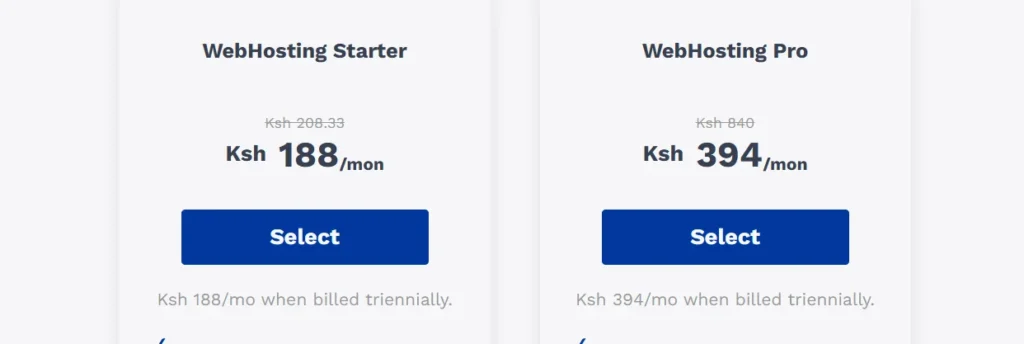
Once you’ve settled on a plan, it’s time to lock it in.
- Click Order or Get Started
- Review what the plan includes
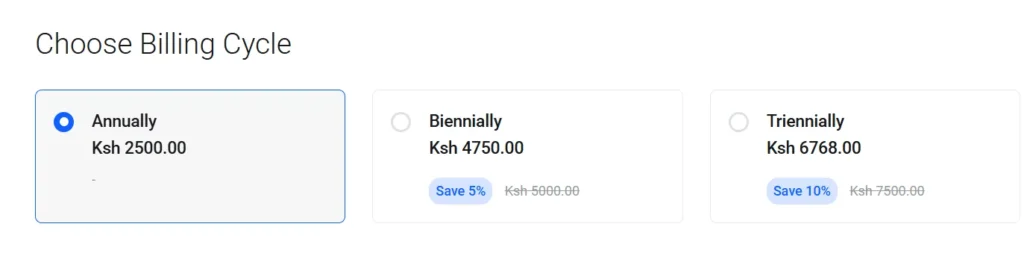
- Select your billing cycle (monthly, yearly, or longer)
If you can afford it, choosing a longer billing period often saves you money.
Many hosting providers offer discounts for annual payments.
Take one last look to confirm everything feels right before moving on.
Step 3: Choose or Add a Domain Name
Next, you’ll be asked what to do about your domain name.
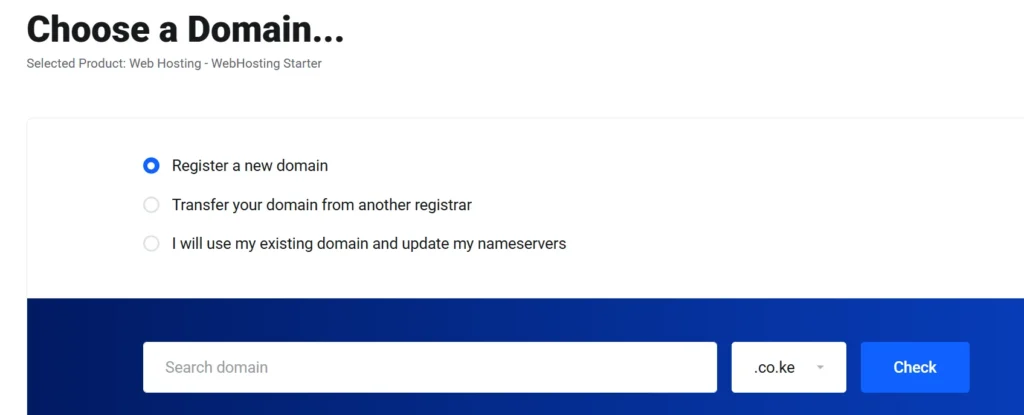
You have three options:
- Register a new domain
- Transfer an existing domain
- Use a domain you already own
If this is your first website and you are unsure, registering a new domain during checkout is the easiest and safest option. It keeps everything in one place and avoids setup confusion later.
Just make sure the domain name:
- Is easy to remember
- Matches your brand or idea
- Is spelled simply
Step 4: Create or Log In to Your Account
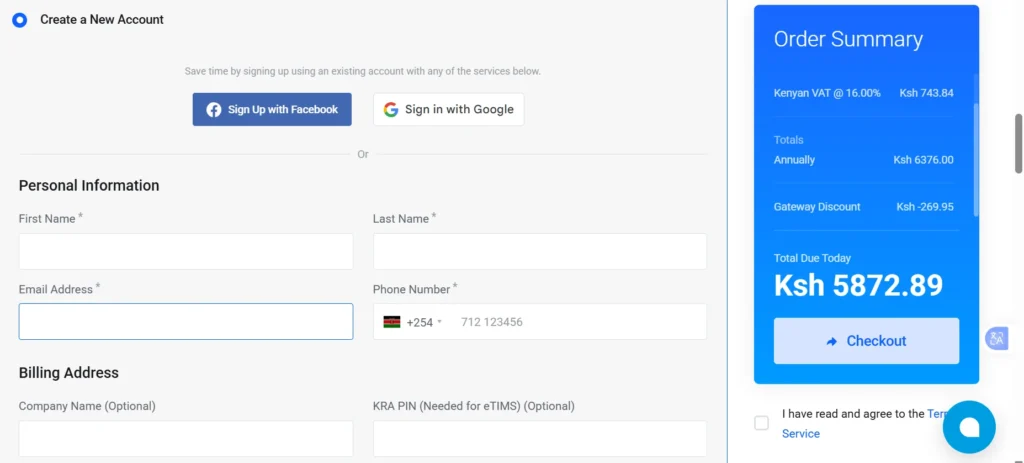
Before you can pay, you’ll need an account.
This account is important. It allows you to:
- View and download invoices
- Manage your hosting and domains
- Contact support when you need help
Use an email address you check regularly.
This is where your login details, receipts, and important updates will be sent.
Step 5: Choose How You Want to Pay
This is where many people pause, but it’s actually the easiest part.
Truehost supports local payment options, which means you don’t need a credit card or PayPal to get started.
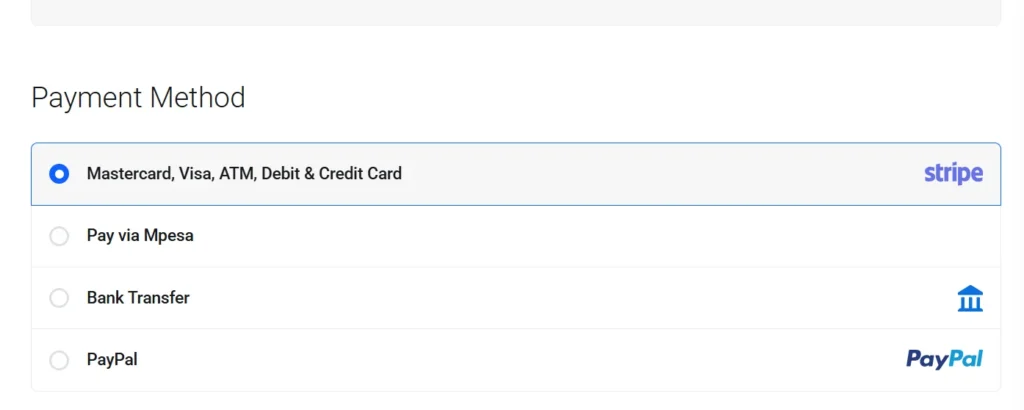
You can choose a payment method that already fits into your daily life, making the entire process smooth and stress-free.
Paying for Web Hosting Using M-Pesa
This is the most popular option in Kenya.
How M-Pesa Payment Works
- Select M-Pesa as your payment method
- Enter your Safaricom number
- Confirm the payment request on your phone
- Enter your M-Pesa PIN
That’s it.
Your hosting account is activated almost instantly after payment.
Paying Using Airtel Money
If you use Airtel:
- Select Airtel Money
- Enter your number
- Confirm on your phone
The process is very similar to M-Pesa.
Paying with a Debit or Credit Card
You can also pay using:
- Visa
- Mastercard
This option is ideal if:
- You are outside Kenya
- You prefer card payments
- You are paying for a company
Your payment is processed securely.
Paying via Bank Transfer
For businesses and institutions, bank transfer works well.
Here’s how it usually goes:
- Choose Bank Transfer at checkout
- You receive payment details
- Make the transfer
- Upload or email proof of payment
Activation may take a bit longer compared to M-Pesa.
Step 6: Confirm Payment and Activation
After payment:
- You receive a confirmation email
- Your hosting account is activated
- Login details are sent to your inbox
If you paid via mobile money, activation is often immediate.
Common Challenges When Paying for Hosting
Sometimes, things don’t go as planned. You might see a “Transaction Failed” message, or your invoice might remain “Unpaid” even after money leaves your wallet.
- Insufficient Funds: Always check if you have enough to cover both the invoice and the transaction fees.
- Wrong Account Number: If you pay manually via Paybill, typing the wrong invoice number is the most common error.
- System Delays: Occasionally, the link between the bank and the hosting billing system lags.
If your payment doesn’t reflect within 30 minutes, don’t panic. Simply open a support ticket with your transaction code.
Conclusion
Paying for web hosting in Kenya doesn’t have to feel complicated or overwhelming.
Once you understand the basics, the process becomes straightforward:
- Pick a hosting plan that fits your needs
- Choose a payment method you are comfortable with
- Complete the payment and move forward
That’s it.
And if you ever feel stuck or unsure, you’re not alone. The support team at Truehost is available to assist you at every stage, from before you pay to long after your website is live.
Every website begins with a single step.
For you, that step is making your first hosting payment.
Now that you know how it works, you can move ahead with confidence and get your website online.