 Domain SearchInstantly check and register your preferred domain name
 Web Hosting
 cPanel HostingHosting powered by cPanel (Most user friendly)
 WordPress HostingHost your WordPress website with fast, secure, and affordable WordPress hosting in Kenya.
 KE Domains
 Reseller HostingStart your own hosting business without tech hustles
 Windows HostingOptimized for Windows-based applications and sites.
 Free Domain
 Affiliate ProgramEarn commissions by referring customers to our platforms
 Free HostingTest our SSD Hosting for free, for life (1GB storage)
 Domain TransferMove your domain to us with zero downtime and full control
 All DomainsBrowse and register domain extensions from around the world
 .Com Domain
 WhoisLook up domain ownership, expiry dates, and registrar information
 VPS Hosting
 Managed VPSNon techy? Opt for fully managed VPS server
 Dedicated ServersEnjoy unmatched power and control with your own physical server.
 Website Builder
 Online Store BuilderLaunch a professional e-commerce store without writing code.
 Web Design ServiceGet a custom-designed website tailored to your brand and goals. From just KES 15,600
 BlogRead our guides on web hosting, online business, digital marketing, and more
 SupportOur support guides cover everything you need to know about our services
 ContactContact us via chat or email

If you’ve ever wondered, “Where is my domain registered?”, you’re not alone. Many website owners lose track of their registrar details, especially if they’ve purchased domains from multiple providers or third parties.
Knowing your domain registrar is important for managing renewals, updates, and troubleshooting issues.
Here’s a step-by-step guide to help you find out where your domain is registered.
Why Knowing Your Registrar is Important
Your domain registrar is the company that manages your domain’s registration. It’s a link between you, the domain owner, and the registry.
For example, Truehost is a domain registrar managing KENIC domains, and other registries.
It’s where you can:
- Renew or transfer your domain.
- Update contact information.
- Manage DNS settings for your website.
If you don’t know your registrar, you risk missing renewal notices, which could lead to losing your domain entirely.
Let’s make sure that doesn’t happen.
How to Check Domain Registration
1) Use a WHOIS Lookup Tool
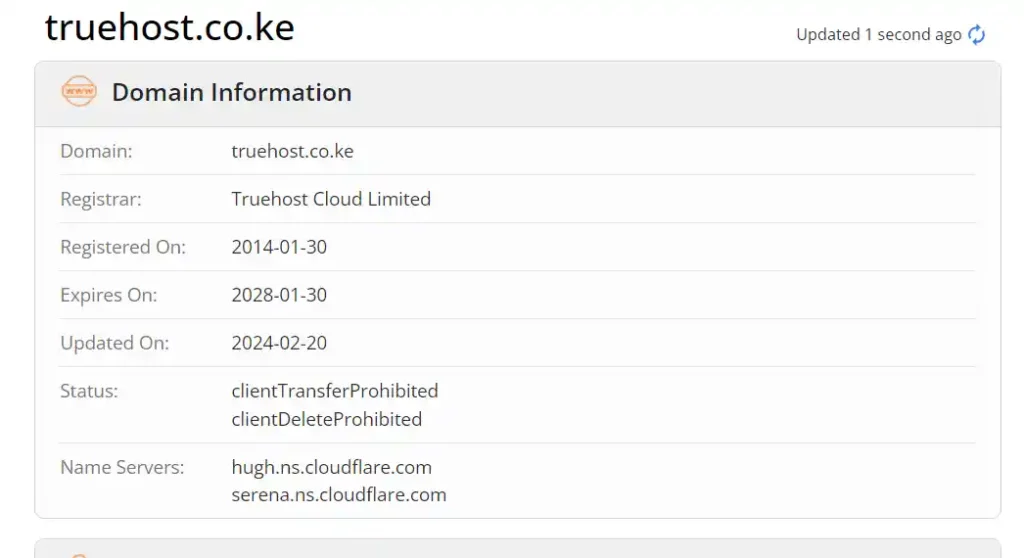
A WHOIS lookup is the fastest way to identify where your domain is registered.
These tools provide information about:
- Registrar name (the company that registered your domain).
- Registration and expiration dates.
- Contact details for the domain owner (if public).
Note, to avoid your contact details from displayed to anyone who looks up your domain name on the web, you need Whois Protection service. It’s just KES 399 at Truehost.
Steps:
- Choose a WHOIS lookup tool:
- Enter your domain name.
- Example: yourdomain.com
- Example: yourdomain.com
- Review the results.
- Look for the Registrar section. This will tell you where your domain is registered.
Pro Tip: Keep your WHOIS details up-to-date to avoid issues, such as losing access to your domain.
Note:
If you’re having trouble managing your domain, consider transferring it to Truehost Kenya for easier control.
Our platform simplifies domain management with an intuitive dashboard.
2) Check Your Account Emails
When you registered your domain, your registrar likely sent a confirmation email or renewal notifications.
These emails contain essential information, such as your:
- Registrar name.
- Domain login credentials.
- Purchase details.
Steps:
- Search your inbox for keywords like:
- Domain registration.
- Yourdomain.com (replace with your domain).
- Registrar name.
- Open relevant emails and note the registrar details.
Lost those emails? Set up filters to organize future emails from your registrar.
Truehost sends timely reminders and updates for domains registered with us. Never lose track of your renewals again.
3) Log Into Potential Registrar Accounts
If you have multiple accounts with different registrars, it’s worth logging into them to check if your domain is listed.
Steps:
i) Visit common registrars:
- Examples include GoDaddy, HostGator, Truehost, Namecheap, or Bluehost.
ii) Log in using your email address.
- If you don’t remember your password, use the forgot password option to recover access.
iii) Navigate to the My Domains or Domain Management section.
- If your domain is listed, you’ve found your registrar.
4) Contact Your Web Hosting Provider
Sometimes, domains are purchased together with hosting services. Your hosting provider may have registered the domain on your behalf.
Steps:
i) Check your hosting account for a Domains section.
- If your hosting account includes domain management, it’s likely the provider registered the domain.
ii) Contact customer support.
- Provide them with your domain name and request registrar details.
When you host your website with Truehost Kenya, you can register and manage your domain all in one place. Simplify your web management with our affordable hosting plans.
5) Reach Out to Registrar Support
If you suspect a particular company but aren’t certain, contact their support team.
They can verify ownership and guide you on how to access your account.
Steps:
i) Visit the registrar’s website.
Example: godaddy.com or truehost.co.ke.
ii) Use the Live Chat or Contact Us option.
Be ready to provide domain details for verification.
What if You Still Can’t Find Your Registrar?
If none of these methods work, don’t panic. Truehost offers domain transfer services to help you regain control.
Simply initiate a transfer by contacting our support team. Our experts will guide you step-by-step.
Alternatively, follow the link below to get started
Why Choose Truehost Kenya for Domain Management?
Managing domains can be complicated when spread across multiple platforms.
Truehost simplifies the process by offering:
- Affordable domain registration and hosting packages.
- A user-friendly dashboard for managing renewals, DNS settings, and more.
- Reliable customer support to help with all your web management needs.
- Registration of most top level domains such as .com, .co, .net, .org, .co.ke, .ke, etc.
Tip: Register or transfer your domain to Truehost today and enjoy seamless management with no hidden costs.
Conclusion
Finding your domain registrar doesn’t have to be stressful. By using tools like WHOIS, checking emails, and leveraging hosting provider support, you can easily identify where your domain is registered.
And if you’re ready to take control of your domains, consider transferring to Truehost Kenya. With affordable pricing and top-notch support, we’re here to make your online journey hassle-free.







