Domain SearchInstantly check and register your preferred domain name
 Web Hosting
 cPanel HostingHosting powered by cPanel (Most user friendly)
 WordPress HostingHost your WordPress website with fast, secure, and affordable WordPress hosting in Kenya.
 KE Domains
 Reseller HostingStart your own hosting business without tech hustles
 Windows HostingOptimized for Windows-based applications and sites.
 Free Domain
 Affiliate ProgramEarn commissions by referring customers to our platforms
 Free HostingTest our SSD Hosting for free, for life (1GB storage)
 Domain TransferMove your domain to us with zero downtime and full control
 All DomainsBrowse and register domain extensions from around the world
 .Com Domain
 WhoisLook up domain ownership, expiry dates, and registrar information
 VPS Hosting
 Managed VPSNon techy? Opt for fully managed VPS server
 Dedicated ServersEnjoy unmatched power and control with your own physical server.
 Website Builder
 Online Store BuilderLaunch a professional e-commerce store without writing code.
 Web Design ServiceGet a custom-designed website tailored to your brand and goals. From just KES 15,600
 BlogRead our guides on web hosting, online business, digital marketing, and more
 SupportOur support guides cover everything you need to know about our services
 ContactContact us via chat or email
Yes, you do need a business email, but maybe not for the reasons you think.
It’s not just about looking professional; it quietly shapes how customers perceive, trust, and even respond to your brand.
And the difference between using one and skipping it? It can impact far more than your inbox.
This piece will give you a clear breakdown of the benefits, show how generic emails compare with business emails, walk you through how to set one up, and answer the most common questions people usually have around it.
Benefits of Using a Business Email
Switching to a business email delivers quick, measurable wins for your business. Let’s discuss the benefits below:
1) Building Trust and Credibility
When a client sees [email protected] in their inbox, they instantly trust you more.
The best marketing doesn’t just reach people, it should relate with them. It earns attention. It makes someone stop, think, and act.
A professional business email cuts through the noise and builds real trust.
Recent insights show that 85% of people view branded emails as more credible than generic free accounts.
A generic Gmail address can unintentionally make even a strong proposal feel less established.
On the other hand, a professional business email instantly signals credibility, stability, and long-term intent.
It also creates a more personal and intentional impression, the kind of touch that today’s customers expect when engaging with brands they can trust and rely on.
2) Cheap Way to Advertise Your Brand
Every email you send is basically free advertising for your business.
Your brand name and domain show up in the ‘From’ line, your signature, and every reply you send.
A simple email signature with your website, phone number, and a link to your latest offer quietly keeps promoting your business in the background.
Clients can forward your emails to others, and new prospects start recognizing your brand just from consistency.
Over time, this builds trust and visibility without spending money on ads.
Instead of chasing customers, your emails do the work for you.
They help you generate steady leads at almost zero cost. That’s a big win, especially for growing businesses in Kenya.
3) Ensure Full GDPR & Data Protection Compliance
Kenya’s Data Protection Act 2019 (and its 2024 updates) requires clear consent, proper data handling, and quick breach reporting.
Fines can reach KES 5 million.
A business email hosted on your own domain gives you full control. You decide where data lives, how it’s backed up, and who accesses it.
Free services like Gmail scan and use your data for their own purposes. With a professional setup, you stay compliant and sleep easier.
4) Easier to Grow & Scale Your Business
As your business expands, you’ll naturally need different emails for different roles, like [email protected], [email protected], and [email protected].
A business email system makes this easy. You can create unlimited email addresses, set up forwarding rules, and manage communication across your team without relying on personal Gmail accounts or sharing passwords.
This keeps your operations organized, more professional, and ready to scale as your team and customer base grow.
5) Maintain Professionalism
Consistency builds respect. The same domain across your website, invoices, quotes, and emails signals to clients that you run a polished operation.
Through this, you avoid mixing personal and business life. You protect your brand image every single time you send an email.
6) It Improves Deliverability
Emails from free accounts land in spam folders far more often. Professional business emails with proper authentication (SPF, DKIM, DMARC) reach inboxes reliably.
Now Gmail and other providers have tightened rules. Branded emails clear those filters easier, so your quotes, newsletters, and follow-ups actually get read.
Business Email Addresses vs. Generic Email Addresses
The difference isn’t just cosmetic. It affects control, safety, and how your business operates day to day.
a) Privacy
With a generic address, the provider (Google, Yahoo, etc.) owns the data and can scan it. A business email keeps your client lists, contracts, and conversations private on servers you control.
b) Accessibility
Business email works smoothly across devices and teams. You set up shared inboxes or auto-replies without giving out personal passwords.
c) Portability
Your domain belongs to you forever. You can switch hosting providers and keep the exact same email address.
Generic accounts tie you to one company. If they change policies or raise prices, you’re stuck.
d) Security
Professional hosting includes enterprise-grade spam filtering, malware scanning, and admin controls.
You get better protection against phishing and can enforce strong passwords or two-factor authentication across the whole team.
Learn all about dedicated email hosting.
How to Set Up Your Business Email
You can have everything running in under an hour. Follow these five steps.
1) Register a Domain Name
Head to a reliable Kenyan registrar and grab your .co.ke or .com domain. Choose something short and memorable that matches your brand.
Truehost makes this fast and affordable, with business-ready features.
If you have not yet registered your domain, get one with us.
2) Select an Email Hosting Service
Skip expensive options like Google Workspace. For Kenyan businesses, local providers give you the same features at a fraction of the price.
We at Truehost offer professional email hosting starting from just KES 670 per year.
It comes with custom addresses, generous storage, and local payment options like M-PESA.
When you choose a plan, this will be your next page.
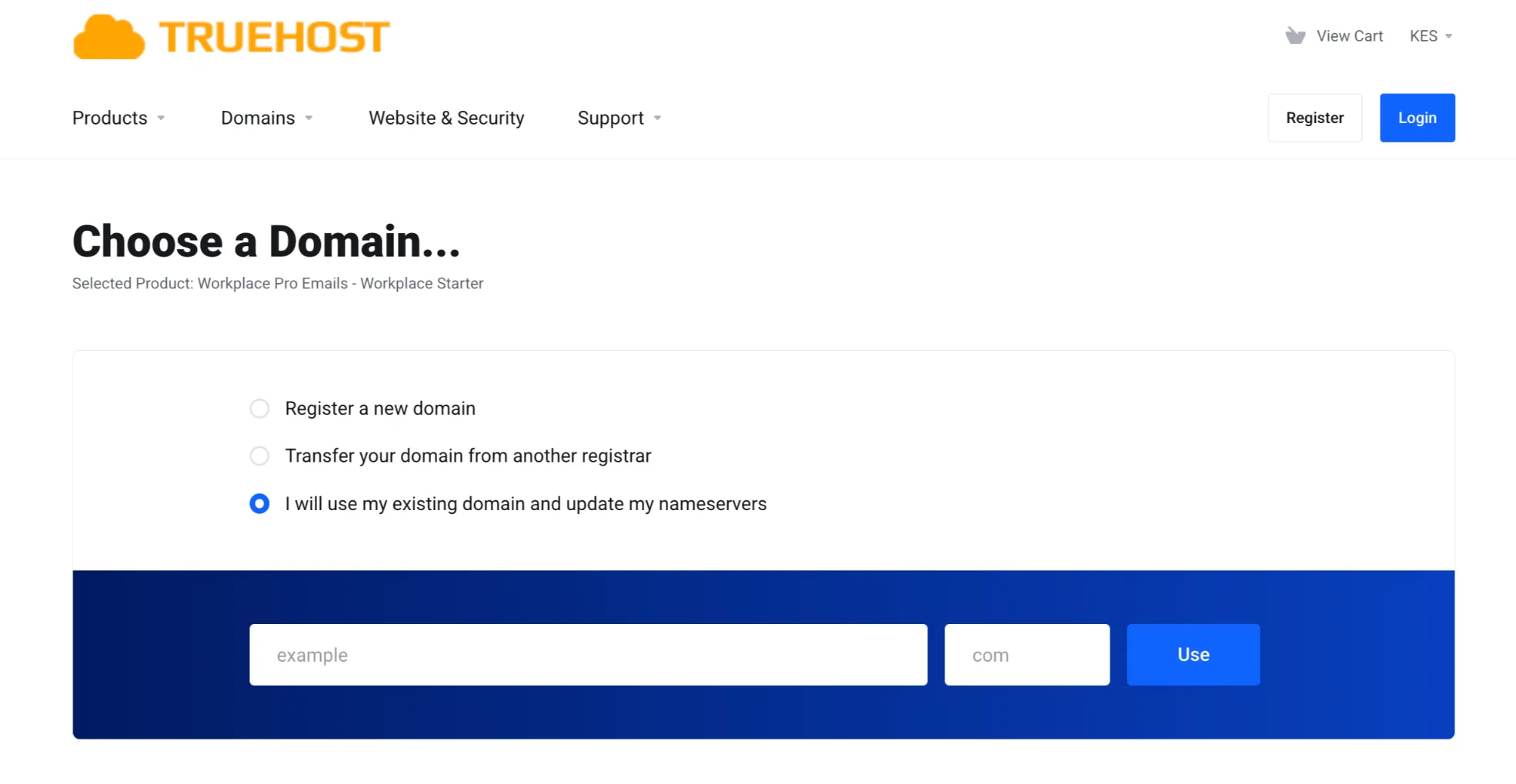
Choose the right option for you.
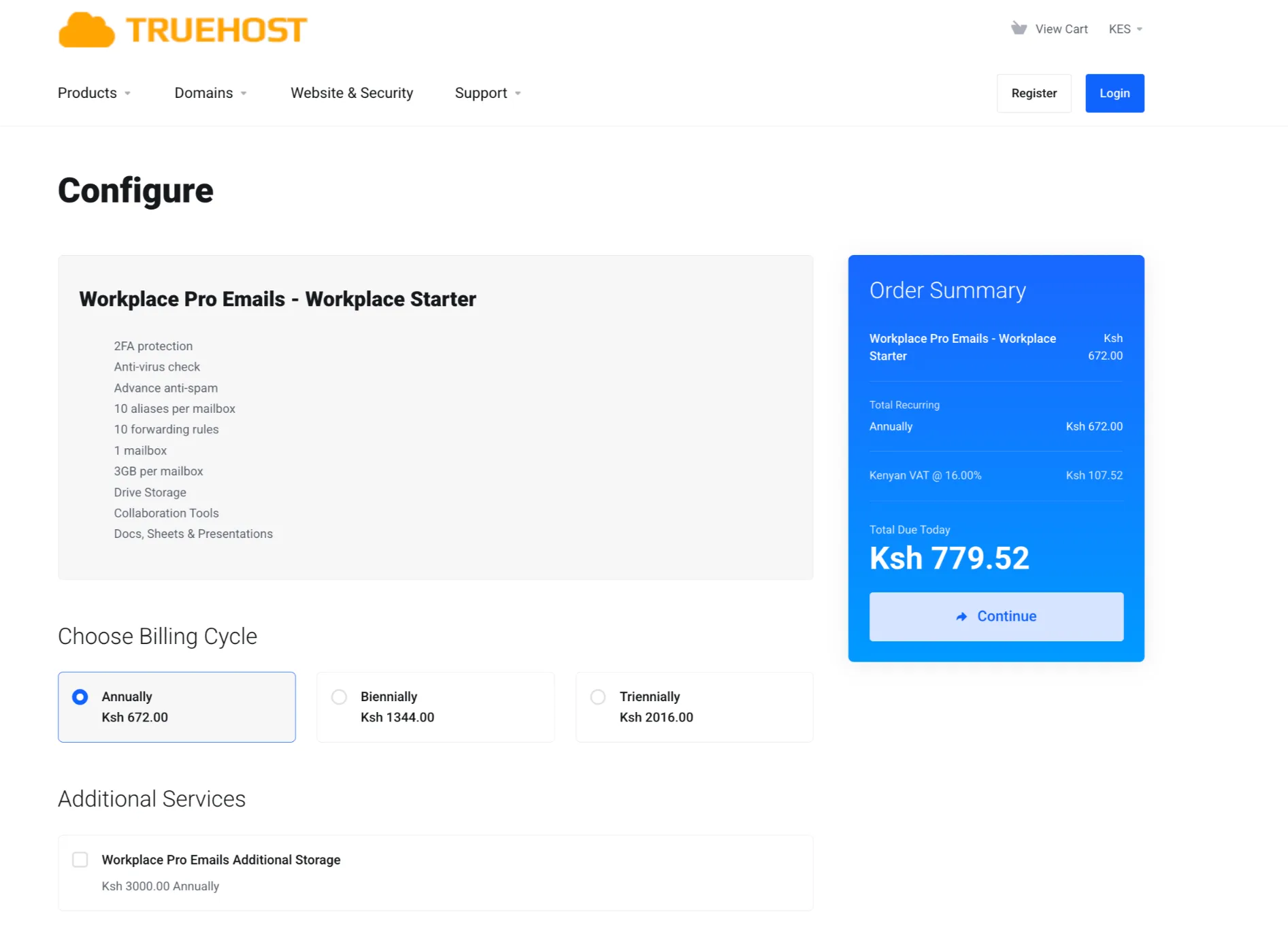
On the checkout point you can choose the additional service ‘Workplace Pro Emails Additional Storage’
3) Create Your Email Addresses
Log in to your hosting dashboard and start creating your email accounts.
If you’re running things solo, one address like [email protected] might be enough to get started.
As your business grows, it’s worth setting up a clear structure. For teams, a consistent format such as [email protected] keeps everything professional and easy to manage.
You can also create role-based email addresses for different functions in your business, for example:
This helps direct messages to the right place faster and gives your brand a more organized, trustworthy feel.
Finally, don’t overlook security; use strong passwords and enable two-factor authentication (2FA) to protect your accounts from unauthorized access.
4) Update Your MX Records
MX records (Mail Exchange records) tell the internet where emails for your domain should be delivered.
After purchasing your email service, one of the first things you’ll need to do is check and update your domain’s DNS settings.
Your email or hosting provider will supply the exact MX records you need. Copy and paste them into your domain’s DNS panel.
Truehost as a hosting provider offer step-by-step guides or support if you’re unsure where to add them.
In addition to MX records, you may also need to configure SPF records. These help verify that emails sent from your domain are legitimate and reduce the chances of your messages being marked as spam.
Once all the required DNS records are correctly set up, give it a little time to propagate. After that, you’re ready to create your first mailbox and start sending and receiving emails from your domain.
5) Set Up Your Email Client
Connect to Outlook, Apple Mail, or your phone in minutes using the provided settings. You can also use the secure webmail portal anytime.
Do you have questions about the difference between web hosting and email hosting? Check out our guide.
Enjoy Your Business Email
Now you’re ready to start sending your first professional emails and building real trust with your customers using a branded email address tied to your domain.
If you’re still deciding which email provider to go with, take a look at our guide on the 7 Best Email Hosting Providers in Kenya to help you compare your options.
But if you’ve already made up your mind and want a simple, reliable setup, you can get started with us at Truehost.
Plans start from the Workplace Starter at Ksh 672.00, all the way up to the Workplace Enterprise plan, depending on your needs.
Get your Email Hosting now and start communicating like a professional from day one.
Business Email FAQs
What is a professional email name?
It’s any address using your own domain, such as [email protected]. It instantly signals legitimacy and reinforces your brand.
Is a business email free to use?
Basic free accounts exist, but they come with limitations and scanning. Professional hosting costs as little as KES 670/year and pays for itself in credibility and deliverability.
Do I need to have a website or create a business email address?
You don’t need a full website to start, but pairing the two makes the strongest impression. A business email alone already boosts trust.
What if I don’t have a business email?
You can still operate, but you risk looking less professional and facing higher spam filters. Most growing Kenyan businesses switch within their first year.
Can I use a normal email for my business?
Technically yes, but it hurts trust, deliverability, and compliance. The small upgrade to a business email removes those risks.
Can a Gmail be a business email?
Only if you upgrade to Google Workspace and add your domain. A plain @gmail.com address is still seen as personal.
What are three specific things you should never do in a business email?
- Use all caps or excessive exclamation marks.
- Reply with a generic free-email signature full of ads.
- Forward sensitive client info to your personal Gmail.
Can I migrate my existing account to Truehost?
Yes. Truehost offers free migration with zero downtime. Our team handles the transfer, so you keep every old email and contact.