 Domain SearchInstantly check and register your preferred domain name
 Web Hosting
 cPanel HostingHosting powered by cPanel (Most user friendly)
 WordPress HostingHost your WordPress website with fast, secure, and affordable WordPress hosting in Kenya.
 KE Domains
 Reseller HostingStart your own hosting business without tech hustles
 Windows HostingOptimized for Windows-based applications and sites.
 Free Domain
 Affiliate ProgramEarn commissions by referring customers to our platforms
 Free HostingTest our SSD Hosting for free, for life (1GB storage)
 Domain TransferMove your domain to us with zero downtime and full control
 All DomainsBrowse and register domain extensions from around the world
 .Com Domain
 WhoisLook up domain ownership, expiry dates, and registrar information
 VPS Hosting
 Managed VPSNon techy? Opt for fully managed VPS server
 Dedicated ServersEnjoy unmatched power and control with your own physical server.
 Website Builder
 Online Store BuilderLaunch a professional e-commerce store without writing code.
 Web Design ServiceGet a custom-designed website tailored to your brand and goals. From just KES 15,600
 BlogRead our guides on web hosting, online business, digital marketing, and more
 SupportOur support guides cover everything you need to know about our services
 ContactContact us via chat or email
When a domain expires and is not renewed during the grace period, it enters the redemption period. At this stage, you cannot renew it at the standard price.
Instead, you have to pay a redemption fee that is significantly higher than the normal renewal fee.
For many domain extensions, this fee ranges from KSh 5,000 to over KSh 26,000, depending on your registrar and the domain extension. If you are not prepared for it, this cost can be so expensive.
Before you pay that fee, read on to understand the redemption period, how much Kenyan registrars charge, and why the fee is so high.
You also need to know if you have options to reduce the cost and how to avoid ever paying a redemption fee again. I have all this covered in this article.
How Much are Domain Redemption Fees?
When buying a domain in redemption, you are not paying for a standard renewal.
You are paying a penalty to the global registry that manages all domains, like Verisign for .com, plus an added fee from your local registrar for the manual work involved.
Fees can range from $40 to over $200 (roughly Ksh 5,200 to Ksh 26,000), depending on who you bought the domain from and the domain extension.
Examples of domain redemption fees for different registrars:
Truehost: For international domains such as .com, .org, and .net, the redemption period begins about 30 days after expiration. The redemption fee is Ksh 15,000.
Note that at Truehost, the .co.ke domain extension has a 90-day grace period, giving you more time to renew it at the standard rate before it enters redemption.
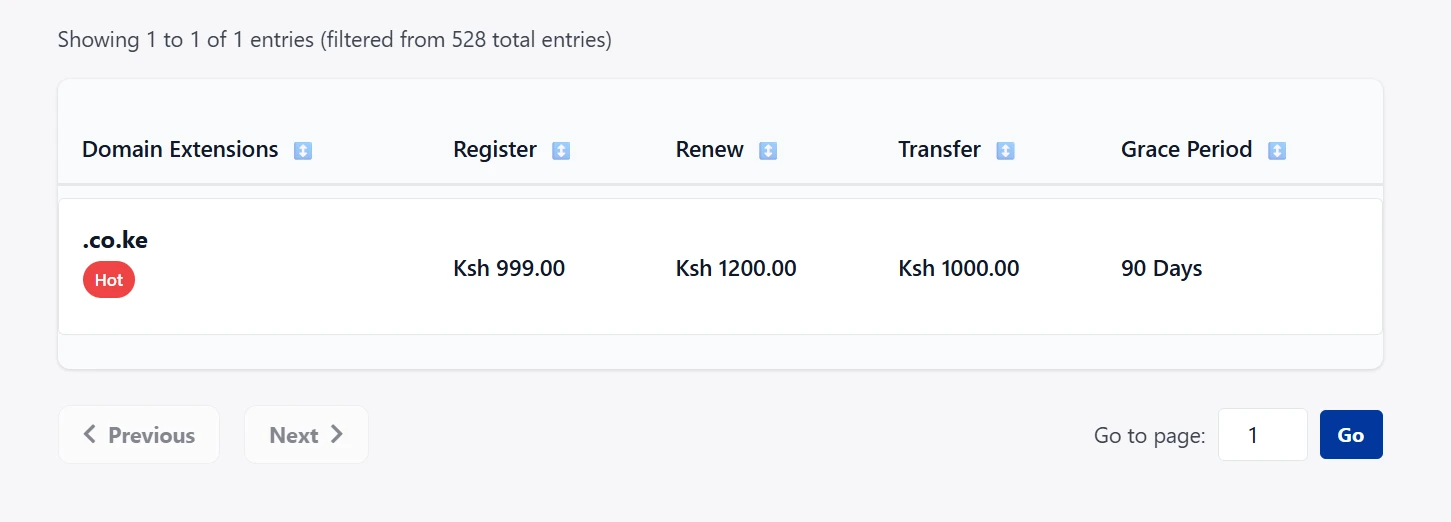
Safaricom Domains: If you registered your domain through Safaricom, the redemption fee is KSh. 12,000.
Spaceship domains: charges around $41.40.
Namecheap: This fee ranges from $42 to $220, depending on the domain extension.
Remember, redemption fees are not standardized; they vary by registrar and domain extension. So, always check your registrar’s specific policy before your domain expires.
Why the Redemption Fee Is So High
Why does a Ksh 1,500 renewal turn into a Ksh 15,000 fee? There are specific layers to this cost.
Registry Penalty Fee
The central registry that controls .com domains; Verisign charges a base fee of $80-100 (Ksh 10,000-Ksh 13,000) just to restore the domain. Your registrar has to pay this to the registry.
The redemption fee must therefore at least cover the registry penalty fee before anything else.
Registrar Markup
Your registrar then adds their own handling fees to the registry penalty. This covers manual processing, risk management, and administrative work required to restore your domain.
Manual Intervention
Note that a standard renewal is automated, while redemption is not. It requires a human employee to verify your identity, coordinate with the central registry, and manually restore your domain’s status.
That labor costs money, adding more to the required redemption fee.
ICANN Rule
ICANN has an Expired Domain Deletion Policy. This policy allows registrars to set their own redemption fees. Because of the manual work and risk involved, these fees sometimes exceed 4x the actual registry cost.
What You Get for the Redemption Fee
If you pay this high fee, what exactly are you buying? You are not just getting another year of registration, you are also getting:
- Registry penalty paid on your behalf: The bulk of the fee goes to the central registry to reinstate the domain.
- Manual restoration of the domain to your account: A support agent manually restores the domain to your account.
- 1-year renewal added: The domain is renewed for one year from its original expiration date, not from the day you pay the fee.
- DNS restoration: After processing, your website’s DNS settings are restored so your site goes live again.
- No transferability: Until the domain is fully restored and the lock period has passed, you cannot transfer the domain to another registrar.
Domain Already in Redemption: How to Cut Costs?
If your domain is already in this period, you have options to reduce the financial damage. These are the tips to cut costs:
1) Act Immediately
Redemption periods typically last only 30 days, though some exceptions exist, such as Truehost’s 90-day redemption period for .co. ke.
If you wait too long, the domain is released back to the public. Every day you delay increases the risk of losing your domain permanently to someone else.
2) Contact Your Registrar Directly
Before you click the pay button online, call or chat with the support team immediately.
Some registrars can offer one-time goodwill discounts, especially if you are a long-term customer with a good history. Ask them directly if they can waive or reduce the redemption fee.
3) Compare Recovery vs. Re-Registration
Ask yourself if the domain is worth the high cost.
If it’s a high-value domain, such as your business brand name, or one with established SEO traffic, it is worth paying the redemption fee to save it.
If it’s a generic domain or one with low traffic, you might be better off letting it go and waiting for it to be deleted so you can re-register it at a standard price later.
4) Consider Transferring After Recovery

Once your domain is restored, some registrars lock the domain for 60 days to prevent immediate transfers.
If your current registrar charges high renewal fees, use this time to plan a transfer. Once the lock period ends, move your domain to a registrar with better pricing.
Truehost offers a smooth, stress-free transfer and affordable domain pricing with no exaggerated renewal fees.
5) Avoid Auction Traps
Be aware that some registrars don’t just hold the domain during redemption; they send it to a public auction.
If you are bidding against others for your own domain, the price can skyrocket far above the standard redemption fee. So, compare the auction bid price versus the redemption fee carefully before committing.
How to Avoid Ever Paying a Redemption Fee
The best way to deal with a redemption fee is to ensure you never have to pay one. Here are some tips for you to avoid paying the redemption fee:
Enable auto-renew: This is the most effective safeguard. It ensures that even if you forget, the system handles the renewal.
Keep payment methods up to date: An expired credit card or an old M-Pesa line is a common failure point for auto-renewal. Always check that your payment details are up to date.
Set multiple reminders: Don’t rely on one email. Set reminders on your phone calendar for 60, 30, and 7 days before the expiration date. Many registrars, including Truehost support, will also send you reminders to renew.
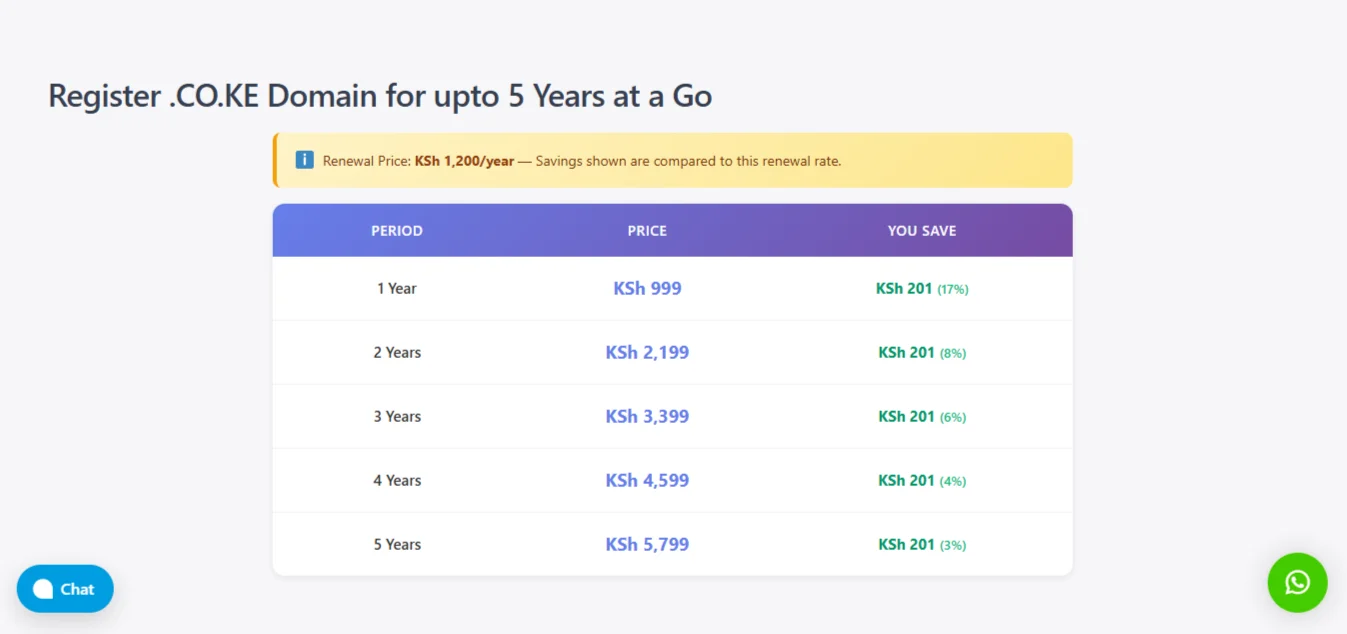
Register for multiple years: Instead of renewing annually, register your domain for 2, 5, or even 10 years. This reduces the frequency of renewal and lowers the risk of oversight.
Verify WHOIS contact email: Ensure the email address listed in your WHOIS records is one you check regularly. This is where renewal notices are sent.
Consolidate domains: If you have multiple domains, manage them under a single registrar account. It’s easier to track one account and one renewal dashboard than scattered accounts across different providers. Truehost allows you to manage all your domains in one place.
Use domain protection tools: Enable domain locking and monitoring alerts. This prevents unauthorized changes to your settings and ensures you are alerted if anything unusual happens with your domain status.
Conclusion
Paying a redemption fee means spending ten to twenty times what you would normally pay for a simple renewal.
And the cost is not just financial. While your domain sits in redemption, your website is down. Customers cannot reach you. Emails stop working.
Search engines start forgetting your site, which means you lose the ranking you worked hard to build. On top of that, there is always the risk that someone else tries to claim your domain while it is out of your control.
To avoid all this, keep your domains with a reliable registrar. You want someone who gives you clear pricing, gives you enough time to renew before penalties kick in, and reminds you to renew.
That’s exactly what Truehost does. We support you to ensure your domain does not go into redemption.







