 Domain SearchInstantly check and register your preferred domain name
 Web Hosting
 cPanel HostingHosting powered by cPanel (Most user friendly)
 WordPress HostingHost your WordPress website with fast, secure, and affordable WordPress hosting in Kenya.
 KE Domains
 Reseller HostingStart your own hosting business without tech hustles
 Windows HostingOptimized for Windows-based applications and sites.
 Free Domain
 Affiliate ProgramEarn commissions by referring customers to our platforms
 Free HostingTest our SSD Hosting for free, for life (1GB storage)
 Domain TransferMove your domain to us with zero downtime and full control
 All DomainsBrowse and register domain extensions from around the world
 .Com Domain
 WhoisLook up domain ownership, expiry dates, and registrar information
 VPS Hosting
 Managed VPSNon techy? Opt for fully managed VPS server
 Dedicated ServersEnjoy unmatched power and control with your own physical server.
 Website Builder
 Online Store BuilderLaunch a professional e-commerce store without writing code.
 Web Design ServiceGet a custom-designed website tailored to your brand and goals. From just KES 15,600
 BlogRead our guides on web hosting, online business, digital marketing, and more
 SupportOur support guides cover everything you need to know about our services
 ContactContact us via chat or email
Don’t let payment methods hold you back from starting your website. A lot of people in Kenya assume you need a credit card to buy a domain name, but that’s no longer true.
Today, you can easily buy a domain using M-Pesa directly from your phone in just minutes. According to the Star, there are over 40 million monthly active users across Kenya. M-Pesa has become the most convenient and trusted payment solution for millions of Kenyans.
From launching a blog or starting a small business to building a growing startup, M-Pesa makes buying a domain simple. No complicated banking steps, no foreign payment hurdles, just a fast, local solution
Even better, providers like Truehost make this process smooth by integrating M-Pesa directly into their checkout system.
In this guide, you’ll learn exactly how buying a domain using M-Pesa works, step-by-step, and how to get your domain registered quickly.
Step-by-Step: Buying a Domain Name Using M-Pesa
1) Decide on a Domain Name
Start by brainstorming a strong domain name. Aim for something short, memorable, and relevant to your brand or business. If targeting a Kenyan audience, consider including local keywords (e.g., nairobicafe.co.ke or bestmatatuapp.co.ke) to boost relevance and trust.
- Avoid trademarked names to prevent legal issues.
- Brainstorm 3–5 options in case your first choice is unavailable.
- Check for easy spelling and pronunciation to make it user-friendly.
2) Choose the Right Domain Extension
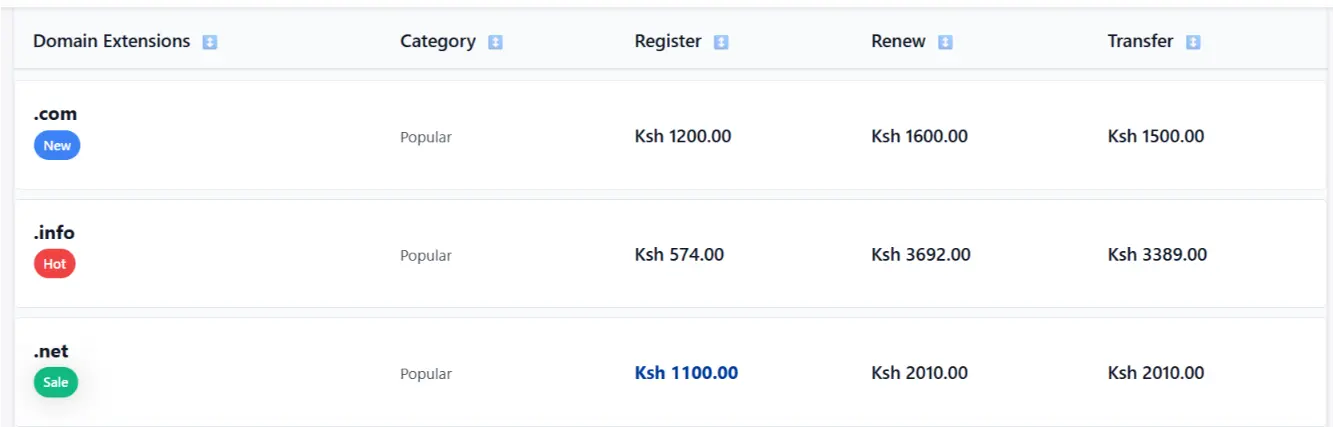
The extension (TLD) affects branding, trust, cost, and audience perception:
- .com: Globally recognized and versatile. Great for international appeal. First-year pricing typically ~KES 1,200 (e.g., at Truehost).
- .co.ke: Builds strong local trust for Kenyan businesses or audiences. Often requires basic KeNIC verification, but signals Kenya-based. Promotional first-year prices as low as KES 999 (renewal ~KES 1,200).
- Others worth considering: .net, .org, .tech, .online, .store, or .africa for niche branding.
Factor in renewal costs (often higher than intro rates) and your target market, local vs. global.
3) Research a Domain Registrar That Supports M-Pesa
Opt for reliable, KeNIC-accredited (for .co.ke) local providers with native M-Pesa integration, fast support, and good uptime:
- Truehost. Affordable, instant activation after payment confirmation, and smooth M-Pesa (highly recommended for ease).
- Alternatives: HostPinnacle, or Webhost Kenya.
Check recent reviews for customer experiences with M-Pesa payments, support speed, and service reliability.
4) Check Availability of the Domain Name
Head to the registrar’s website (e.g., truehost.co.ke/domains or their domain search tool).
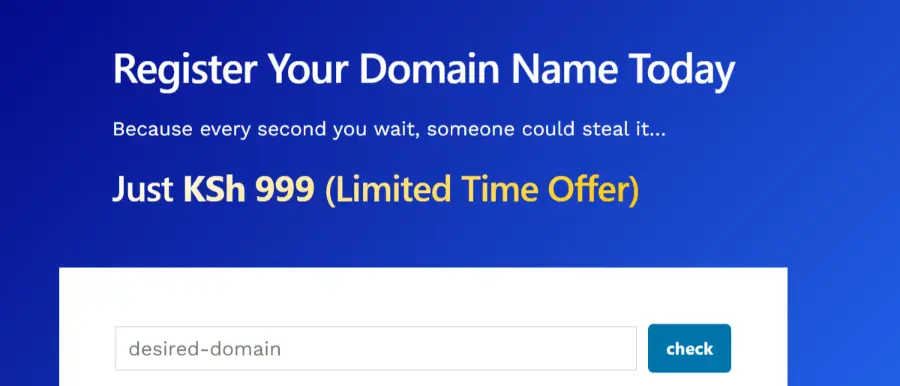
- Enter your desired name (with extension) in the search bar.
- Review results: available, taken, premium, or suggested alternatives.
- Act fast, good names get registered quickly!
5) Add to Cart and Checkout
Once you find an available domain:
- Select it and add to cart.
- Proceed to checkout.
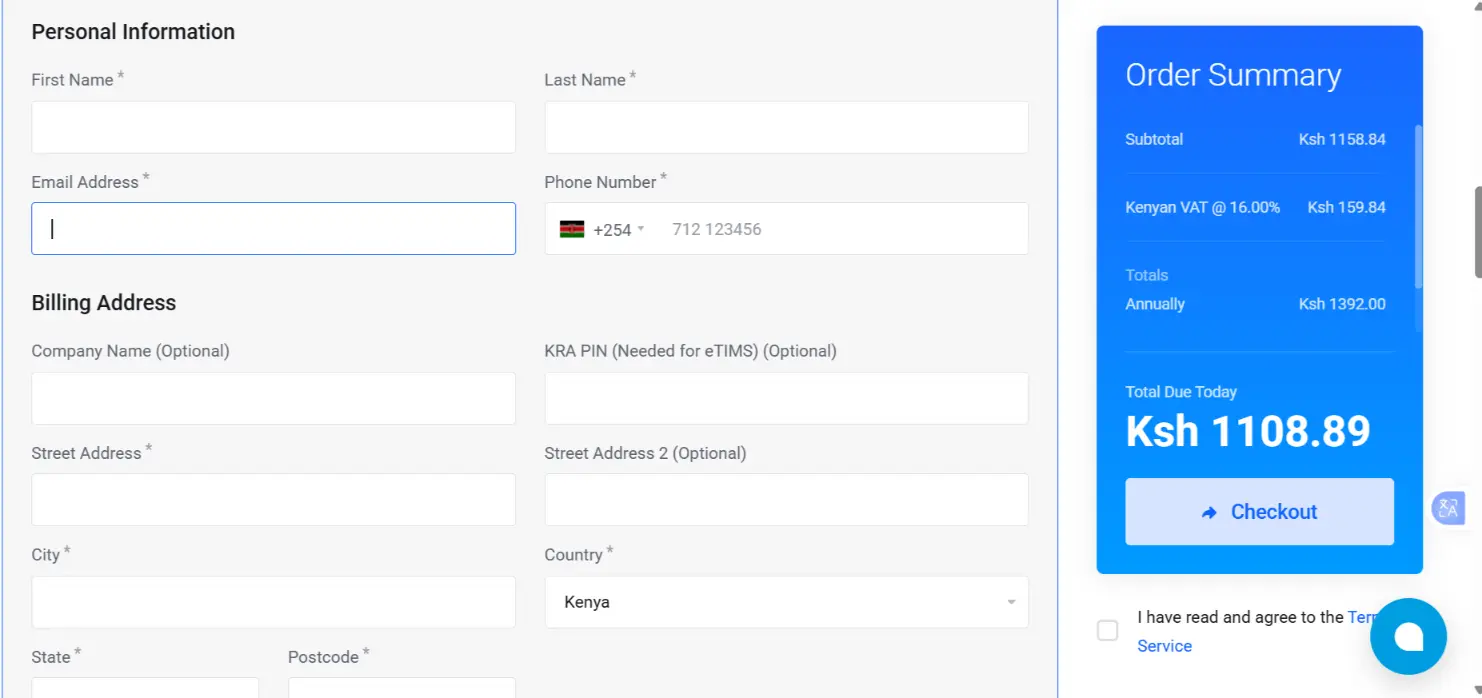
- Create an account or log in (provide email, name, phone, and use accurate details).
- Fill in registration info (WHOIS details: name, address, email). For .co.ke, additional basic verification may apply.
- Review the order summary.
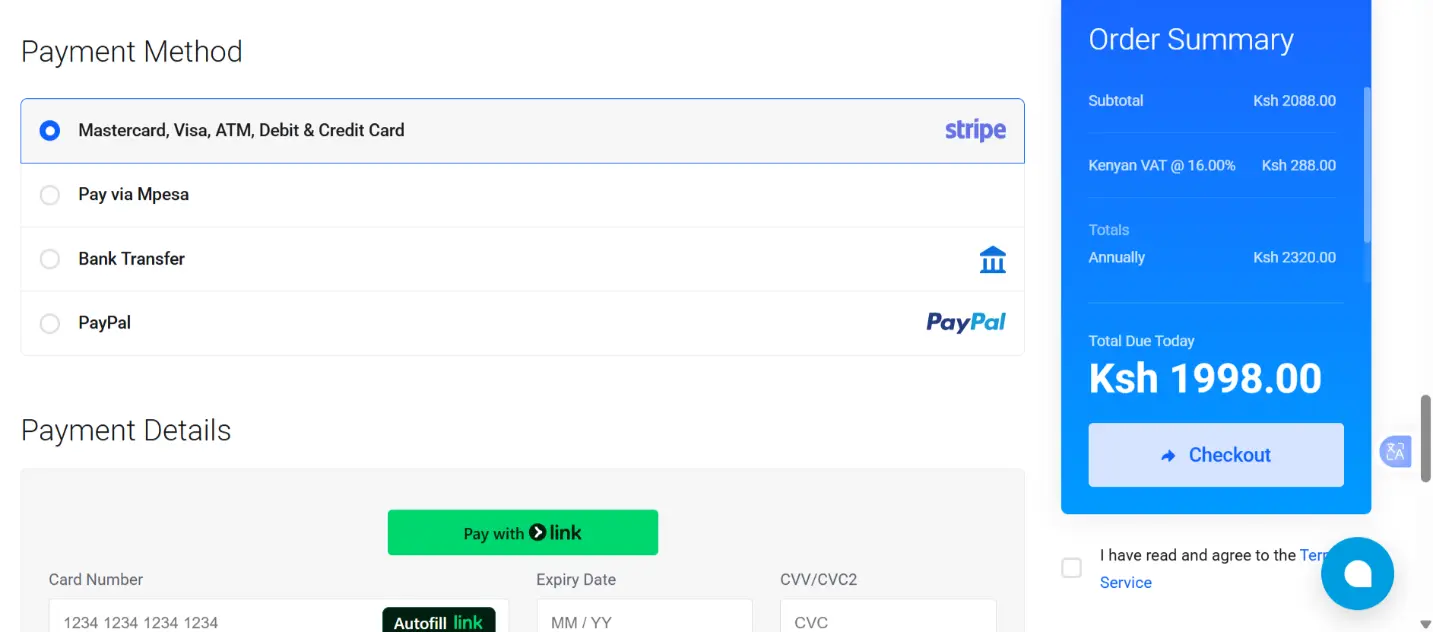
- Select M-Pesa (often listed as Lipa na M-Pesa) as the payment method.
- Proceed to payment.
Paying Your Domain With M-Pesa
Truehost supports M-Pesa primarily via Lipa na M-Pesa Paybill (manual confirmation), with possible STK push prompts in some flows.
a) Choose M-Pesa Payment
At checkout or on the generated invoice, select Lipa na M-Pesa.
b) Pay via Paybill (Most Common Method)
- Paybill Number: 4123955
- Account Number: Your invoice number (e.g., something like 535965 or as specified on the invoice).
- On your phone: Go to M-Pesa → Lipa na M-Pesa → Buy Goods/Paybill → Enter 4123955 → Enter Account No. → Input the amount → Enter PIN → Send.
- Note the transaction code/receipt from your M-Pesa confirmation SMS (important for next step).
Ensure your M-Pesa balance covers the amount plus any small transaction fee.
c) Confirm Transaction on Site
- Return to the Truehost client area or invoice page.
- Locate the unpaid invoice.
- Enter the M-Pesa transaction/reference code in the provided box.
- Submit/Confirm.
d) Alternative: Prompt/STK Push (If Available)
Some checkouts prompt for your Safaricom number → Approve the push notification on your phone → Enter PIN.
(This is faster when integrated; fallback to Paybill if not prompted.)
e) Completion & Activation
- Payment confirmation takes seconds to minutes.
- Domain activates almost instantly (check email or client area).
- If delayed, double-check code entry or contact support (usually quick resolution).
- Wrong details? Payments can often be reversed or retried easily.
Why Buy a Domain Using M-Pesa?
- Accessibility: Over 90% of Kenyans use M-Pesa daily; no credit card or forex needed.
- Speed: Confirmation in seconds/minutes; instant domain activation.
- Low friction: Ideal for beginners and SMEs, no international hurdles.
- Security: M-Pesa’s encryption and PIN system is trusted for online payments.
- Local edge: Providers like Truehost integrate it natively, avoiding delays common with global registrars.
Alternative Ways to Buy a Domain in Kenya
While M-Pesa is the most convenient for many:
- PayPal: Supported at Truehost and globals like Namecheap (requires a funded account).
- Credit/Debit Cards: Visa/Mastercard (local banks work); some use M-Pesa-linked virtual cards.
- Payoneer: Limited for direct purchases.
- Wise: Rarely integrated directly.
- Bank Transfer: Slower, but accepted by some.
M-Pesa vs Other Payment Methods
| Method | Ease of Use | Speed | Accessibility |
|---|---|---|---|
| M-Pesa | Very easy | Instant | High |
| Card | Moderate | Instant | Medium |
| PayPal | Moderate | Instant | Low |
What You Can Do After Buying Your Domain
- Connect it to hosting (Truehost bundles make this smooth).
- Set up a professional business email.
- Launch a site, blog, or online store.
- Point to platforms like WordPress or Olitt for quick setup.
Buying Domain and Hosting Together
Many providers (like Truehost) offer bundles that include:
- Domain + hosting
- Free setup
- Easy connection
- Discounts
This means you can go from a domain purchase → live website in just minutes.
Start your domain search and buy with M-Pesa at Truehost today; it’s one of the easiest ways to get online in Kenya.
Buying a Domain Name Using M-Pesa – FAQs
Does Truehost send an STK push for M-Pesa payment, or do I use Paybill?
Both are possible; many flows prompt STK first; fallback to Paybill 4123955 if needed.
What if my M-Pesa payment fails or times out during domain checkout?
The transaction may reverse automatically; retry or manually enter the confirmation code on the invoice page.
Are there extra fees when paying for domains with M-Pesa?
No hidden registrar fees; only standard small M-Pesa transaction charges apply.
How fast is domain activation after M-Pesa payment confirmation?
Usually instant to 5–10 minutes; rare delays if the code is entered correctly.
Can I renew my domain later using M-Pesa?
Yes, same client-area process, with email reminders sent.
Is M-Pesa payment secure for domain purchases in Kenya?
Yes, encrypted and PIN-protected; Truehost handles thousands of such transactions reliably







