Domain SearchInstantly check and register your preferred domain name
 Web Hosting
 cPanel HostingHosting powered by cPanel (Most user friendly)
 WordPress HostingHost your WordPress website with fast, secure, and affordable WordPress hosting in Kenya.
 KE Domains
 Reseller HostingStart your own hosting business without tech hustles
 Windows HostingOptimized for Windows-based applications and sites.
 Free Domain
 Affiliate ProgramEarn commissions by referring customers to our platforms
 Free HostingTest our SSD Hosting for free, for life (1GB storage)
 Domain TransferMove your domain to us with zero downtime and full control
 All DomainsBrowse and register domain extensions from around the world
 .Com Domain
 WhoisLook up domain ownership, expiry dates, and registrar information
 VPS Hosting
 Managed VPSNon techy? Opt for fully managed VPS server
 Dedicated ServersEnjoy unmatched power and control with your own physical server.
 Website Builder
 Online Store BuilderLaunch a professional e-commerce store without writing code.
 Web Design ServiceGet a custom-designed website tailored to your brand and goals. From just KES 15,600
 BlogRead our guides on web hosting, online business, digital marketing, and more
 SupportOur support guides cover everything you need to know about our services
 ContactContact us via chat or email
When your web hosting goes down, the worst thing you can do is panic. Website downtime can feel overwhelming, especially if your business relies on online traffic, sales, or customer communication. The good news is that most downtime issues are temporary and can usually be fixed once you figure out what caused them.
The key is having a clear, step-by-step approach so you can reduce downtime, protect your data, and get your website back online as quickly as possible.
Start by checking whether the problem is affecting everyone or just you locally. Once you confirm that, contact your hosting provider’s support team right away and put temporary communication measures in place, like posting updates on social media, sending email notifications, or redirecting visitors to a temporary page, so your audience knows what’s happening.
The good thing is that most hosting problems fall into a few common categories. Once you understand them, troubleshooting becomes much easier and far less stressful.
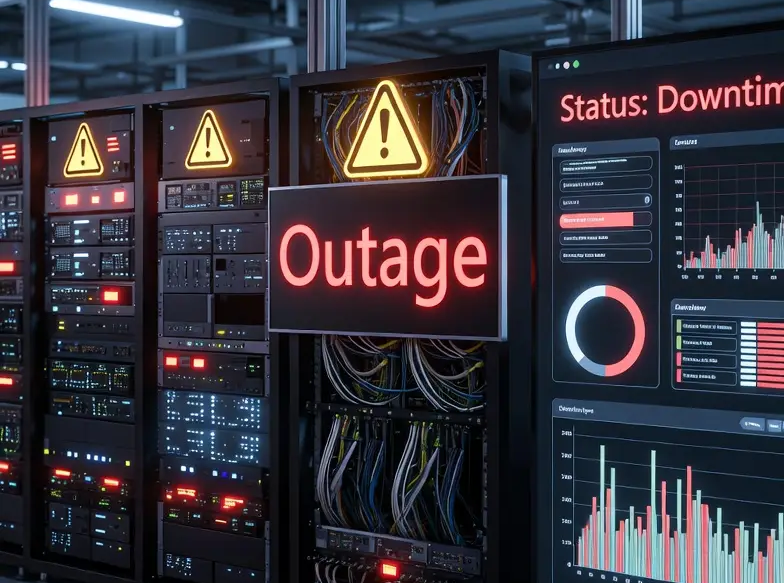
Common Causes & Solutions
1) Hosting Provider Outage
Your hosting provider’s infrastructure, including physical servers, networking equipment, or data centres, can fail or temporarily go offline for maintenance. This is completely outside your control, but reputable hosting providers usually resolve these incidents quickly.
How to confirm it:
Visit your hosting provider’s status page. Most providers maintain a public status dashboard where they report outages, maintenance windows, and ongoing incidents.
You can also check sites like Downdetector and search for your host’s name to see whether other customers are reporting similar problems.
If multiple users are experiencing issues at the same time, the problem is likely with the hosting company itself rather than your website.
What to do:
Unfortunately, there is not much you can do except monitor the situation and wait for the provider to restore services. However, you should still contact support to confirm the issue and request updates.
If outages happen repeatedly, especially without proper communication from the host, it may be time to move to a more reliable hosting provider with better uptime guarantees and infrastructure.
2) Server Resource Overload
Every hosting plan comes with limits on CPU usage, RAM, storage I/O, and simultaneous connections. If your website suddenly exceeds those limits due to high traffic, inefficient code, or runaway processes, the server may become unresponsive.
This is especially common on shared hosting plans where multiple websites compete for resources.
How to confirm it:
Log into your hosting control panel, such as cPanel, Plesk, or your provider’s dashboard, and review your resource usage statistics.
Look for:
- CPU usage consistently hitting 100%
- Memory (RAM) spikes
- Excessive processes running
- High entry process limits
- 503 Service Unavailable errors
Some hosts also send automatic notifications when your account exceeds resource limits.
What to do:
In the short term:
- Restart web services if your hosting plan allows it
- Stop runaway PHP or MySQL processes
- Temporarily disable resource-heavy plugins or scripts
For long-term stability:
- Enable website caching
- Optimize database queries
- Compress images and reduce page weight
- Upgrade to VPS or cloud hosting if traffic has outgrown shared hosting
A site that frequently overloads its resources usually needs optimization or a higher-tier hosting plan.
3) Domain Name Expired
Your domain name is rented, not permanently owned. If you fail to renew it before expiration, the domain stops pointing to your hosting server, and visitors can no longer access your website.
This is one of the simplest yet most overlooked causes of downtime.
How to confirm it:
Perform a WHOIS lookup using tools like who.is or DomainTools and check the domain’s expiration date.
If the expiry date has passed, your domain registration has lapsed.
You may also notice:
- A registrar parking page
- “This site can’t be reached” errors
- DNS failures
What to do:
Log in to your domain registrar account immediately and renew the domain.
Most registrars provide:
- A grace period after expiry
- Standard-price renewal during that window
- A redemption period afterward (often more expensive)
Once renewed, DNS propagation may take several hours, though full global propagation can sometimes take up to 48 hours.
To avoid future issues:
- Enable auto-renewal
- Keep payment details updated
- Register domains for multiple years if possible
4) DNS Misconfiguration
DNS records act like the internet’s address book. They tell browsers where your website is hosted.
If DNS settings are changed incorrectly, visitors may be directed to the wrong server, outdated IP addresses, or nowhere at all.
DNS issues commonly happen after:
- Website migrations
- Changing hosting providers
- Updating nameservers
- Editing DNS records manually
How to confirm it:
Use tools like DNSChecker.org to inspect your DNS records globally.
Check whether:
- Your A record points to the correct IP address
- Nameservers are correct
- Different regions return inconsistent results
If records are incorrect or inconsistent, you likely have a DNS configuration problem.
What to do:
Review your DNS settings carefully in your registrar or DNS management dashboard.
Verify:
- Correct nameservers
- Correct A records
- Proper CNAME records
- No accidental typos
If you recently changed hosts, ensure your nameservers and IP addresses match the new server information exactly.
Remember that DNS changes take time to propagate worldwide. Many updates are completed within a few hours, but full propagation can occasionally take up to 48 hours.
5) SSL Certificate Expired
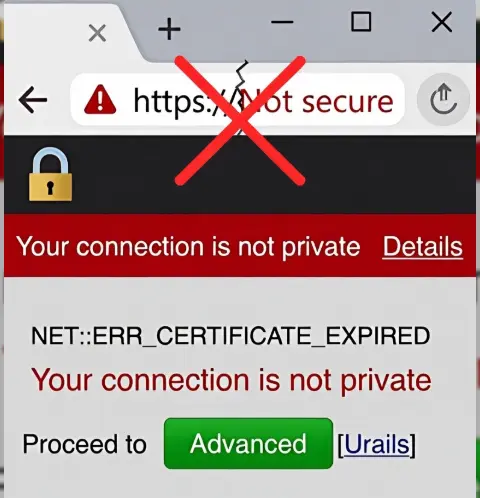
SSL certificates secure your website using HTTPS encryption. When a certificate expires, browsers display large security warnings that scare visitors away, even if the website itself is still technically online.
Modern browsers treat expired SSL certificates very seriously.
How to confirm it:
Click the padlock icon beside your website URL and inspect the certificate details.
You can also use online SSL checker tools to scan your domain and confirm whether the certificate is expired or invalid.
Typical symptoms include:
- “Your connection is not private.”
- Security certificate warnings
- HTTPS errors
What to do:
Renew the SSL certificate immediately.
If your hosting provider manages SSL automatically, look for:
- “Renew SSL” buttons
- AutoSSL features
- Let’s Encrypt renewal settings
If you manage certificates manually, renew them through your certificate authority and reinstall the updated certificate.
To prevent future downtime:
- Enable auto-renewal
- Use managed SSL whenever possible
- Monitor certificate expiry dates
6) Bad Code or Plugin Update
A broken plugin update, incompatible theme, or coding error can crash an entire website instantly.
This is extremely common with WordPress websites because plugins update frequently, and conflicts are not always predictable.
How to confirm it:
Common symptoms include:
- 500 Internal Server Error
- White Screen of Death
- PHP fatal errors
- Sudden crashes immediately after an update
Check your server error logs inside cPanel or your hosting dashboard. Error logs usually identify the exact file or plugin causing the issue.
What to do:
If a plugin or theme update caused the crash:
- Disable the plugin manually via FTP
- Rename the plugin folder inside wp-content/plugins/
- Roll back recent changes
- Restore a clean backup if necessary
If custom code caused the problem:
- Revert to the previous stable version
- Check syntax errors
- Review deployment logs
Always test updates on a staging site before applying them to a live website.
7) Database Connection Error
Most modern websites rely heavily on databases. WordPress, Joomla, Drupal, Magento, and other CMS platforms store content, settings, and user data inside databases.
If the database server fails or credentials become incorrect, your site becomes inaccessible.
How to confirm it:
The error is usually obvious:
“Error establishing a database connection.”
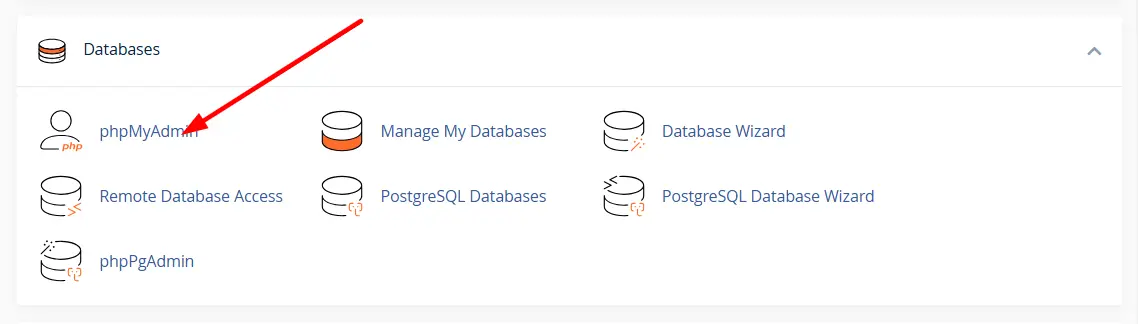
You can also attempt to access phpMyAdmin from your hosting control panel. If phpMyAdmin fails to load, the database server itself may be down.
What to do:
First, verify your database credentials inside configuration files like:
- wp-config.php (WordPress)
- configuration.php (Joomla)
Ensure:
- Database name is correct
- Username is correct
- Password matches
- The database host is accurate
If credentials are correct:
- Repair database tables using phpMyAdmin
- Check disk space usage
- Contact your host if the database server is failing
Regular database backups are critical because database corruption can sometimes lead to permanent data loss.
8) DDoS Attack or Sudden Traffic Spike
A Distributed Denial of Service (DDoS) attack floods your server with massive volumes of fake traffic until legitimate visitors cannot access the site.
However, legitimate viral traffic can create similar problems by overwhelming server resources unexpectedly.
How to confirm it:
Check:
- Server access logs
- Bandwidth spikes
- Massive request rates
- Traffic from unusual geographic regions
- Sudden CPU/network overload
Many hosting dashboards also display abnormal bandwidth or traffic patterns.
What to do:
One of the fastest emergency solutions is enabling Cloudflare, even on its free plan. Cloudflare can:
- Filter malicious traffic
- Cache pages
- Reduce server load
- Absorb DDoS attacks
You should also:
- Contact your hosting provider immediately
- Temporarily enable rate limiting
- Block abusive IP ranges if necessary
For businesses handling sensitive or high-traffic websites, advanced DDoS protection services may be worth the investment.
Quick Solutions You Can Try Immediately
Before diving into advanced troubleshooting, try these quick fixes first:
- Restart your router and internet connection
- Clear your browser cache and cookies
- Flush your local DNS cache
- Try accessing the site from another device or network
- Restart local services if you have VPS or dedicated server access
- Roll back recent plugin, theme, or deployment changes
- Disable problematic plugins manually
- Check whether your SSL certificate is valid
- Verify your domain has not expired
Sometimes the issue is surprisingly simple and can be fixed within minutes.
Long-Term Prevention Tips
i) Use a CDN
A Content Delivery Network (CDN) stores cached versions of your website across multiple global servers.
Benefits include:
- Faster loading times
- Reduced server load
- Better resilience during traffic spikes
- Improved DDoS protection
Cloudflare is one of the most popular CDN solutions for small and medium-sized websites.
ii) Set Up Uptime Monitoring
Uptime monitoring tools notify you immediately when your website goes offline.
Popular monitoring tools include:
- UptimeRobot
- Pingdom
- Better Stack
- StatusCake
Early alerts allow you to react before customers even notice the problem.
iii) Automate Backups
Backups are your safety net.
Always maintain:
- Daily automated backups
- Offsite backup storage
- Multiple restore points
Without backups, recovering from corruption, hacking, or accidental deletion becomes extremely difficult.
iv) Upgrade to Reliable Hosting
Cheap hosting often means overloaded servers, poor support, and inconsistent uptime.
If downtime becomes frequent:
- Upgrade to VPS hosting
- Consider managed cloud hosting
- Choose providers with strong uptime guarantees
- Look for 24/7 support and proactive monitoring
Reliable hosting is one of the best investments you can make for website stability.
v) Optimize Website Performance to Reduce Server Load
Poorly optimized websites consume unnecessary server resources.
Improve performance by:
- Compressing images
- Enabling caching
- Reducing unnecessary plugins
- Optimizing databases
- Using lightweight themes
- Minifying CSS and JavaScript
A faster website is usually a more stable website.
Staying Ahead of Downtime
Website downtime can be frustrating, but having the right setup and knowing how to respond quickly can make a huge difference. Most hosting issues are temporary, and once you identify the cause, you can often get your site back online faster than expected.
The best way to reduce downtime is to stay prepared. Regular backups, uptime monitoring, automatic renewals, performance optimization, and reliable hosting all help keep your website stable and accessible when it counts most.
If your current hosting provider is constantly giving you problems, slow support, or repeated outages, it may be time to upgrade to a more dependable solution.
For faster performance, reliable uptime, daily backups, and responsive customer support, consider hosting your website with Truehost. From small business websites and blogs to online stores and growing platforms, choosing reliable hosting is one of the smartest ways to protect your traffic, customers, and revenue.