Domain SearchInstantly check and register your preferred domain name
 Web Hosting
 cPanel HostingHosting powered by cPanel (Most user friendly)
 WordPress HostingHost your WordPress website with fast, secure, and affordable WordPress hosting in Kenya.
 KE Domains
 Reseller HostingStart your own hosting business without tech hustles
 Windows HostingOptimized for Windows-based applications and sites.
 Free Domain
 Affiliate ProgramEarn commissions by referring customers to our platforms
 Free HostingTest our SSD Hosting for free, for life (1GB storage)
 Domain TransferMove your domain to us with zero downtime and full control
 All DomainsBrowse and register domain extensions from around the world
 .Com Domain
 WhoisLook up domain ownership, expiry dates, and registrar information
 VPS Hosting
 Managed VPSNon techy? Opt for fully managed VPS server
 Dedicated ServersEnjoy unmatched power and control with your own physical server.
 Website Builder
 Online Store BuilderLaunch a professional e-commerce store without writing code.
 Web Design ServiceGet a custom-designed website tailored to your brand and goals. From just KES 15,600
 BlogRead our guides on web hosting, online business, digital marketing, and more
 SupportOur support guides cover everything you need to know about our services
 ContactContact us via chat or email
Domain expiration can catch you off guard. One moment your website is running smoothly, and the next it’s down.
Your email may stop working too, leaving you wondering if your domain can still be recovered.
Managing a domain is usually straightforward. You just need to renew it on time and keep your contact details updated.
But once the grace period passes, things become more complicated. The domain moves into a redemption period, where deadlines are tighter and fees are higher.
In this guide, I will walk you through what happens after a domain expires.
You’ll learn about the different stages, including the Redemption Grace Period (RGP).
This limited window is often your last chance to take back control of your domain.
What is the Redemption Period for Expired Domain Names?
The redemption period, also known as the Redemption Grace Period (RGP),
is a 30-day window within the domain lifecycle.
During this time, the original owner still has a chance to recover an expired domain after the initial grace period ends.
If the domain is not redeemed during this period, it moves into Pending Delete status.
Domain Lifecycle Stages
Domain names follow a predictable sequence after expiration. Domain names move through these standard stages:
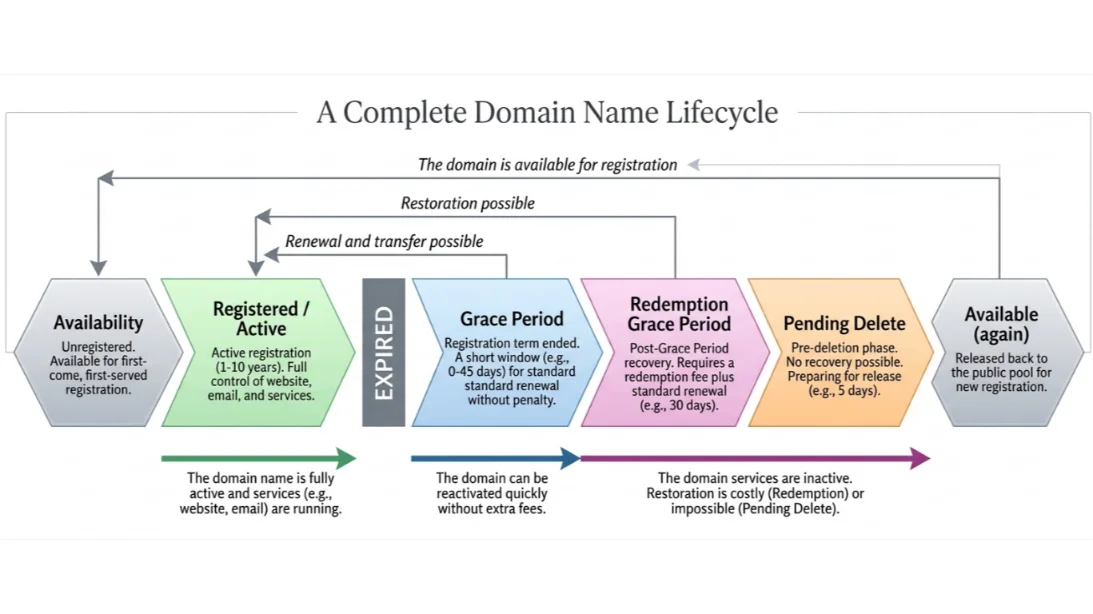
- Available (Unregistered): Anyone can register the domain on a first-come, first-served basis.
- Registered / Active: You register the domain for the chosen term (usually one year or longer). You gain exclusive rights, connect it to your website, email, hosting, and other online services, and maintain full control.
- Expired (Grace Period): The registration reaches its end date without renewal.
- Redemption (Redemption Grace Period): A recovery window opens after the grace period.
- Pending Delete: The domain prepares for deletion with no recovery possible.
- Released / Available: The domain returns to the first stage and anyone can register it again.
You protect your online presence and investment when you know what happens at each stage and act in time.
Right after the expiration date, the domain enters the Expiration Grace Period.
1) Expiration Grace Period (0–45 days)
For most international TLDs such as .com, this phase lasts up to 45 days. Your website, email, and connected services usually become inaccessible.
You can still renew the domain at the standard price with no extra penalties. You continue to receive renewal notifications from your registrar during this phase.
At Truehost, we send timely email and call reminders so you can renew without delay.
For Kenyan .ke and .co.ke domains, Truehost follows KeNIC policies and offers a longer grace period, often up to 90 days while you renew at the normal rate in KES.
Services may remain partially accessible for local domains in some cases, and you pay conveniently using M-PESA or other local methods.
Some registrars, including Truehost, allow straightforward renewal at the standard price throughout this period.
2) Redemption Period (30 days)
After the grace period ends, the domain enters the Redemption Grace Period (RGP), which lasts 30 days.
The domain becomes fully inactive, your website and email stop working, and you cannot make any changes to DNS, contacts, or other settings.
You recover the domain as the original owner only by paying a redemption fee plus the regular renewal cost.
This redemption fee is usually significantly higher than a standard renewal to cover additional processing and registry requirements.
At Truehost, we handle redemption requests quickly through your client area or by contacting our support team.
We apply clear redemption pricing for both local .ke domains and international TLDs
Our team will guide you step by step so you can restore your domain without unnecessary complications.
You simply log in, pay the redemption fee plus renewal, and we reactivate your services promptly.
3) Pending Delete (5 days)
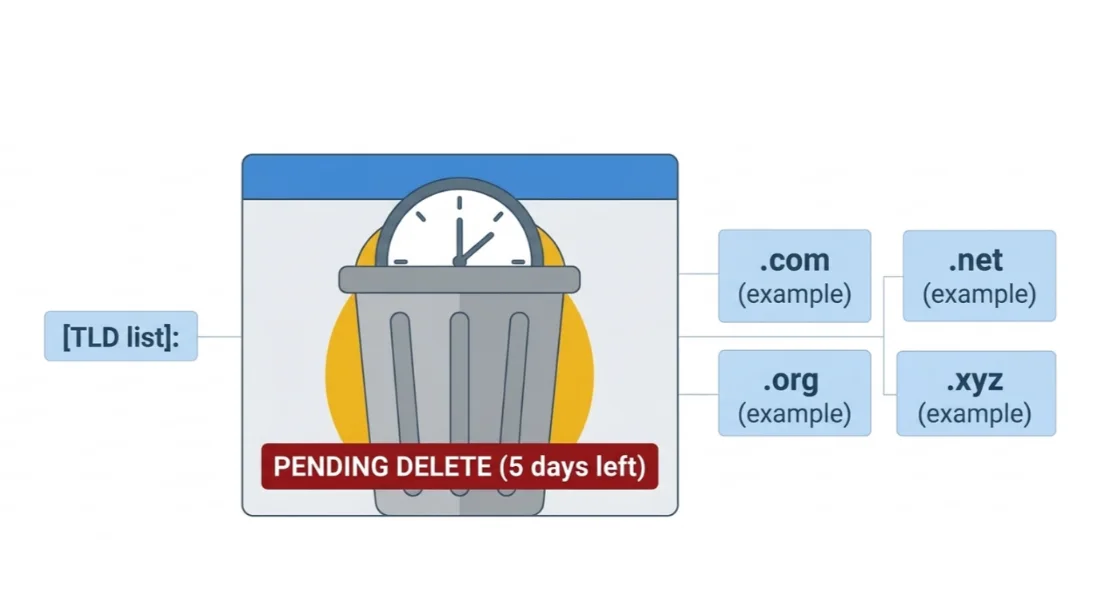
If you do not redeem the domain during the redemption period, it moves to Pending Delete status for about 5 days.
No renewal, redemption, or recovery is possible at this stage. The domain is queued for deletion at the registry level.
After these 5 days, the domain is released and becomes available for public registration again on a first-come, first-served basis.
We monitor this final phase closely and notify you if your domain reaches it, but once pending delete begins, we cannot restore it.
The domain then returns to the open market, and anyone can register it.
For more information, check our guide on the domain life cycle.
Important Notes About the Redemption Grace Period (RGP)
Here are a few key things to keep in mind about the RGP:
- Most TLDs enter the RGP if the domain isn’t renewed on time.
- Once a domain expires, website and email services stop working, and no changes can be made.
- If you miss the grace period, the domain automatically enters the RGP, which lasts exactly 30 days.
- During this stage, only the original owner can redeem the domain by paying the redemption fee along with any additional charges.
Final Opportunity to Recover an Expired Domain
The redemption period is your last chance to regain control of your domain.
Taking action within this 30-day window helps you avoid losing it permanently.
Once this period ends, the domain moves into Pending Delete and is eventually released to the public.
The redemption period is designed to protect you from permanent mistakes.
By renewing or redeeming your domain in time, you maintain full ownership and avoid disruption.
If your domain has expired and you are trying to get it back, follow the steps outlined above.
Reach out to us through your Truehost client area by raising a ticket, or contact our support team via official email.
We will guide you through the redemption process and help you recover your domain quickly.
We build clear and reliable recovery options at Truehost so you keep full control of your domain.
If your domain has expired or you want to register a new one, visit our domains page today and secure your name before it slips away.
We handle the details so you stay focused on your business.