 Domain SearchInstantly check and register your preferred domain name
 Web Hosting
 cPanel HostingHosting powered by cPanel (Most user friendly)
 WordPress HostingHost your WordPress website with fast, secure, and affordable WordPress hosting in Kenya.
 KE Domains
 Reseller HostingStart your own hosting business without tech hustles
 Windows HostingOptimized for Windows-based applications and sites.
 Free Domain
 Affiliate ProgramEarn commissions by referring customers to our platforms
 Free HostingTest our SSD Hosting for free, for life (1GB storage)
 Domain TransferMove your domain to us with zero downtime and full control
 All DomainsBrowse and register domain extensions from around the world
 .Com Domain
 WhoisLook up domain ownership, expiry dates, and registrar information
 VPS Hosting
 Managed VPSNon techy? Opt for fully managed VPS server
 Dedicated ServersEnjoy unmatched power and control with your own physical server.
 Website Builder
 Online Store BuilderLaunch a professional e-commerce store without writing code.
 Web Design ServiceGet a custom-designed website tailored to your brand and goals. From just KES 15,600
 BlogRead our guides on web hosting, online business, digital marketing, and more
 SupportOur support guides cover everything you need to know about our services
 ContactContact us via chat or email
You’ve been with Safaricom Domains for a while, and for some reason, you’re ready to move.
It could be because you’re on the hunt for:
better renewal prices
better customer support
a provider that does more than just domains and hosting
Or maybe you’re simply looking at other options. Whatever the case, transferring your domain to another registrar is a very easy process.
I’ll show you how you can do it with Truehost.
Requirements
Before you start the transfer, there are a few simple things to check to avoid delays or your domain getting stuck in a “pending” status:
Domain Status: Make sure your domain is active. It’s best to start the transfer at least 15 days before it expires to avoid any issues.
60-Day Rule: Your domain must be at least 60 days old before you can transfer it, as required by KeNIC and ICANN.
Email Access: You’ll need access to the domain’s admin email address since confirmation codes will be sent there.
Truehost Account: Create a free account at truehost.co.ke so you can receive and manage your domain once the transfer is complete.
Step-by-Step: Transfer Your Domain from Safaricom to Truehost
Transferring your domain from Safaricom to Truehost is pretty straightforward.
You just need to prepare a few things first, then follow the transfer process.
1) Prepare Your Domain (Safaricom Side)
Before you start the transfer, you’ll need two key things from Safaricom:
Unlock your domain (disable domain lock if it’s on)
Get your EPP/Auth Code (transfer code)
To request your EPP code:
Log in to your Safaricom Domains client area
Go to “Domains then my domains
Select the domain you want to transfer
Look for the option to request the EPP/Auth code under domain management
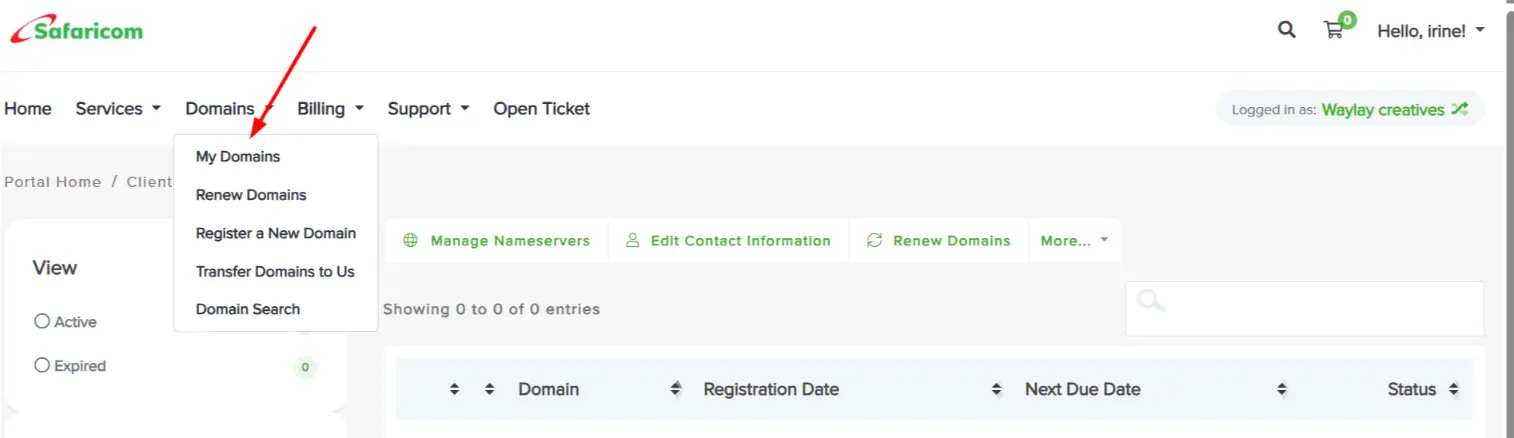
If you don’t see the option, you can email Safaricom Business Support and request it. They may ask for verification (like your ID).
Safaricom usually responds within 1–2 business days (sometimes faster).
Once you receive the EPP code:
It will be sent via email
It’s usually a mix of letters and numbers
Save it securely (don’t share it)
It’s time-sensitive and used only once
If you don’t get a response after 48 hours, follow up on the same email thread or call their support for faster help.
2) Start the Transfer on Truehost
Now head over to Truehost and begin the transfer process.
Start the domain transfer directly here: Transfer Domain at Truehost
Enter your full domain name (e.g.,
yourbusiness.co.keorexample.com)Click “Order Now”
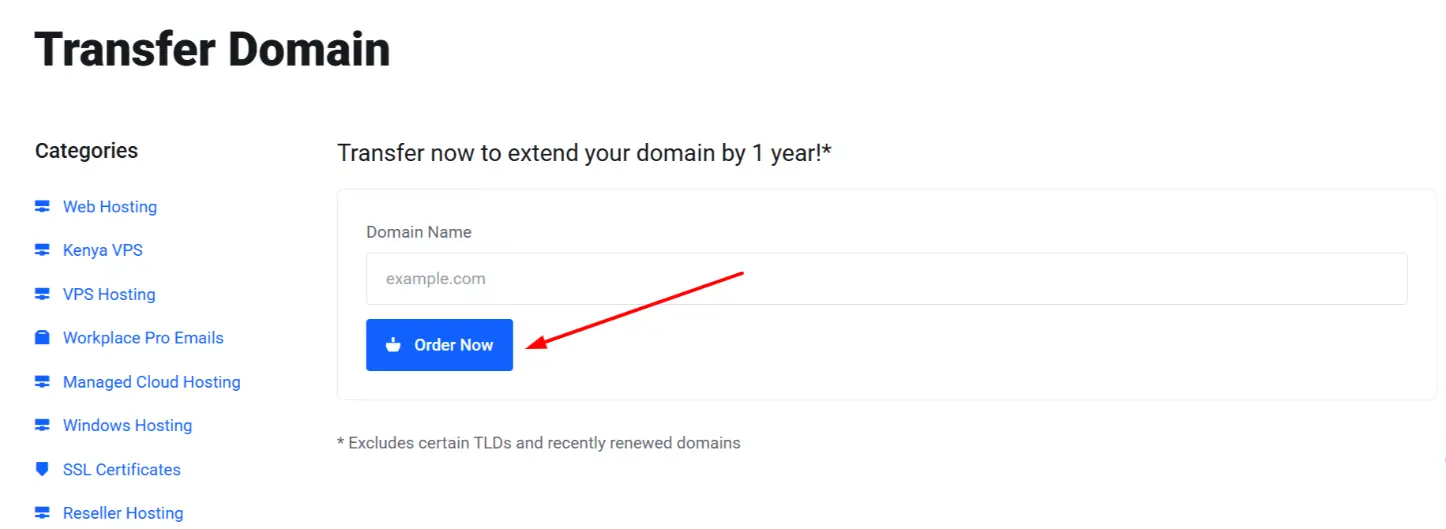
This step checks if your domain is eligible for transfer.
3) Enter Your EPP Code
During the setup or checkout process:
Paste the EPP/Auth code you got from Safaricom
Confirm the transfer request
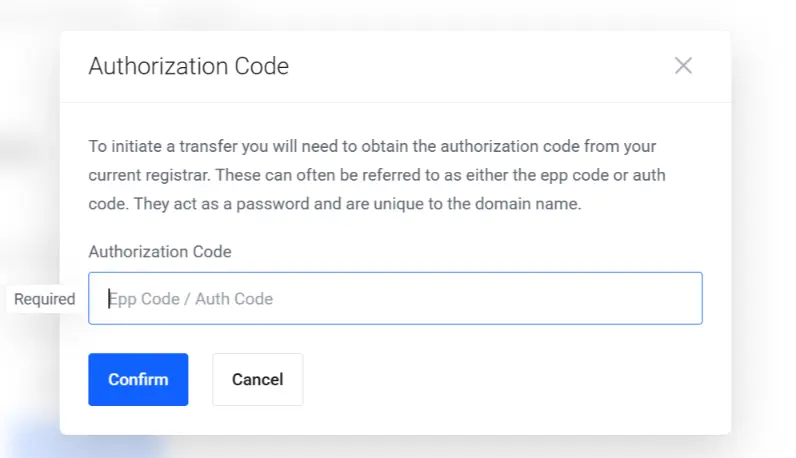
This step authorizes Truehost to initiate the transfer.
4) Configure Your Domain
Next, you’ll review and configure your domain settings:
Confirm your EPP code again
Choose optional add-ons like:
Email Forwarding
Once done, click Continue.
5) Review and Checkout
This is where you finalize everything.
a) Review your order
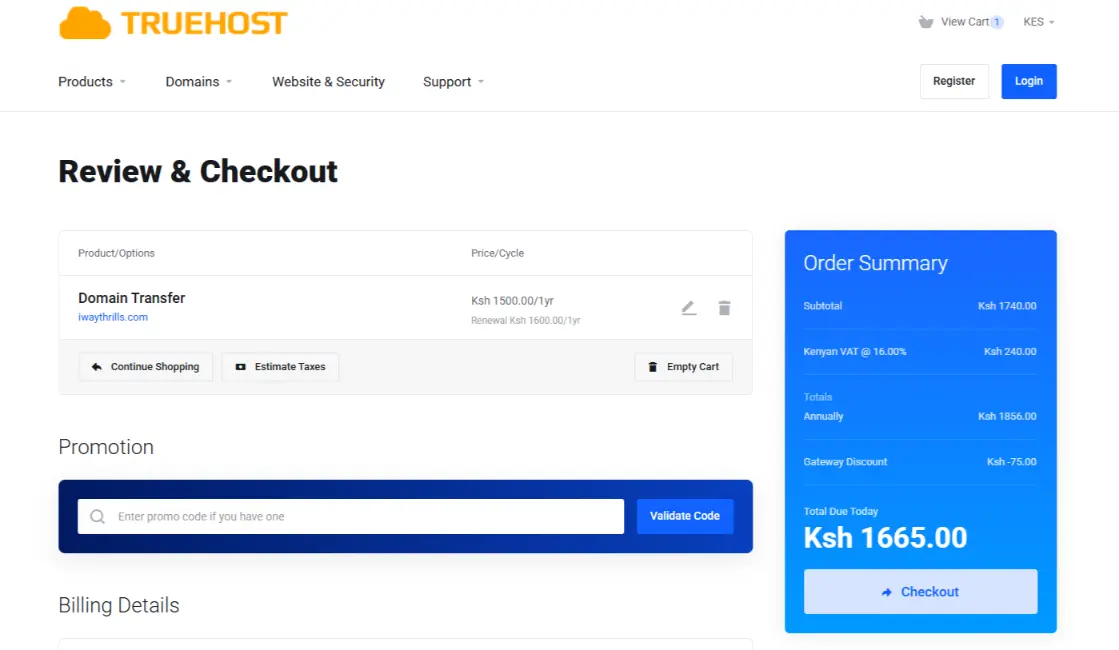
Double-check your domain name
Confirm the transfer fee (if any)
Make sure no extra services were added by mistake
b) Log in or create an account
Existing user → just log in
New user → enter your details (name, email, phone)
This account is where you’ll manage your domain after the transfer.
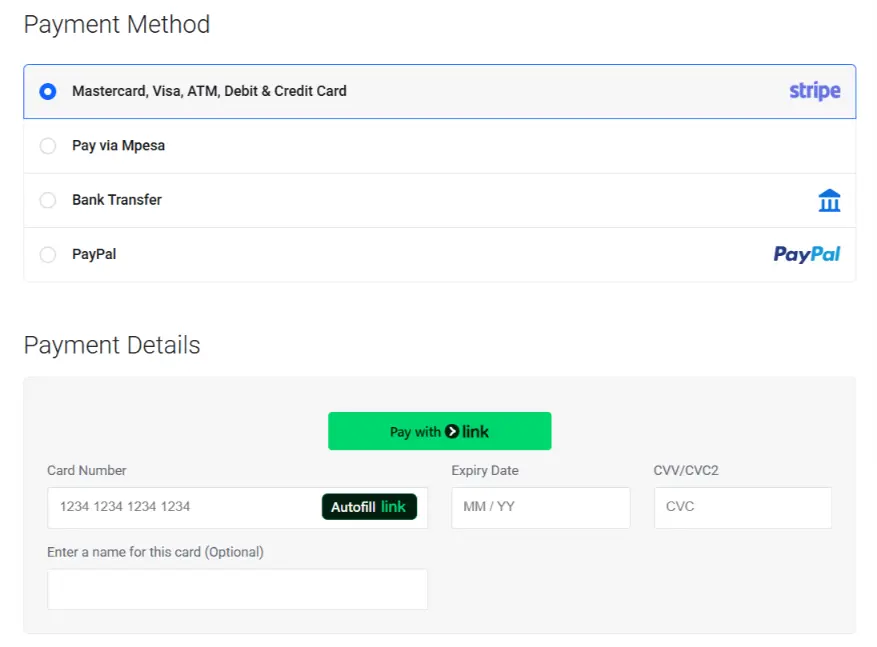
c) Choose a payment method
Select your preferred option (M-Pesa, card, etc.)
Complete the payment if required
For many .co.ke domains, the transfer is often free or comes with a renewal.
d) Submit your order
Click Complete Order / Checkout
You’ll receive an invoice and confirmation email
At this point, your transfer request is officially submitted to Truehost.
Truehost will send a confirmation email once the domain is successfully moved to your account.
When complete, the domain will appear under “My Domains” in your Truehost dashboard, ready for management (DNS updates, renewal, etc.).
No downtime occurs during the transfer; your website and email continue to work until you update your nameservers.
After the Transfer: Immediate Next Steps
Update the nameservers in your Truehost dashboard if you are also moving hosting.
Configure DNS records, email forwarding, or SSL directly in the Truehost control panel.
Test your website and email to confirm everything resolves correctly.
Transfer Pricing at Truehost (March 2026)
Here at Truehost, we offer a full 1-year renewal/extension to every successful transfer at no extra hidden cost.
Here are the current transfer prices (in KES) for popular extensions:
Common Issues & Quick Fixes
No reply from Safaricom? If you haven’t heard back in 48 hours, call their business support line directly (0722 00 2222) to expedite the request.
Code rejected? Double-check for extra spaces when copying the code. Also, ensure Safaricom has “unlocked” the domain at the registry level.
Transfer delayed? If the transfer takes longer than 8 days, contact Truehost support.
They can check the KeNIC or ICANN registry status to see if the losing registrar (Safaricom) is withholding the release.
Make the Switch with Confidence
Moving your domain from Safaricom to Truehost is a simple step that can save you money and give you better control over your website. With faster support, clear pricing, and an easier dashboard, managing your domain becomes stress-free.
If you’ve been dealing with slow responses or high renewal costs, this is your chance to upgrade.
Transfer your domain to Truehost today and enjoy a smoother, more reliable experience.







