Domain SearchInstantly check and register your preferred domain name
 Web Hosting
 cPanel HostingHosting powered by cPanel (Most user friendly)
 WordPress HostingHost your WordPress website with fast, secure, and affordable WordPress hosting in Kenya.
 KE Domains
 Reseller HostingStart your own hosting business without tech hustles
 Windows HostingOptimized for Windows-based applications and sites.
 Free Domain
 Affiliate ProgramEarn commissions by referring customers to our platforms
 Free HostingTest our SSD Hosting for free, for life (1GB storage)
 Domain TransferMove your domain to us with zero downtime and full control
 All DomainsBrowse and register domain extensions from around the world
 .Com Domain
 WhoisLook up domain ownership, expiry dates, and registrar information
 VPS Hosting
 Managed VPSNon techy? Opt for fully managed VPS server
 Dedicated ServersEnjoy unmatched power and control with your own physical server.
 Website Builder
 Online Store BuilderLaunch a professional e-commerce store without writing code.
 Web Design ServiceGet a custom-designed website tailored to your brand and goals. From just KES 15,600
 BlogRead our guides on web hosting, online business, digital marketing, and more
 SupportOur support guides cover everything you need to know about our services
 ContactContact us via chat or email
Web hosting is what keeps your website running. It affects speed, security, uptime, and the experience people have on your site. And as more businesses in Kenya go online, choosing the right plan (without overspending) becomes increasingly important.
Here’s what pricing looks like in 2026:
- Entry-level shared hosting: typically around KSh 200–500 per month, or about KSh 2,000–3,000 per year when you pay annually (especially during promos)
- Mid-range hosting (improved shared or managed WordPress): roughly KSh 1,000–4,000 per month
- High-performance setups (VPS or dedicated servers): anywhere from KSh 15,000 to KSh 40,000+ per month
So instead of saying “a few hundred shillings,” the reality is you’re usually looking at around KSh 200 to KSh 500 monthly for basic hosting, and even lower per month if you commit to a yearly plan.
For most small to medium websites, a yearly budget of KSh 20,000 to KSh 40,000 hits the sweet spot. It’s enough to get reliable hosting without dealing with slow speeds or frequent downtime.
At the end of the day, it’s not about choosing the cheapest or the most expensive plan; it’s about paying for what you actually need. Go too cheap, and you risk performance issues. Spend too much too early, and you’re just paying for resources you won’t use yet.
What Actually Affects Web Hosting Costs?
Your hosting bill is shaped by a few key things. Once you understand them, it becomes much easier to choose a plan that fits your budget and your website.
1) Type of Web Hosting
The type of hosting you choose has the biggest impact on how much you’ll pay. It’s similar to choosing the kind of “space” your website lives in; each setup comes with different levels of power, control, and cost.
a) Shared Hosting
This is the cheapest and most beginner-friendly option. Your website shares server resources with other sites, which keeps costs low. It works well for:
- Personal blogs
- Portfolio sites
- Small business websites
- Sites with low to moderate traffic (roughly under 10,000–25,000 visitors/month)
Most shared plans are easy to use (usually with cPanel) and often include basics like free SSL.
b) VPS (Virtual Private Server)
Here, you still share a physical server, but you get your own dedicated slice of resources like CPU and RAM. That means better performance and more control.
It’s a good fit if:
- Your website is growing
- You’re running an online store
- You need more flexibility or custom setups
It costs more than shared hosting, but you’re paying for improved speed, stability, and control.
c) Dedicated Servers
This is the top tier; you get an entire server to yourself. No sharing, no limitations from other users.
Best for:
- High-traffic websites
- Large businesses
- Heavy applications or complex platforms
It’s expensive, but you get maximum performance and full control over everything.
d) Cloud Hosting
This is the flexible option. Instead of relying on one server, your site uses multiple servers, which improves reliability and uptime.
What makes it different:
- You can scale resources up or down easily
- You only pay for what you use
- It handles traffic spikes much better
Great for startups, fast-growing websites, or projects where traffic isn’t predictable.
| Hosting Type | Starting Price (KES) | Best For | Key Features |
| Shared Hosting | ~2,500/year | Beginners, blogs, small sites | Free SSL, email, cPanel |
| VPS Hosting | ~2,999/month | Growing sites, developers | Dedicated resources, root access |
| Dedicated Server | ~15,000+/month | High-traffic websites | Full control, top performance |
| Cloud Hosting | Pay-as-you-go | Startups, scaling projects | Flexible resources, high uptime |
2) Web Hosting Provider
The company you choose to host your website plays a huge role in how much you pay and what you actually get for that price.
At first glance, many hosting plans look similar. Same storage, same bandwidth, same “unlimited” claims. But behind the scenes, there are real differences that affect performance, reliability, and support, and that’s why prices vary.
Some providers charge more because they invest in better infrastructure and service quality. For example:
- Faster server technology
Hosts using technologies like LiteSpeed servers or NVMe storage can deliver significantly faster loading speeds compared to older setups. That directly impacts user experience and even SEO. - Stronger uptime reliability
Premium providers often guarantee higher uptime (like 99.9% or more) and actually have the systems to back it up. This means your site stays online consistently, which is critical for business credibility. - Local or responsive support
If you’re in Kenya, having access to local or region-aware support can make a big difference. Whether it’s payment options like M-Pesa or faster response times, support quality is often what separates a smooth experience from a frustrating one. - Data center location
The closer the server is to your audience, the faster your website loads for them. Some providers offer data centers in Africa or nearby regions, which can improve performance compared to hosting your site far away.
On the flip side, cheaper hosting providers usually reduce costs somewhere, and it often shows in:
- Slower server speeds
- Frequent downtime
- Overloaded servers (too many websites sharing resources)
- Poor or delayed customer support
This is where many website owners run into issues. A plan may look affordable at first, but the hidden trade-offs can lead to slow-loading pages, site outages, and lost visitors.
3) Hosting Plan Features
Two hosting plans can look almost identical on the surface, same price range, similar descriptions, but what’s included behind the scenes can be very different. And those differences are what usually determine how well your website performs.
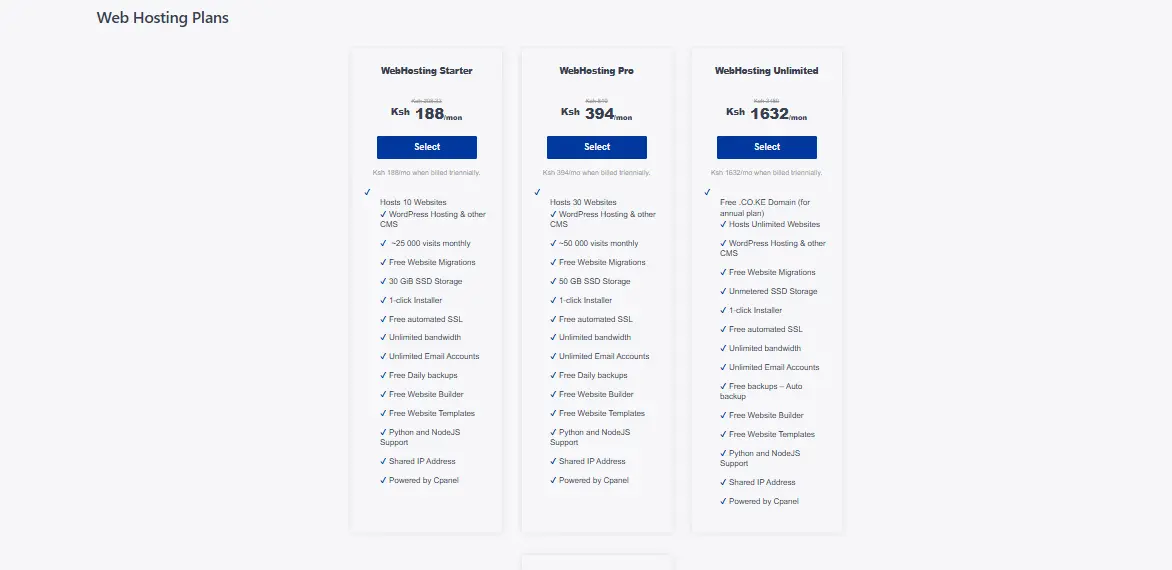
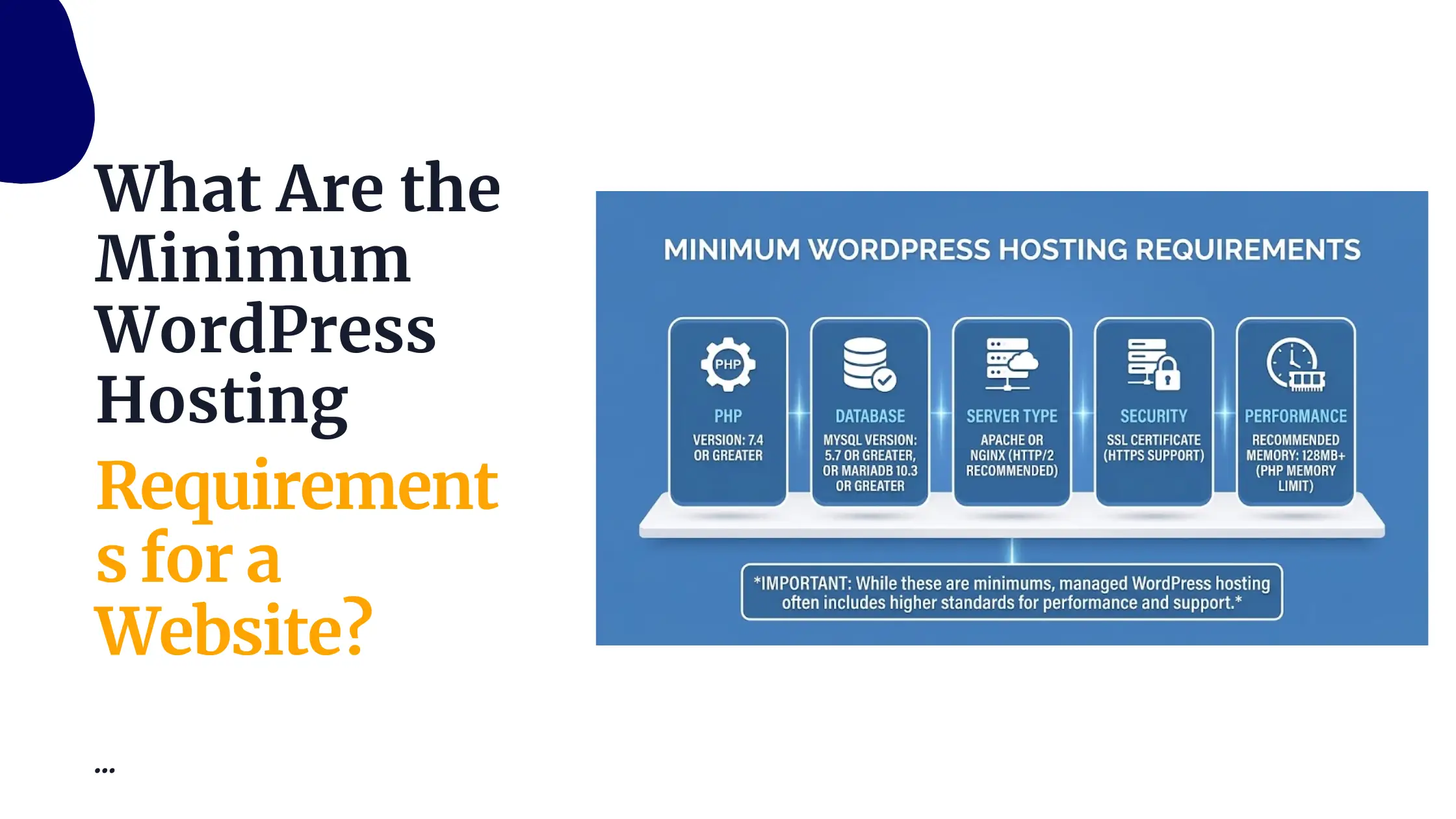
Here are the key features that directly affect cost (and quality):
- Storage type (SSD vs NVMe)
Not all storage is equal. Traditional SSDs are already fast, but NVMe storage is even faster and more efficient. Websites hosted on NVMe servers tend to load more quickly, especially under traffic. Plans with better storage usually cost more, but they also deliver noticeably better performance. - Bandwidth limits
Bandwidth controls how much traffic your site can handle. Some plans offer “unlimited” bandwidth (often with fair usage limits), while others cap it. If your site starts getting more visitors, limited bandwidth can slow things down or even cause downtime. - Number of websites allowed
Entry-level plans may only allow one website, while higher-tier plans let you host multiple sites under one account. If you plan to run more than one project, this feature becomes important. - Control panel (e.g., cPanel)
A good control panel makes managing your website much easier, including installing WordPress, setting up emails, managing files, etc. Some cheaper plans use limited or custom dashboards, while more premium ones include industry-standard tools like cPanel. - Security features
Built-in protections like malware scanning, firewalls, and DDoS protection can save you from serious issues. Plans with stronger security setups often cost more, but they reduce risks significantly.
In simple terms, the more complete the feature set, the higher the price, but also the smoother your experience. Cutting costs here often leads to performance or security issues later.
4) Standard vs Add-On Features
This is where many people get caught off guard.
Some hosting providers include essential features in their plans. Others keep the base price low, but charge extra for almost everything you actually need.
Here are common features to watch closely:
- SSL certificates (HTTPS security)
- Automatic backups
- Email hosting
- Website migration (moving your site from another host)
- Advanced security tools
With a good hosting plan, many of these come included at no extra cost. But with cheaper plans, each one might be an add-on you have to pay for separately.
And that’s how a “cheap” hosting plan quickly becomes expensive.
For example, you might start with a low monthly price, but once you add SSL, backups, and email hosting, the total cost can easily double or more.
The smarter approach:
Look beyond the base price. Always check what’s included vs what’s extra. A slightly higher upfront cost with more built-in features is often cheaper (and less stressful) in the long run.
5) Subscription Period
At first glance, monthly hosting plans look more affordable. You pay a small amount upfront, which feels easier on your wallet. But over time, they’re usually the more expensive option.
Most hosting providers reward longer commitments with significant discounts. When you switch from monthly billing to annual (or even multi-year plans), you’ll often save anywhere between 20% to 50% overall.
For example:
- A plan that costs KSh 400/month could drop to the equivalent of KSh 250–300/month when billed yearly
- That adds up to thousands of shillings saved over the year
Beyond the cost savings, annual plans also give you:
- Price stability (you’re locked in at a lower rate)
- Less interruption (no monthly renewals to worry about)
- Extra perks (some providers include free domains or bonuses on yearly plans)
The only downside is paying more upfront, but if you’re serious about your website, it’s usually the smarter financial move.
Simple rule: If you’re just testing, go monthly. If you’re committed, go annual and save.
6) Managed vs Unmanaged Hosting
This choice comes down to one thing: how much technical work you’re willing (or able) to handle yourself.
Managed Hosting
With managed hosting, the provider takes care of the heavy lifting for you. This typically includes:
- Server setup and maintenance
- Security updates and monitoring
- Performance optimization
- Backups and sometimes even support for your website (like WordPress-specific help)
You pay more for this, but what you’re really buying is peace of mind and saved time. You don’t have to worry about technical issues breaking your site.
Unmanaged Hosting
Here, you’re in full control, but also fully responsible.
That means:
- Setting up the server
- Installing software
- Managing security
- Fixing issues when something goes wrong
It’s cheaper because the provider is only giving you the server, not the support. This option
Smart Budgeting Tips
a) Choose Annual Billing:
Pay yearly or more for significant discounts and predictable costs. Avoid monthly unless testing.

b) Start Small and Scale:
Begin with affordable shared hosting. Monitor traffic and performance, then upgrade smoothly (most good hosts allow this without downtime).
c) Select Plans with Built-in Essentials:
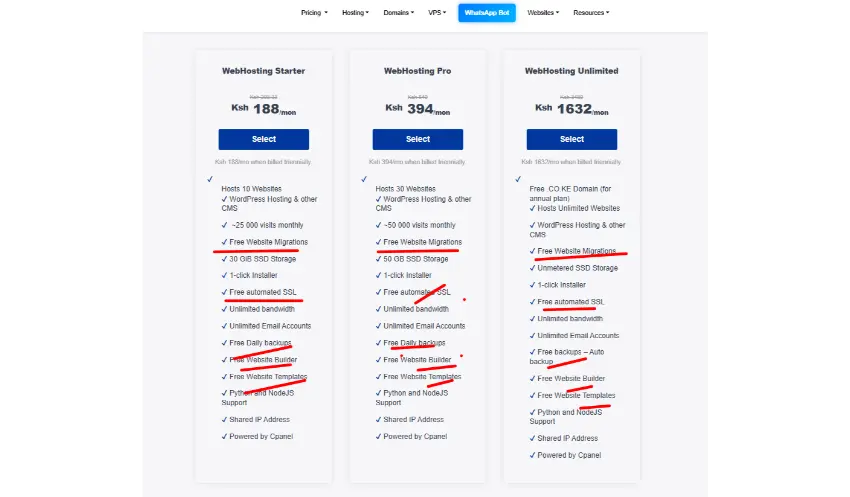
Prioritize free SSL, automated backups, email accounts, one-click installs, and basic security. These prevent costly add-ons later.
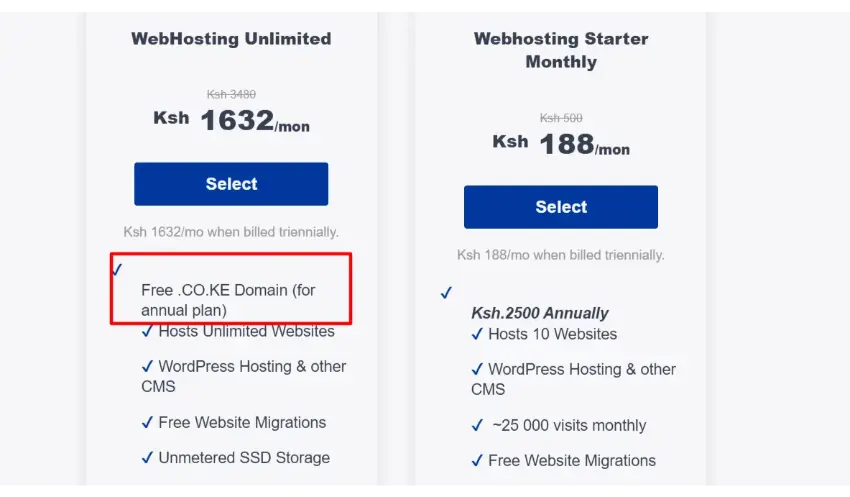
d) Bundle Domain + Hosting:
Many providers (including Kenyan ones) offer a free .co.ke or .com domain with annual hosting plans, saving KSh 1,000–2,000+ upfront.
e) Prioritize Performance and Reliability Over the Lowest Price:
Cheap hosting can mean slow speeds, frequent downtime, poor support, and security risks that damage your reputation or SEO. A slightly higher investment in quality often yields better long-term value through faster loading times, higher conversions, and fewer headaches.
Additional Tips:
- Compare renewal rates (promotional first-year prices can double later).
- Factor in local needs like M-Pesa integration and Kenya/East Africa-optimized servers.
- Read reviews for real-user experiences on support and uptime.
- Consider the total cost of ownership: time saved with managed services or tools.
works best for developers or users who are comfortable managing servers.
The Smart Way to Host Your Website on a Budget
The simplest way to approach web hosting is to start lean, but think long-term.
Begin with shared hosting if you’re building a new website or still testing your idea. It’s affordable, easy to manage, and more than enough for most early-stage sites. From there, make sure you choose a provider that already includes the essentials like SSL certificates, backups, and email hosting, so you don’t get hit with surprise add-on costs later.
Whenever possible, go for annual billing instead of monthly payments. It lowers your overall cost and often comes with extra perks or discounts. Then, instead of overpaying for power you don’t need yet, simply upgrade your hosting when your traffic and site demands actually grow.
This approach keeps your costs under control while still giving your website the speed and reliability it needs.
At the end of the day, good hosting isn’t just about finding the cheapest option; it’s about finding a setup that grows with you without slowing you down.
If you’re looking for a reliable place to start, Truehost is a solid option for beginners and growing websites. They offer affordable plans, local support, and all the key features you need to get online without stress.
FAQs: Web Hosting Costs & Budgeting Tips
Can I host my website for free?
Yes, but free hosting comes with major limitations, ads, poor performance, limited control, and weak security. It’s fine for testing, not for serious projects.
Is free web hosting good?
Not really for business or professional use. It often leads to slow speeds and unreliable uptime.
Is expensive web hosting better?
Not always. What really counts is value, not price. Some mid-range plans can actually perform better than expensive ones if they’re properly optimized.
Should I choose managed or unmanaged hosting?
If you’re not technical, go managed. It saves time and prevents costly mistakes. Developers may prefer unmanaged for control.
Why does the hosting price vary so much?
Because of differences in:
- Server resources
- Features included
- Support quality
- Infrastructure
You’re not just paying for space, you’re paying for performance and reliability.
What happens if I choose very cheap hosting?
You may experience:
- Slow loading speeds
- Frequent downtime
- Poor customer support
- Security risks
Cheap hosting often costs more in the long run through lost traffic and frustration.