 Domain SearchInstantly check and register your preferred domain name
 Web Hosting
 cPanel HostingHosting powered by cPanel (Most user friendly)
 WordPress HostingHost your WordPress website with fast, secure, and affordable WordPress hosting in Kenya.
 KE Domains
 Reseller HostingStart your own hosting business without tech hustles
 Windows HostingOptimized for Windows-based applications and sites.
 Free Domain
 Affiliate ProgramEarn commissions by referring customers to our platforms
 Free HostingTest our SSD Hosting for free, for life (1GB storage)
 Domain TransferMove your domain to us with zero downtime and full control
 All DomainsBrowse and register domain extensions from around the world
 .Com Domain
 WhoisLook up domain ownership, expiry dates, and registrar information
 VPS Hosting
 Managed VPSNon techy? Opt for fully managed VPS server
 Dedicated ServersEnjoy unmatched power and control with your own physical server.
 Website Builder
 Online Store BuilderLaunch a professional e-commerce store without writing code.
 Web Design ServiceGet a custom-designed website tailored to your brand and goals. From just KES 15,600
 BlogRead our guides on web hosting, online business, digital marketing, and more
 SupportOur support guides cover everything you need to know about our services
 ContactContact us via chat or email

As a foreigner in Kenya, a few things can be challenging to get used to, but registering a domain shouldn’t be one of them. I’m here to make sure of it by helping you know your way around how to register a domain as a foreigner.
First off, you don’t even need to be physically present in the country, and you definitely don’t need a Kenyan ID to get started.
Everything can be done online in just a few minutes, as long as you’re working with the right registrar.
Why would you even be considering it?
Well, if your goal is to reach a Kenyan audience, working with a ccTLD like the .ke domain gives you a clear advantage. It signals that your business is relevant locally, which helps build trust with Kenyan customers.
It can also improve your visibility in local search results, making it easier for people in Kenya to find you online.
Now, that’s not all. It’s important to work with a reliable registrar.
They should make the process easy and fast enough for you by handling the technical setup and ensuring your domain is registered correctly without unnecessary delays.
In this guide, I’ll walk you through the exact steps to register your domain as a foreigner in Kenya.
We’ll cover:
- What you need and what you don’t
- The process of how to register a domain as a foreigner
- Domain pricing
- Important rules to keep in mind
So, let’s get you to confidently secure your domain and start building your presence in the Kenyan market.
Requirements for Foreigners
As I mentioned above, you don’t need to be a Kenyan citizen or have a local address to register a domain in Kenya.
The process is open to foreigners, and everything can be handled online through an accredited registrar.
For instance, there are 107,096 registered domains in Kenya, and 28,517 of those are .ke domains, but there are a total of 289,817 .ke domains registered worldwide.
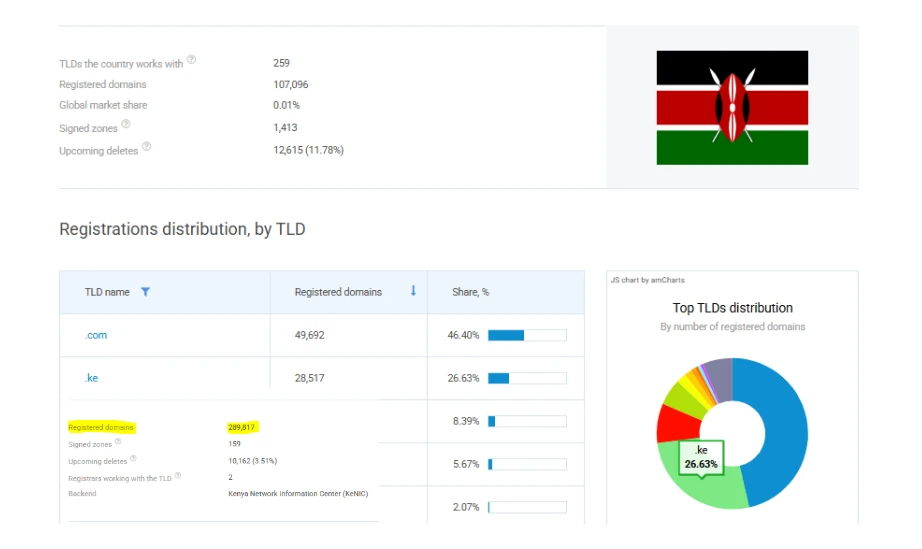
This means you can secure your domain from anywhere in the world without dealing with relocation, paperwork, or local representation requirements in most cases.
Basic requirements: what you actually need
Getting started is simple. In most cases, you’ll only be asked for:
- A valid email address
- Your full name and contact details (including phone number)
- Basic identification (such as passport details for individuals or company details for businesses)
- A payment method to complete the registration
That’s it.
Optional requirements (rare cases)
Occasionally, if your domain is clearly tied to a business, a registrar may request additional proof, such as documentation showing business intent.
This doesn’t happen often, and when it does, it’s usually a quick verification step.
Some providers may also mention requirements like a local representative or a Certificate of Compliance, but these are not standard for most Kenyan domain registrations and can often be avoided by choosing the right registrar.
At Truehost, our main goal is to get you online quickly, without slowing you down with unnecessary requirements or technical hurdles.
Guide to Register a Domain as a Foreigner with Truehost
This is as simple as just a few minutes’ work, even when it’s your first time.
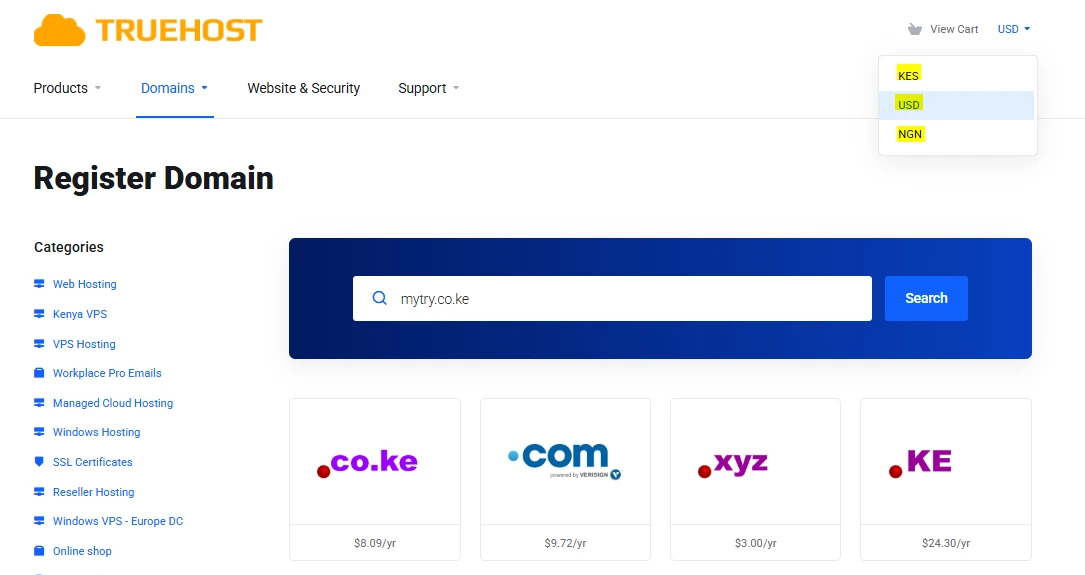
Step 1: Visit Truehost and use the domain search tool
Head over to the Truehost website and open the domain search tool.
This is where everything begins. You’ll enter the name you want and check if it’s available.
And you can change the currency to your preferred one for your convenience.
Step 2: Check availability and suggestions
Type in your preferred domain name with an extension like .co.ke at the end (for example, yourbrand.co.ke) and run the search.
If it’s available, you’re good to go. If not, you’ll see alternative suggestions you can choose from without starting over.
Step 3: Add to cart and create or log in to your account
Once you find an available name, add it to your cart and continue to check the ID protection and email forwarding boxes if needed.
You’ll then be prompted to either create an account or log in. The signup process is simple and only requires basic details (name, email address, phone number, and billing info and password).
Even easier, you can use your Google account or other alternatives.
Step 4: Enter your contact information
Next, fill in your contact details. As a foreigner, you can use your international billing address and passport information.
There’s no restriction on location, so you can complete this step from anywhere.
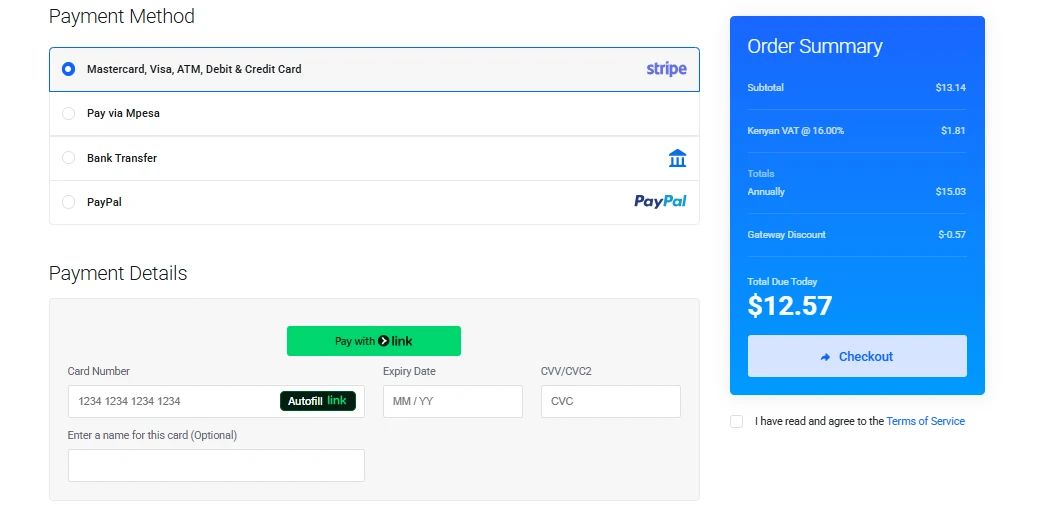
Step 5: Secure checkout
Choose how long you want to register the domain (typically between 1 and 5 years), then proceed to checkout.
Payments are secure and flexible, with options like card, M-Pesa, PayPal, or bank transfer depending on what works best for you.
Step 6: Receive confirmation
After completing your payment, you’ll receive a confirmation email.
In most cases, your domain is activated within minutes, so you can start using it almost immediately.
That’s all there is to it.
Pricing and Why Truehost Beats the Competition
Current deals (popular extensions and pricing in USD)
If you’re registering from outside Kenya, it helps to look at pricing in USD so it can easily resonate with your budget.
These are the current prices of some of the popular domains we have at Truehost:
| Domain Extension | Register/1yr | Renew/1yr |
.co.ke | $8.09 | $9.72 |
.com | $9.72 | $12.96 |
.org | $9.72 | $12.15 |
.net | $8.91 | $16.28 |
.ke | $24.30 | $24.30 |
.tech | $9.43 | $60.56 |
.xyz | $3.00 | $20.57 |
.africa | $14.58 | $16.20 |
Keep in mind, promo prices can change, but renewals tend to stay consistent, so always look at both before deciding.
What you get with Truehost
Truehost evidently has competitive pricing, but that is not all. Our domains come with more benefits:
- Free DNS management (no need for third-party tools)
- Instant activation after payment: your domain is live within minutes
- Clean, beginner-friendly dashboard for managing domains
- Optional Whois privacy to keep your personal info hidden
- Easy bundling with hosting, email, and SSL certificates
We also offer local infrastructure with global accessibility, which helps your website perform the best in the local market.
Important Rules You Should Know
Before you go ahead and register your domain, there are a couple of rules worth keeping in mind.
They’re simple, but knowing them upfront can save you time and confusion later.
1) Some domains are restricted
Not every Kenyan domain extension is open to the public. A few extensions are reserved for specific institutions.
You won’t be able to register the following unless you meet strict requirements:
.go.ke– Reserved for government institutions.ac.ke– Only for accredited universities and higher learning institutions.sc.ke– For registered schools
These domains require official documentation and verification from relevant authorities. Without that, your application won’t go through.
For most businesses, blogs, and online stores, .co.ke or .ke is the safest and simplest option.
2) Registration period: 1 to 5 years
When registering your domain, you’ll choose how long you want to keep it. Most Kenyan domains can be registered for between 1 and 5 years at a time.
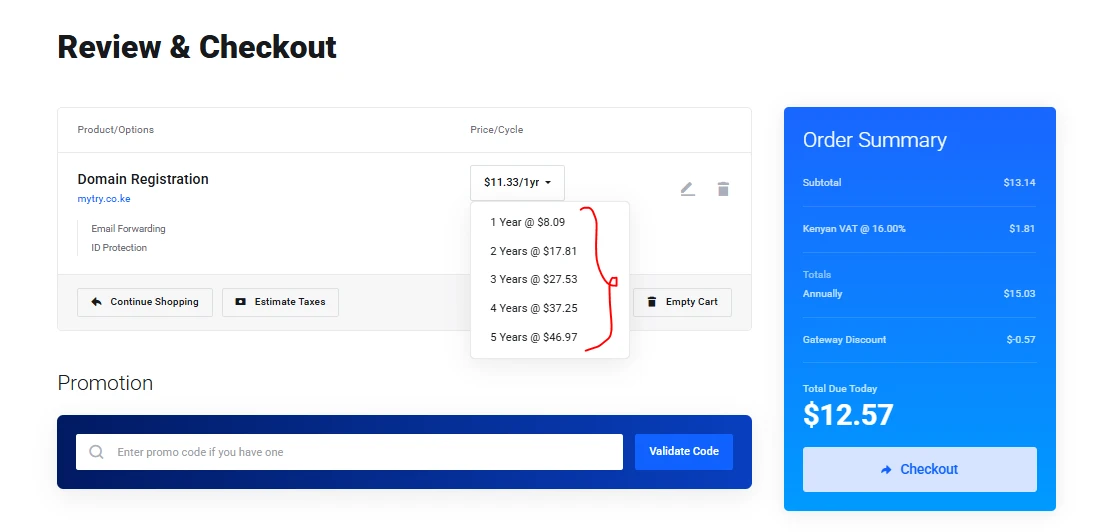
Here’s what that means in practice:
- You can start with just 1 year if you’re testing an idea
- You can secure your domain for longer (up to 5 years) to avoid yearly renewals
- Renewals are simple and can be done anytime before expiry
If you plan to build something long-term, registering for multiple years can save you the hassle of renewing every year and helps ensure you don’t accidentally lose your domain.
Next Steps After Registration
Once your domain is registered, the next step is to actually use it. A domain on its own doesn’t do much until it’s connected to a website or email service.
Most people pair their domain with:
- Web hosting to launch a website
- Professional email (like
[email protected]) for a more credible brand
With Truehost, you can add hosting or email during checkout and have everything set up in one go.
That means your domain, website, and email can all be up and running within the same day, without jumping between different providers.
From there, it’s about growth.
Now, if you’re ready to get your Kenyan domain, head over to Truehost, search for your domain name, add it to your cart, and complete checkout.
In most cases, your domain will be active within minutes.






