Domain SearchInstantly check and register your preferred domain name
 Web Hosting
 cPanel HostingHosting powered by cPanel (Most user friendly)
 WordPress HostingHost your WordPress website with fast, secure, and affordable WordPress hosting in Kenya.
 KE Domains
 Reseller HostingStart your own hosting business without tech hustles
 Windows HostingOptimized for Windows-based applications and sites.
 Free Domain
 Affiliate ProgramEarn commissions by referring customers to our platforms
 Free HostingTest our SSD Hosting for free, for life (1GB storage)
 Domain TransferMove your domain to us with zero downtime and full control
 All DomainsBrowse and register domain extensions from around the world
 .Com Domain
 WhoisLook up domain ownership, expiry dates, and registrar information
 VPS Hosting
 Managed VPSNon techy? Opt for fully managed VPS server
 Dedicated ServersEnjoy unmatched power and control with your own physical server.
 Website Builder
 Online Store BuilderLaunch a professional e-commerce store without writing code.
 Web Design ServiceGet a custom-designed website tailored to your brand and goals. From just KES 15,600
 BlogRead our guides on web hosting, online business, digital marketing, and more
 SupportOur support guides cover everything you need to know about our services
 ContactContact us via chat or email
If your website is online in 2026, it’s already being scanned.
Cyberattacks today aren’t rare or targeted; they’re constant, automated, and increasingly powered by AI. Hackers don’t “choose” websites anymore; bots crawl the internet 24/7 looking for any weak point. Once they find one, exploitation is almost immediate.
And the numbers make it even clearer:
- Thousands of cyberattacks happen every single day
- Up to 67% directly target websites
- Data breaches can cost millions globally
- Over 40% of businesses faced at least one cyberattack in the past year
Most of these attacks don’t succeed because of advanced hacking; they succeed because of basic gaps in security.
The most common risks (closely aligned with the OWASP Top 10) include:
- Broken access control (users getting access they shouldn’t)
- Weak or missing encryption exposes data
- Injection attacks like SQL injection and XSS
- Security misconfigurations
- Outdated or vulnerable software components
- Weak login and authentication systems
And it doesn’t stop there. Newer threats are also rising fast: AI-driven attacks, phishing scams, DDoS floods, and weaknesses in third-party tools or supply chains.
The takeaway is simple: website security is no longer optional. It’s a core part of running any serious online business today.
Here’s how to actually secure yours.
Practical Ways to Secure Your Website
1) Choose a Secure Hosting Provider (and Consider Managed Support)
Your hosting provider is basically the foundation of your website’s security. If it’s weak, everything built on top of it is exposed.
A good host should already have strong security baked in, including:
- Built-in firewalls that filter suspicious traffic
- Malware scanning to detect infected files early
- DDoS protection to handle traffic-based attacks
- Regular server updates to patch vulnerabilities
If you’re not technical (or don’t want to deal with server issues), managed hosting is usually the safer choice. In this setup, the provider takes care of security patches, monitoring, and system updates for you.
The simple truth: cheap hosting without proper security layers often ends up costing more in the long run.
2) Install and Enforce HTTPS (SSL Certificate)

If your website still shows “Not Secure” in the browser, that’s a red flag.
HTTPS encrypts data between your website and your visitors, which helps protect:
- Login credentials
- Payment details
- Any personal information submitted on your site
It also builds trust and can slightly improve your search rankings.
Most hosting providers now offer free SSL certificates. What counts is not just installing it, but making sure:
- All traffic is forced through HTTPS (no HTTP access)
- The certificate renews automatically, so it never expires
3) Keep Everything Updated
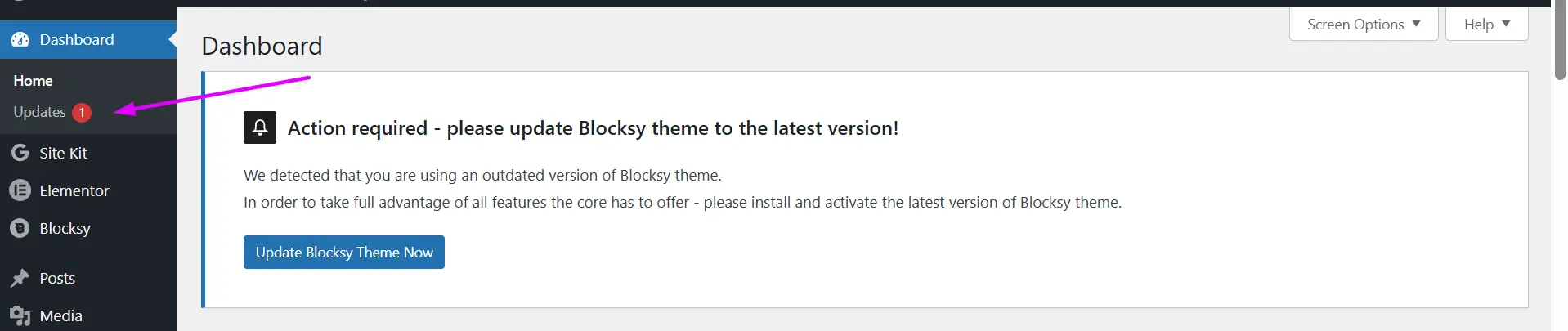
Outdated software is one of the easiest entry points for attackers.
This includes everything your website depends on, your CMS (like WordPress), themes, plugins, extensions, and even server-side software. Each of these components is constantly being improved, and updates are usually released to patch newly discovered security flaws.
The problem is that vulnerabilities are found all the time, and once they’re public, attackers actively scan the internet looking for sites that haven’t updated yet.
That’s why updates aren’t just about new features; they’re about closing security gaps before they’re exploited.
A simple but often overlooked habit is cleaning up what you don’t use. Old plugins, unused themes, or abandoned extensions may still be active in the background or simply forgotten, but they can still be exploited. If it’s not needed, removing it reduces your attack surface and keeps your site lean and safer.
4) Use Strong Passwords + Enable MFA
A surprising number of breaches still come down to weak login details.
To tighten this up:
- Use long, unique passwords (avoid reuse across platforms)
- Enable Multi-Factor Authentication (MFA) wherever possible
- Avoid predictable usernames like “admin.”
You can also strengthen your login layer by:
- Limiting login attempts to block brute-force attacks
- Restricting admin access to trusted users or IP addresses
- Assigning roles so not everyone has full control
5) Set Up Automated Backups (Off-Site)
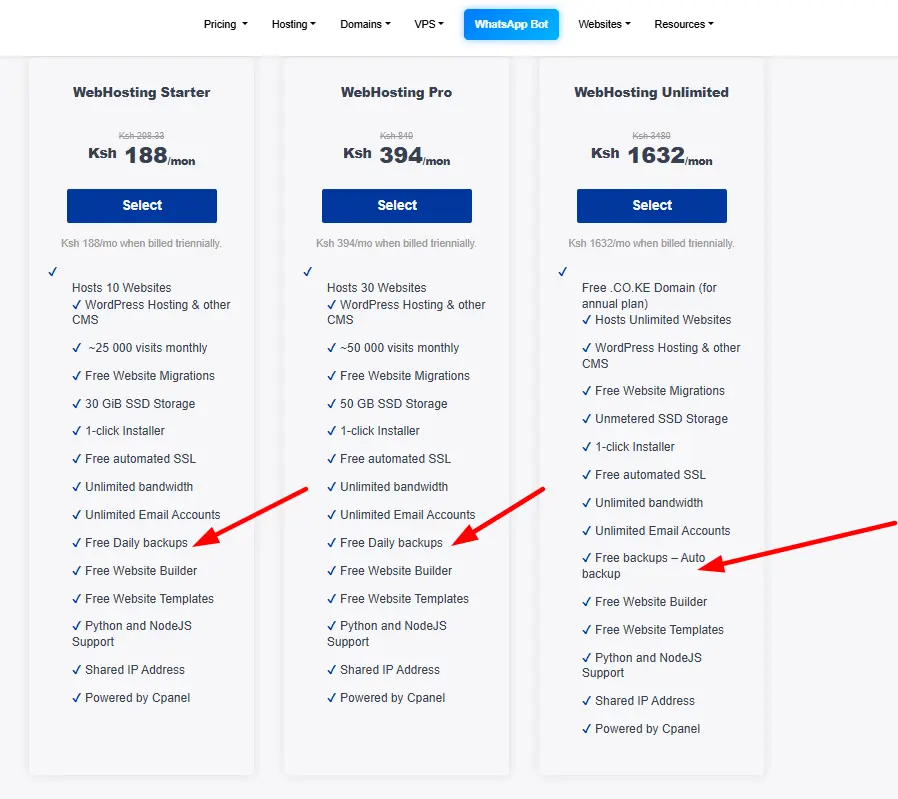
Backups are your recovery plan when things go wrong, not if, but when.
If your site gets hacked, corrupted, or accidentally broken, backups let you restore everything quickly.
A solid setup includes:
- Automatic backups (daily or weekly, depending on activity)
- Off-site storage, like cloud or external servers
- Regular testing to confirm the backups actually work
Without backups, even a small issue can turn into a major loss.
6) Use Security Monitoring Tools
You can’t protect what you can’t see; that’s where security monitoring comes in.
Security monitoring tools work quietly in the background, giving you visibility into what’s happening on your website at all times. They help you:
- Detect malware before it spreads
- Track unusual login attempts or unexpected file changes
- Send real-time alerts when something suspicious happens
The truth is, many website breaches don’t get noticed right away; they can sit undetected for weeks or even months while damage builds up.
With proper monitoring in place, you shorten that gap significantly, allowing you to respond quickly, limit impact, and stay in control instead of finding out when it’s already too late.
7) Add Basic Security Protections (Headers)
Security headers are small configurations that add an extra layer of protection to your website.
They help:
- Prevent clickjacking
- Block certain malicious scripts
- Improve overall data protection in the browser
Common ones include:
- Content Security Policy (CSP)
- X-Frame-Options
- X-Content-Type-Options
The good news is that most modern hosting platforms or security plugins can enable these with minimal effort.
8) Install a Web Application Firewall (WAF)
A Web Application Firewall (WAF) sits between your website and the internet, acting as a protective filter for everything trying to reach your site.
Instead of letting all traffic pass through directly, it inspects incoming requests in real time and decides what is safe and what should be blocked. This helps stop harmful activity before it ever reaches your application or database.
A WAF is especially useful because it can:
- Block suspicious requests that look like attack patterns
- Filter out bots, scrapers, and automated hacking tools
- Prevent common web exploits such as SQL injection and cross-site scripting (XSS)
- Reduce the impact of brute-force login attempts and abuse traffic
In simple terms, it creates a controlled entry point for your website. Every request is checked against security rules before it is allowed through, reducing the chances of malicious code or harmful traffic interacting with your system.
When combined with other security practices like HTTPS, updates, strong authentication, and backups, a WAF adds an important extra layer of defense. It doesn’t replace other security measures, but it strengthens them by cutting off a large portion of automated and predictable attacks at the edge.
Building a Secure Website in 2026
Security isn’t something you “set and forget”; it’s an ongoing habit.
The safest websites are built in layers. You start with a solid foundation like secure hosting and infrastructure, then add protection through encryption, proper access control, regular updates, and continuous monitoring.
On top of that, tools like a Web Application Firewall (WAF) and security headers help block common attacks before they even reach your site.
If you’re building or managing a website, security should be part of the process from day one, not something added later. That means writing safer code, validating and cleaning user inputs, using prepared statements for databases, and regularly reviewing or testing your system for weaknesses. And as AI features and automation become more common, it’s also important to stay aware of new risks emerging in those areas.
It also helps to stay updated through trusted security sources like OWASP, CVE databases, and alerts from your hosting or security providers.
In the end, it’s the small, consistent actions that make the biggest difference. A site that stays updated, uses HTTPS, enables MFA, keeps backups, and has basic protections in place is already blocking most automated attacks without much effort.