 Domain SearchInstantly check and register your preferred domain name
 Web Hosting
 cPanel HostingHosting powered by cPanel (Most user friendly)
 WordPress HostingHost your WordPress website with fast, secure, and affordable WordPress hosting in Kenya.
 KE Domains
 Reseller HostingStart your own hosting business without tech hustles
 Windows HostingOptimized for Windows-based applications and sites.
 Free Domain
 Affiliate ProgramEarn commissions by referring customers to our platforms
 Free HostingTest our SSD Hosting for free, for life (1GB storage)
 Domain TransferMove your domain to us with zero downtime and full control
 All DomainsBrowse and register domain extensions from around the world
 .Com Domain
 WhoisLook up domain ownership, expiry dates, and registrar information
 VPS Hosting
 Managed VPSNon techy? Opt for fully managed VPS server
 Dedicated ServersEnjoy unmatched power and control with your own physical server.
 Website Builder
 Online Store BuilderLaunch a professional e-commerce store without writing code.
 Web Design ServiceGet a custom-designed website tailored to your brand and goals. From just KES 15,600
 BlogRead our guides on web hosting, online business, digital marketing, and more
 SupportOur support guides cover everything you need to know about our services
 ContactContact us via chat or email
I bet you’ve at some point come across a web address like artists.spotify.com or support.google.com. If yes, then you’ve already seen a subdomain in action, even if you didn’t realize it at the time. So what is a subdomain?
A subdomain is simply an extra section added to your main domain name. It sits in front of your primary web address and helps organize different parts of your site.
For example, if your main domain is yourdomain.co.ke, you can create something like blog.yourdomain.co.ke or shop.yourdomain.co.ke. Each one points to a specific area, while still being part of the same website.
This is what sets a subdomain apart from a full domain. A domain stands on its own, like yourbusiness.co.ke. A subdomain, on the other hand, is connected to that main domain and doesn’t exist independently.
It’s more like an extension of what you already have, not something completely separate.
To see how this works, let’s look at the structure. Every subdomain follows a simple hierarchy:
prefix.maindomain.extension
- The prefix is what you create (like blog, shop, or support)
- The main domain is your core name (like yourbusiness)
- The extension is the ending (like
.co.keor.com)
So when someone visits blog.yourdomain.co.ke, they’re going to the blog section of your main website. The structure makes it clear, both to visitors and to browsers, how everything is connected.
Now, you’ll notice this pattern on some of the biggest websites out there.
Spotify uses artists.spotify.com to host artist-related tools, Google uses support.google.com for help resources, and HubSpot runs community.hubspot.com for user discussions. Each section feels distinct, but it all ties back to the same main domain.
Let’s look at how you can create and use a subdomain and make the best out of it, starting with figuring out how it works.
How Subdomains Work
So while the subdomain is the address for your website, the hosting is the home for that website.
And behind every subdomain is a system called the Domain Name System (DNS). It acts like a directory that connects a web address (domain/subdomain) to the place where your website is stored (hosting).
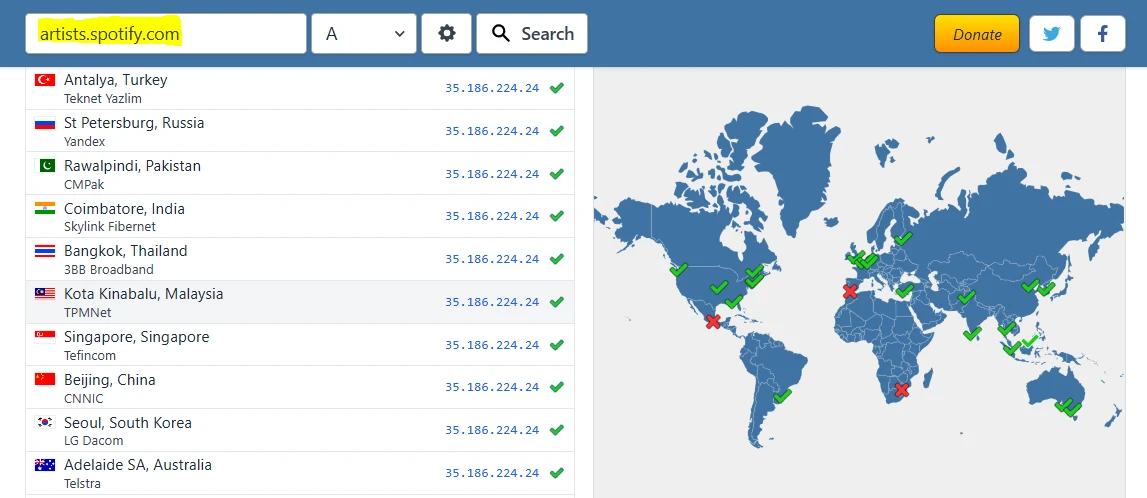
When a visitor types blog.yourdomain.co.ke, DNS steps in and directs that request to the correct location for your website.
In this case, the website is the specific section for your subdomain, say the blog section of your website.
This is done using records such as the following:
- A record: links your subdomain to a specific server IP address
- CNAME: points your subdomain to another domain name instead of an IP
Once that connection is set, your subdomain can lead to its own folder within your hosting account or even a completely different server.
That’s why a subdomain can feel like a separate website, even though it’s still tied to your main domain.
Lucky enough, you don’t have to handle all the technical setup yourself. Once your domain is active and your hosting is in place, creating and linking a subdomain is usually just a few clicks.
Common Uses of Subdomains
Subdomains are popular because they help keep a website organized as it grows. Instead of cramming everything into one place, you can split sections into clear, focused areas.
Here are some of the most common ways you can use them:
- Blogs
blog.yourdomain.co.ke
You get a dedicated space for articles, updates, or guides, separate from your main pages.
- Online stores
shop.yourdomain.co.ke
It keeps your products and checkout experience distinct from your main website.
- Support or help centres
support.yourdomain.co.ke
This one gives you a clean place for FAQs, guides, and customer assistance.
- Testing or staging sites
dev.yourdomain.co.ke or staging.yourdomain.co.ke
Useful when you’re trying out new designs or features before making them public.
- Email services
mail.yourdomain.co.ke
This one helps power branded email addresses linked to your domain.
- Regional pages
nairobi.yourdomain.co.ke
It’s great if your businesses serve different locations with specific content.
- Customer portals or web apps
app.yourdomain.co.ke
You can use this for dashboards, login areas, or software platforms.
Using subdomains this way keeps everything easy to navigate. Visitors land exactly where they need to be, and your main website stays clean instead of feeling overcrowded.
Subdomain vs Subdirectory vs Addon Domain
It’s easy to mix these three up at first, but each one serves a different purpose.
When you choose the right option early on, it can save you time and keep your site organized as it grows.
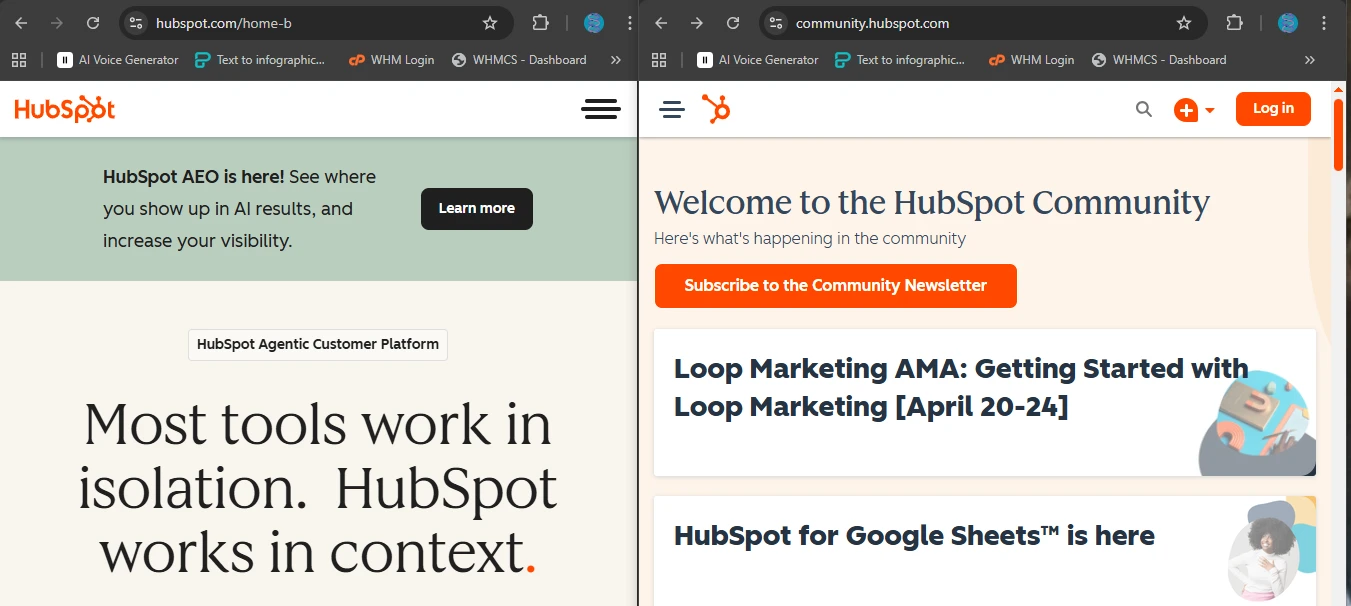
A subdomain is a separate section that sits in front of your main domain, like the above community.hubspot.com. It can run its own design, content, or even a different system entirely.
A subdirectory (also called a subfolder) stays inside your main site, like the one on the above image, hubspot.com/home-b. It’s part of the same website, sharing everything from design to structure.
An addon domain is different from both. It’s a completely separate domain, like anotherbusiness.co.ke, hosted on the same account as your main domain. It doesn’t share branding or structure unless you choose to link them.
Now let’s look at them side-by-side:
| Feature | Subdomain | Subdirectory | Addon Domain |
|---|---|---|---|
| Example | blog.yourdomain.co.ke | yourdomain.co.ke/blog | anotherdomain.co.ke |
| Structure | Separate section of main domain | Folder within main domain | Completely separate domain |
| Independence | High (can have its own system, design) | Low (shares main site setup) | Full independence |
| SEO impact | Treated more like a separate site | Shares authority with main site | Treated as a different website |
| Best for | Blogs, apps, support pages | Content within main site | Running multiple websites |
This distinction helps you manage your site, organize your content, and even determine how search engines treat your pages.
If you want full separation, a subdomain gives you that flexibility. If you prefer everything under one roof, a subdirectory keeps things tightly connected. And if you’re running multiple websites, an add-on domain lets you manage them all from one place.
How to Create a Subdomain
Once your domain is active, you can have a new section of your site ready in just a few minutes.
There are two common ways to do it, that is, through your hosting dashboard or by editing DNS records.
Method 1: Using cPanel
This is the quickest route, especially if you’re using Truehost.
- Log in to your cPanel account
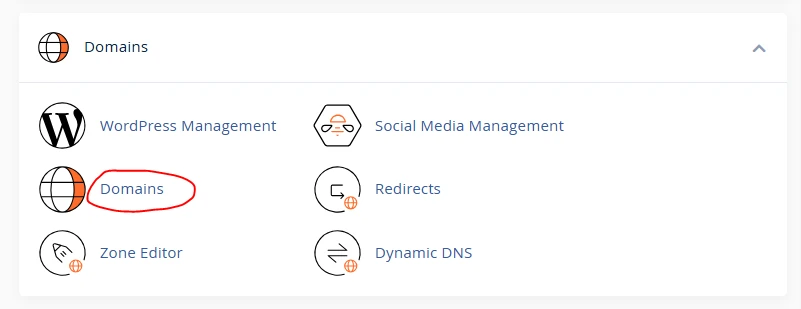
- Scroll to the Domains section and click Domains
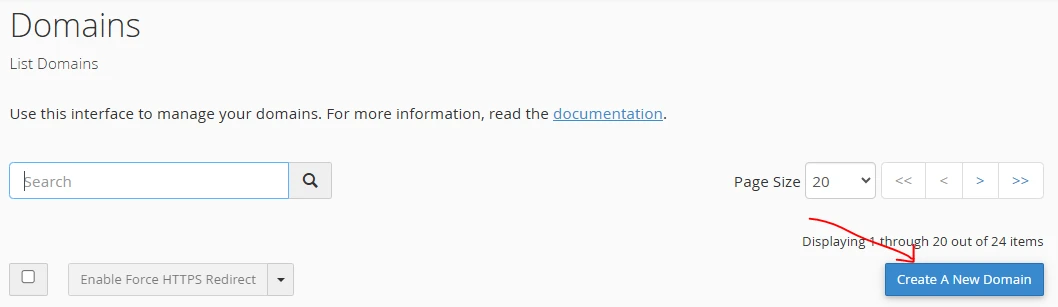
- On the domains page, click “Add a New Domain”
- Enter your subdomain name (for example, blog or shop)
- Uncheck “Share Document Root” if you want the subdomain to have its own folder
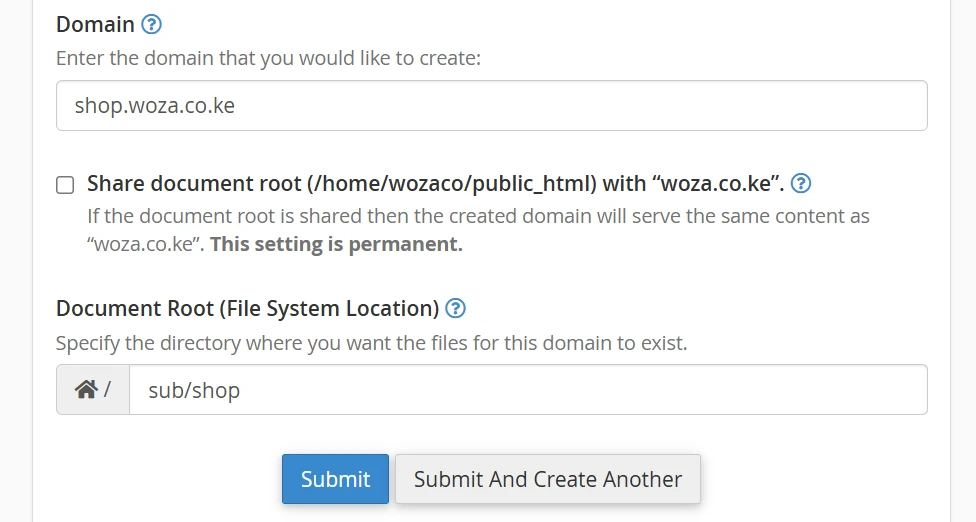
- Specify the document root (this is where your subdomain files will live)
- Click Submit
Once that’s done, you’ll see a confirmation message. Your subdomain is now active and ready to use.

Method 2: Using DNS Records
This option is useful when you’re connecting your subdomain to an external service, like an online store or app.
- Log in to your Truehost client area
- Go to Manage Domain, then Manage DNS
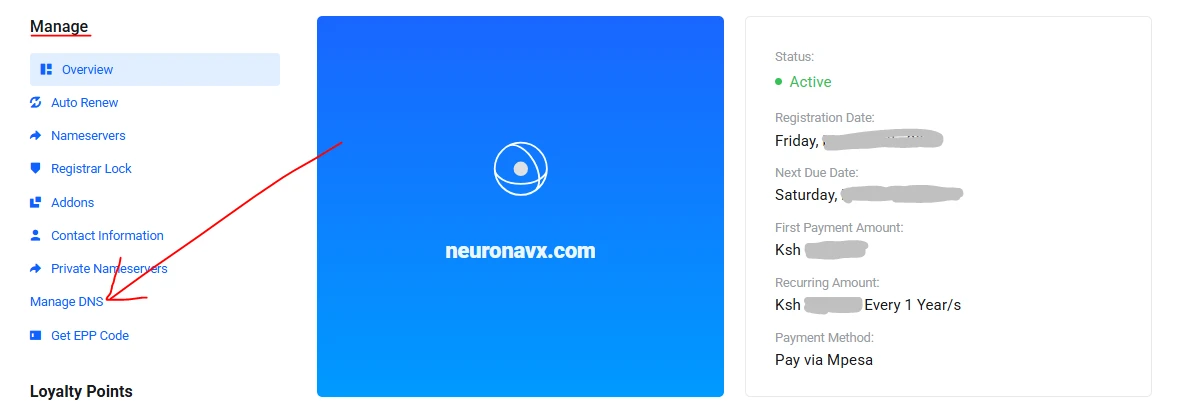
- Click Add Record
- Fill in the details:
- Type: CNAME
- Name: your subdomain prefix (for example, store)
- Value / Points to: the address provided by your service (for example,
shop.shopify.com) - TTL: leave as default
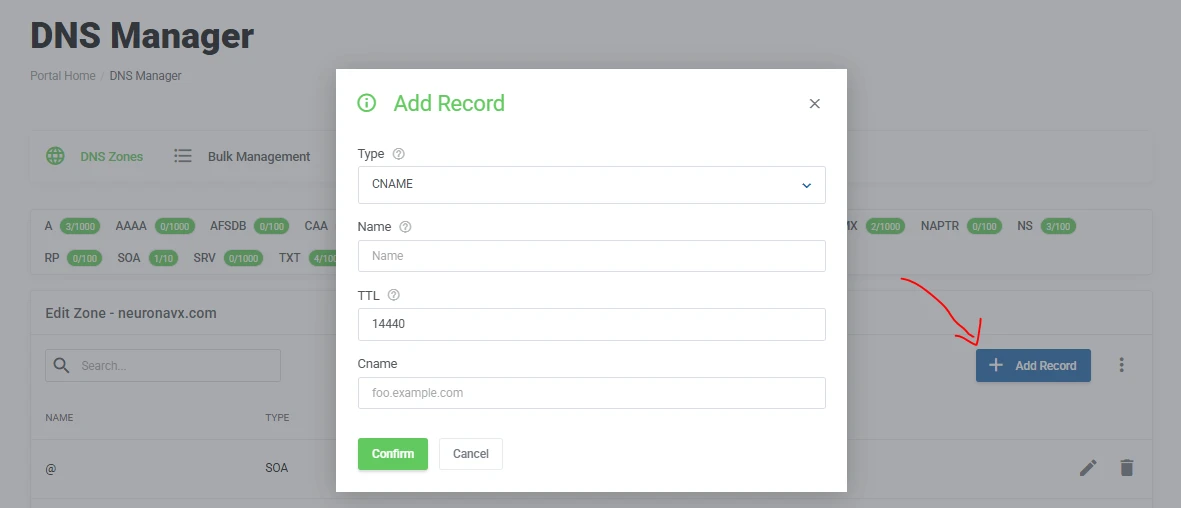
- Save the record
After saving, it may take a short while for the changes to reflect across the internet.
For most people, the cPanel method is the easiest place to start. It’s quick, requires no technical setup, and gives you full control right away.
The DNS method comes in handy when you’re linking your subdomain to tools or platforms outside your hosting account.
Key Benefits of Using Subdomains
Once you start using subdomains, you’ll notice how much easier it becomes to grow your website without losing structure.
These are the perks of having one:
1. They help you serve different audiences. Your main site can speak to general visitors, while a subdomain like blog can focus on readers, and another like app can serve logged-in users. Each group gets a space that feels made just for them.
2. They also bring better organization. Instead of stacking everything onto one homepage, you can split your content into clear sections. This keeps your site tidy and easier to manage as it expands.
3. If you want to present different styles or experiences, subdomains allow for separate branding. Your blog can have its own layout, your store can look more product-focused, and your main site can stay clean and simple.
4. Subdomains are also great for testing new ideas. You can set up something like dev.yourdomain.co.ke to try out changes without affecting your live site. It gives you room to experiment safely.
5. From a visitor’s perspective, this setup leads to a smoother user experience. People land directly on the section they need, without having to click through multiple pages.
6. Finally, there’s cost-effective scaling. You don’t need to keep buying new domains every time you add something new. One main domain can support multiple subdomains, all working together under the same brand.
As your site grows, subdomains give you the flexibility to expand in a way that still feels structured and easy to navigate.
Ready to Create Your First Subdomain?
At this point, you’ve seen what is a subdomain, how it works, and the different ways it can be used.
Now let me ask, does your website need separate spaces for things like a blog, shop, support page, or even a test area? If the answer is yes, then a subdomain is the practical way to go.
Getting started doesn’t take much. Once you have your domain set up, you can create your first subdomain in just a few steps and start building right away.
From there, you can add more as your site grows, each one serving its own purpose while still staying connected to your main brand.
If you’re ready to move forward, your next step is to register your domain and access your hosting dashboard. From there, you’ll be able to create and manage your subdomains whenever you need them.
It’s a small step that opens up a lot of room for growth.






