Domain SearchInstantly check and register your preferred domain name
 Web Hosting
 cPanel HostingHosting powered by cPanel (Most user friendly)
 KE Domains
 Reseller HostingStart your own hosting business without tech hustles
 Windows HostingOptimized for Windows-based applications and sites.
 Free Domain
 Affiliate ProgramEarn commissions by referring customers to our platforms
 Free HostingTest our SSD Hosting for free, for life (1GB storage)
 Domain TransferMove your domain to us with zero downtime and full control
 All DomainsBrowse and register domain extensions from around the world
 .Com Domain
 WhoisLook up domain ownership, expiry dates, and registrar information
 VPS Hosting
 Managed VPSNon techy? Opt for fully managed VPS server
 Dedicated ServersEnjoy unmatched power and control with your own physical server.
 Website Builder
 Online Store BuilderLaunch a professional e-commerce store without writing code.
 Web Design ServiceGet a custom-designed website tailored to your brand and goals. From just KES 15,600
 BlogRead our guides on web hosting, online business, digital marketing, and more
 SupportOur support guides cover everything you need to know about our services
 ContactContact us via chat or email
probably bought that VPS to host a website or run a small app.
Yet most of it sits idle most of the time. You pay for computing power that only works a few hours a day.
What if you turned your VPS into a 24/7 automation engine that handles repetitive tasks while you focus on growing your business?
n8n is a powerful open-source workflow automation tool that can help you automate all that.
You build visual workflows by connecting nodes. Self-host it on your own server, keep full control of your data, and run unlimited executions without per-task fees.
Unlike shared hosting or cloud tools like Zapier and Make, a VPS gives you direct server access.
You run heavier tasks, connect to local services, handle AI or local LLM workloads, and stay online even if a third-party platform goes down.
Your automations become reliable and private.
You can set up n8n on a VPS using Docker in about 30 minutes. The barrier to entry stays low, yet the possibilities scale with your needs.
This guide will take you through 13 n8n automation ideas you can try right away.
These mix simple scheduled tasks for beginners with more advanced webhook and API workflows.
Let’s get your server working smarter for you.
1) Automated Incident Response and Escalation Pipeline
Server issues happen at the worst times. You want a fast response without constant manual checks.
With n8n on your VPS, you build a workflow that monitors uptime or resource usage.
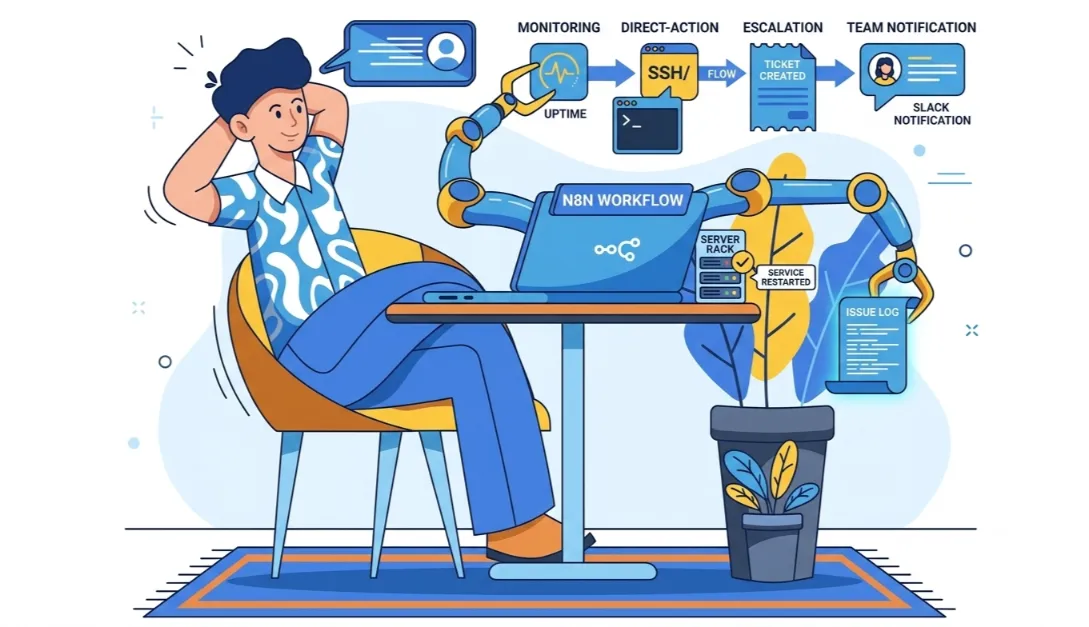
When something fails, it triggers an SSH or Docker command to auto-restart the service.
It rechecks the status. If the problem persists, it creates a helpdesk ticket, notifies your team via Slack or email, and logs the full incident timeline.
Direct server access makes this powerful. The workflow does not just send alerts; it acts on your server.
You reduce downtime and response time dramatically.
2) Automated CI/CD Deploy Pipeline
Manual deployments eat up hours and introduce errors. Automate the entire process instead.
Set up a webhook that triggers on Git push or pull request. n8n runs your tests.
If they pass, it deploys via Docker Compose or SSH commands.
It performs a post-deploy health check and sends your team a clear build report or failure log.
Full environment control on a VPS lets you execute real deploy commands safely.
Shared hosting simply cannot offer this level of integration and reliability.
3) End-to-End E-commerce Order Automation
New orders create a flood of manual follow-ups. Streamline the full lifecycle.
A webhook from Shopify or WooCommerce starts the flow. n8n updates inventory, generates and sends an invoice, triggers fulfillment notifications, and updates your CRM status automatically.
This covers the complete order journey, not just one step. You keep everything consistent and reduce errors for your online store.
4) AI Customer Support Bot with Knowledge-Base Escalation
Customers expect quick replies, but you cannot monitor every message.
Incoming chats or emails hit your n8n workflow. An AI node checks your knowledge base.
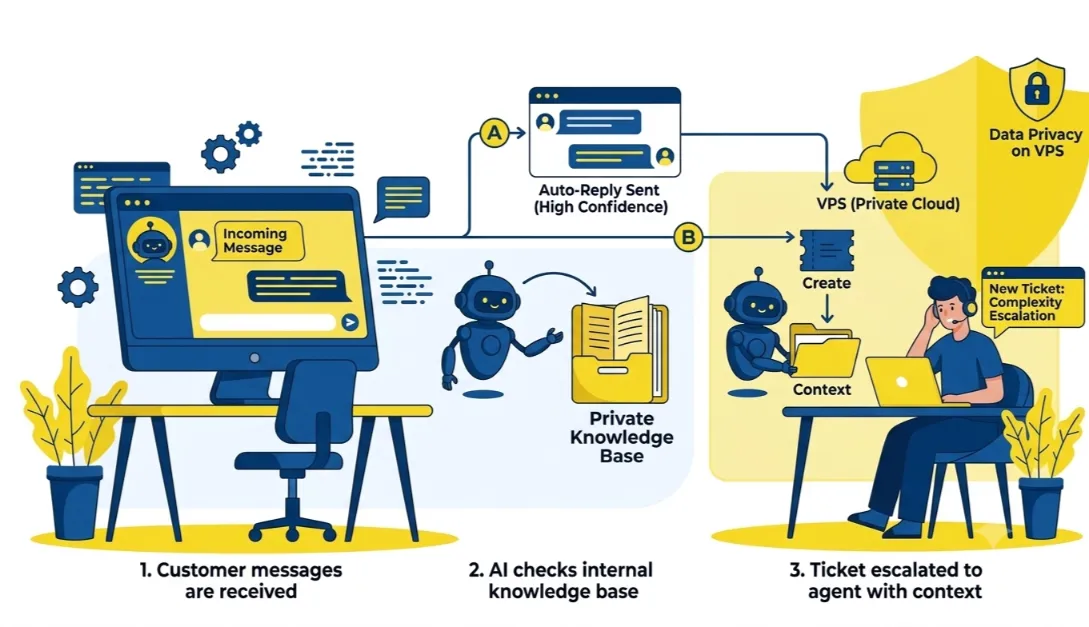
If confidence is high, it sends an auto-reply. Otherwise, it creates a ticket, includes full context, and notifies the on-call agent.
Everything stays private on your VPS instead of routing sensitive conversations through external AI services.
You maintain control and data security.
Read also: n8n Automation: Why Your Business Needs This Guiding Approach
5) Verified, Redundant Backup Pipeline
Backups are only important if they work when you need them.
Schedule a cron-based export of your databases and files. n8n uploads copies to two different destinations (like S3 and Google Drive).
It runs a test restore to verify integrity, logs the results, and alerts you only on failure.
VPS access gives true filesystem and database control for complete, verifiable snapshots.
Plugin-level backups on shared hosting cannot match this reliability.
6) Auto-Publish WordPress Posts from a Content Calendar
Sticking to a publishing schedule takes discipline. Let automation handle it.
A new row in Google Sheets or your CMS triggers the workflow.
n8n publishes the WordPress post at the scheduled time, no manual logins required.
Since your WordPress site and n8n live on the same VPS infrastructure, you avoid third-party API throttling and enjoy faster, more reliable execution.
7) Auto-Share New Posts to Social Media the Moment They Go Live
Publishing is only half the job. Distribution is important too.
A WordPress publish event immediately triggers posts to X, Facebook, LinkedIn, and other platforms.
You control volume without per-post fees.
This works smoothly at any publishing pace because everything runs on your own server.
Read also: How to Run n8n on a VPS: A Step-by-Step Guide
8) Auto-Tag and Categorize WordPress Posts
Manually tagging every new post slows you down and leads to inconsistency.
n8n fetches existing tags and categories through your WordPress REST API.
It analyzes the new post and automatically applies the correct taxonomy.
Direct API access on your VPS makes this smooth and accurate.
9) Log Monitoring with AI-Based Anomaly Detection
Sifting through logs manually is tedious and error-prone.
The workflow tails your server and application logs. An AI step identifies unusual error patterns.
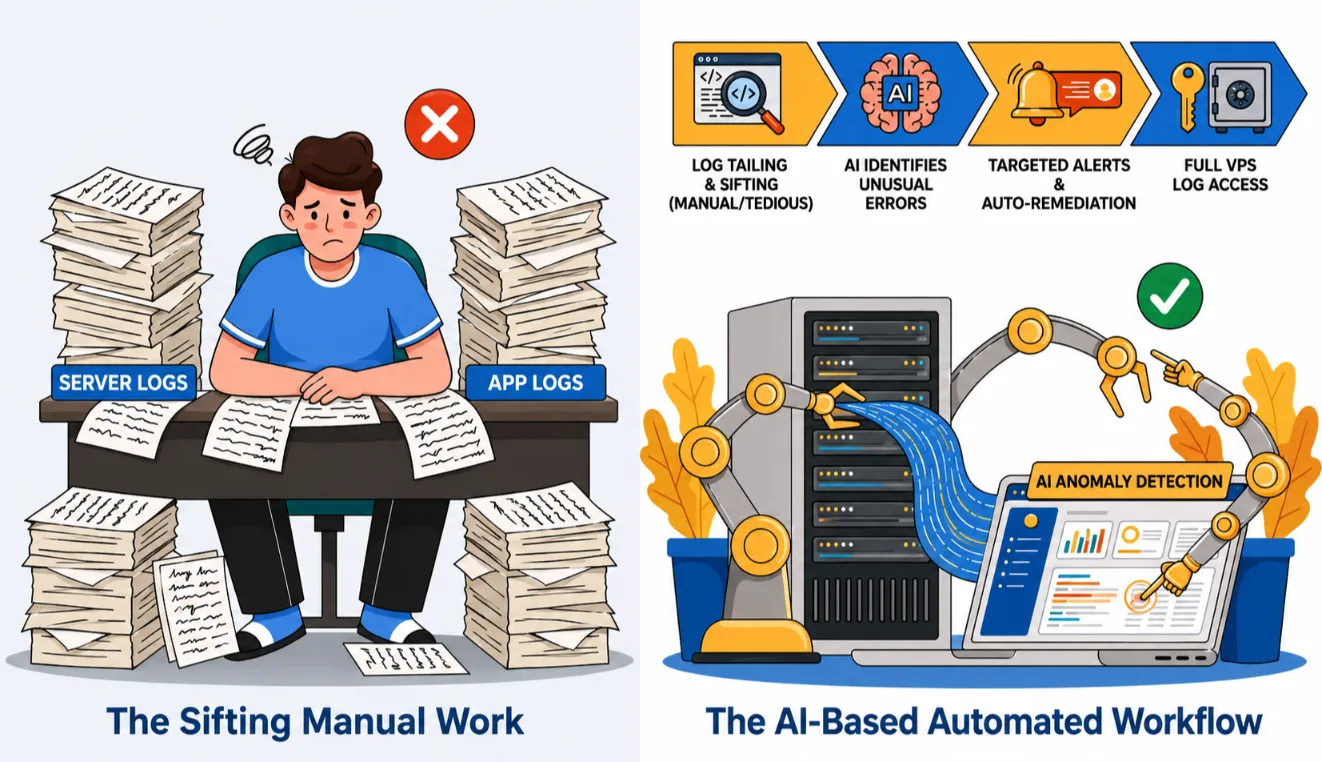
It sends targeted alerts and can even trigger basic auto-remediation.
Full access to every log file on the VPS gives you insights that shared hosting environments simply block.
10) Capture Leads from Web Forms and Sync to Your CRM
Leads slip through the cracks when follow-up is manual.
Form submissions instantly create or update contacts in your CRM.
n8n adds follow-up tasks so nothing falls through.
You handle any volume privately without paying per connection or task.
11) Auto-Generate Invoices or PDFs from Form Submissions
Manual data entry for invoices wastes time and invites mistakes.
A new order or form entry triggers PDF generation with the right details. n8n emails it immediately.
For Kenyan freelancers and SMEs, this shines with KES-denominated invoicing and local compliance needs. You save hours every week.
12) Automate M-Pesa Payment Confirmations
M-Pesa powers most Kenyan online transactions. Missing a callback can break your order flow.
An STK Push callback or webhook updates the order status to “paid” and automatically triggers delivery or fulfillment.
This is a centerpiece idea for Kenyan businesses. Webhook reliability and 24/7 uptime on your VPS ensure you never miss a payment confirmation.
13) Automate WhatsApp Business Customer Replies with AI
WhatsApp serves as the main customer service channel for many Kenyan SMEs.
An incoming message triggers an AI step. It checks your product spreadsheet or knowledge base, drafts a relevant reply, or escalates to a human with full context.
Self-hosting keeps all customer data private and running continuously without extra bot subscriptions.
See also: Can You Host n8n for Free with a VPS?
Start Small: Your 3-Step Action Plan
Your VPS is more than a website host. It becomes the reliable engine running these automations quietly in the background for free, indefinitely.
Do not try to build all 13 ideas at once. Pick just two or three that solve your most repetitive tasks this week.
Start there and expand as you gain confidence.
Each workflow often begins from an existing n8n template. You customize rather than build everything from scratch.
Progress feels fast and achievable.
Ready to bring these ideas to life? We at Truehost make it simple.
Check out our optimized n8n self-hosting plans with easy setup and reliable Kenyan infrastructure.
n8n Automation Ideas FAQs
How to use n8n efficiently?
Start with templates, keep workflows modular, and use error-handling nodes. Monitor resource usage on your VPS and scale as needed.
Is n8n free to use on a VPS?
Yes. The community edition is completely free for self-hosting with unlimited executions.
Do I need coding skills to build these workflows?
No for most ideas. The visual editor handles the basics. JavaScript nodes help for advanced logic, but you can start without them.
What VPS specs do I need to run n8n?
A solid starting point is 2 vCPUs and 4 GB RAM. This handles multiple workflows comfortably. Scale up for heavy AI usage.
How is self-hosted n8n different from Zapier or Make?
You own your data, avoid task-based pricing, and gain direct server control. Costs stay predictable even at high volume.
Can n8n really integrate with M-Pesa?
Yes. Official and community nodes support Daraja API, STK Push, callbacks, and more.
Is it safe to automate sensitive tasks like backups or customer data on a self-hosted instance?
Very safe when you follow security best practices, strong credentials, firewalls, regular updates, and encrypted connections. You control the environment completely.
How long does it take to set up n8n on a VPS?
Usually 30 minutes or less with Docker. Truehost plans include helpful guides for quick deployment.
Can I run all 13 of these automations at once?
Absolutely. A properly sized VPS handles them easily. Monitor performance and upgrade resources if you add complex AI workflows.
Your VPS already has the power. n8n gives you the tools to use it. Pick one idea today, set it up, and watch how much time and effort you reclaim tomorrow.
We at Truehost are here to support your automation journey with reliable VPS, dedicated servers, and specialized n8n hosting. Start building smarter workflows now.