Domain SearchInstantly check and register your preferred domain name
 Web Hosting
 cPanel HostingHosting powered by cPanel (Most user friendly)
 WordPress HostingHost your WordPress website with fast, secure, and affordable WordPress hosting in Kenya.
 KE Domains
 Reseller HostingStart your own hosting business without tech hustles
 Windows HostingOptimized for Windows-based applications and sites.
 Free Domain
 Affiliate ProgramEarn commissions by referring customers to our platforms
 Free HostingTest our SSD Hosting for free, for life (1GB storage)
 Domain TransferMove your domain to us with zero downtime and full control
 All DomainsBrowse and register domain extensions from around the world
 .Com Domain
 WhoisLook up domain ownership, expiry dates, and registrar information
 VPS Hosting
 Managed VPSNon techy? Opt for fully managed VPS server
 Dedicated ServersEnjoy unmatched power and control with your own physical server.
 Website Builder
 Online Store BuilderLaunch a professional e-commerce store without writing code.
 Web Design ServiceGet a custom-designed website tailored to your brand and goals. From just KES 15,600
 BlogRead our guides on web hosting, online business, digital marketing, and more
 SupportOur support guides cover everything you need to know about our services
 ContactContact us via chat or email
If you are building an online store, blog, or business site, understanding the difference between a webpage and a website is an important part of the process.
People use these words as if they’re interchangeable. They are closely related, but not identical.
Knowing the difference helps you in three specific ways. One, you’ll plan your content better by understanding how individual pages fit into a larger structure. Two, you’ll structure your site correctly so visitors can find what they need.
And three, you’ll communicate clearly when you’re talking to developers, designers, or clients; no confusion about what you’re asking for.
So let’s start with know what each term entails.
What is a webpage?
A webpage is a single page on the internet.
It’s one document. One screen. One view in your browser. When you click a link and land somewhere, you’re usually looking at a webpage.
That page might be long or short. It might have text, images, videos, or forms. But primarily, it’s a single piece of content with a single purpose.
Examples of webpages are things you see every day:
- The blog post you’re reading right now
- A contact page with a form and an address
- A product page showing one specific item you can buy
For instance, this screenshot is an example of a webpage containing a blog post:
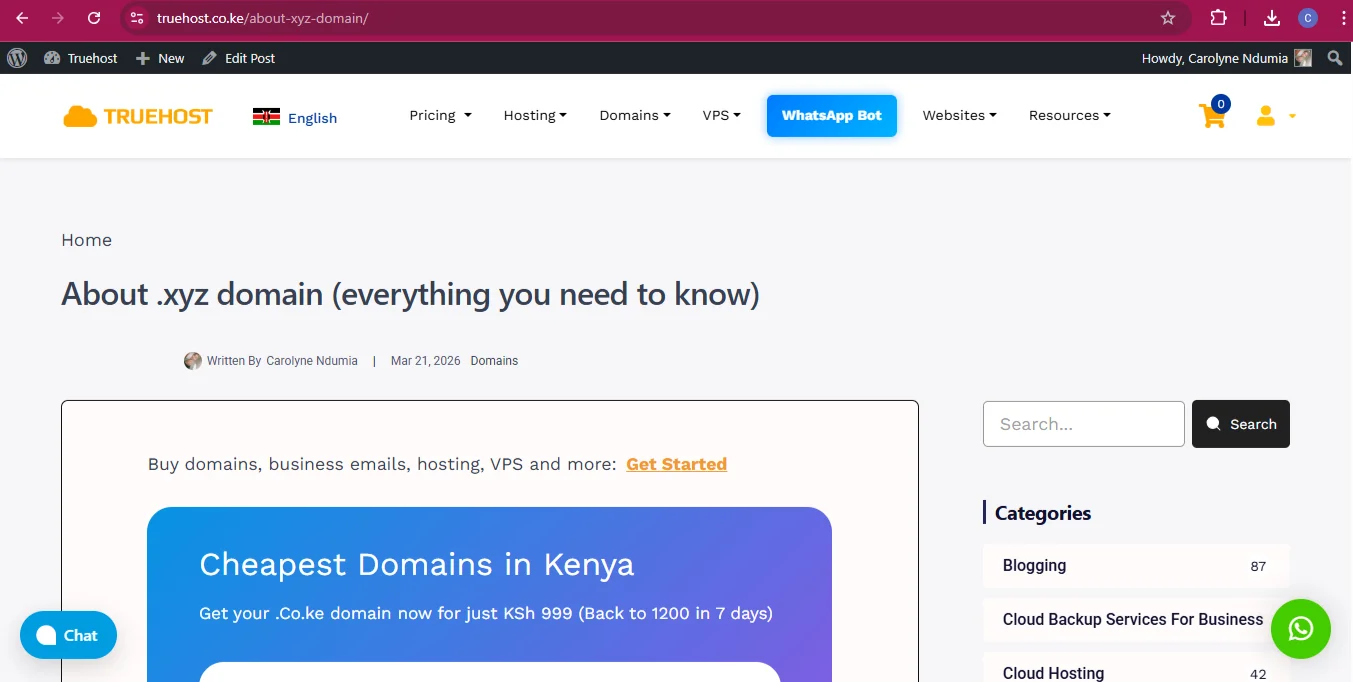
Every webpage has its own unique URL. That’s how the internet knows which page to show you. You can usually see the full path in your browser’s address bar.
For example:
yourwebsite.com/aboutyourwebsite.com/blog/how-to-startyourwebsite.com/products/laptop
Simply put, a webpage is one piece of content with its own address.
What is a website?
Now, a website is a collection of interconnected webpages that all share the same domain name.
If a webpage is a single document, a website is the entire folder that contains the document. It’s the complete, organized structure that users navigate to find information.
You don’t just land on a random page and stop there; you move through the site using menus, links, and categories.
A website includes elements that tie everything together:
- A homepage that acts as the entry point
- Navigation menus that help you move around
- Internal links that connect related pages
- Consistent branding so you know you’re still in the same place
Examples of websites are the major sites you visit all the time:
- Amazon.com
- BBC.com
- Truehost.co.ke
- Olitt.com

When you go to Olitt.com, you’re not looking at a single webpage. You’re entering an entire system of many pages, all connected under one roof.
Webpage vs website: 7 key differences
A quick comparison:
| Feature | Webpage | Website |
| Scope | Single page | Multiple pages |
| Structure | Standalone document | Organized collection of pages |
| URL | Has a specific URL path | Uses a root domain |
| Purpose | Focuses on one goal | Several multiple goals |
| Creation process | Quick to create | Takes more planning and setup |
| SEO impact | Ranks for specific keywords | Builds overall authority |
| Components | Title, headline, body, media, links | Header, footer, main body, pages, posts, other content types |
Now, let’s go through each aspect in detail.
1) Scope
A webpage is a single page. A website has multiple pages.
This is the simplest way to tell them apart. A webpage is just one part of a larger whole. A website is the whole thing.
If you’re working on a site and someone asks how many pages it has, they’re asking how many individual webpages exist inside that website.
2) Structure
A webpage is a standalone document, while a website is an organized collection of pages.
When you look at a single webpage, it exists on its own. It has its own content, its own URL, and its own purpose.
But when you look at a website, you see structure. You see navigation menus at the top. You see categories that group related content.
You also see internal links that connect one page to another. That structure is what turns a collection of pages into a real website.
3) URL
While a webpage has a specific URL path, a website uses a root domain.
The root domain is the main address you register, like example.com. Every webpage underneath that domain gets its own path added to the end.
So the website lives at the root domain, and each webpage lives at a specific path under that domain.
For example:
- Website →
example.com - Webpage →
example.com/services
You can tell right away whether someone is referring to a whole site or a single page just by looking at the URL.
4) Purpose
A webpage focuses on one goal, while a website can serve multiple goals.
A well-designed webpage usually has a single job. It might be there to get someone to sign up for a newsletter, read an article, or buy a specific product.
A website, on the other hand, can do many things at once. It can educate visitors through blog posts, sell products through a store, provide information through an about page, and offer support through a help section, all in one place.
5) Creation process
A webpage is quicker to create, but a website takes more planning and setup.
If you need a single page, you can put one together pretty fast. You write the content, add some images, and publish it.
A website requires more groundwork. You have to decide on a domain name, set up hosting, plan the structure, design the navigation, and organize how everything connects. It’s like building a whole system.
The good thing is, there are modern tools to help you build a website without breaking a sweat. For instance, with our website builder, you only need a vision for your website, and the rest will be handled for you.
And if you don’t have web hosting yet, we will set you up with hosting for any website at a great price.
6) SEO impact
A webpage ranks for specific keywords while a website builds overall authority.
Search engines like Google analyze things at two levels. Individual webpages rank for specific search terms. That’s why you’ll see one blog post show up for a particular question you searched.
But the authority of your website as a whole affects how well any individual page can rank.
A website with a strong reputation, good backlinks, and consistent quality will help all its pages perform better.
7) Components
A webpage includes things like a title, headline, body content, media, and links to other pages or sites.
On the other hand, a website includes broader structural elements: a header that appears on every page, a footer with links and copyright info, the main body area where content lives, and various content types like pages, blog posts, products, or portfolio items.
Where domain names come in
Every website starts with a domain name.
The domain is your address on the internet. It’s what people type to find you. Once you register a domain, that address becomes the home of all your webpages.
Everything you publish lives under that one domain.
If you’re building a site, choosing a domain is your first step. And it’s worth getting right. Pick something that’s clear and easy to remember.
A good domain name should be short enough that people don’t struggle to type it, brandable so it stands out, and if it makes sense for your business, include a keyword that tells people what you do.
If you’re at the point where you’re thinking about creating a website, you’ll need a domain first. At Truehost, you can register your domain right now.
And we have so many domain extensions, ensuring that any website you’d like to build has the perfect TLD waiting for you to register.
Single-page vs. multi-page websites
When building a website, you have to decide between two main approaches: a single-page or a multi-page website. They’re built differently, and each one suits different needs.
Some of the differences are:
Navigation
Single-page sites scroll continuously. Everything is on a single long page, and users navigate sections by scrolling or clicking anchor links.
Multi-page sites use menus to load entirely separate pages. Each click brings up a new view.
Complexity
Single-page sites are simpler to build. You don’t have to worry about organizing multiple pages or building out a complex menu structure.
But they can get messy if you have a lot of content to cover. Multi-page sites take more work upfront but offer a cleaner way to organise complex content.
SEO
Multi-page sites offer more opportunities to target multiple keywords. You can create a dedicated page for each topic, service, or product and optimise each page for different search terms.
Single-page sites have to do all their SEO work on one URL, which limits how many keywords you can realistically target.
Scalability
Multi-page websites are better suited for growing businesses. If you plan to add more content over time, more blog posts, more products, more services, a multi-page structure gives you room to grow.
Single-page sites work well for small projects like portfolios or event pages, but they don’t scale as easily.
Final Take
To wrap it up, A webpage is a single document with its own URL, while a website is a collection of those documents, all connected under one domain. You need both.
The webpage provides specific content, and the website gives it a home and structure.
If you’re ready to build either a website or a webpage, your first step is to get a domain name. That’s your address.
Lock yours in now with Truehost domains and use our website builder to put your pages together.
We also have affordable hosting plans for any website’s needs.