Domain SearchInstantly check and register your preferred domain name
 Web Hosting
 cPanel HostingHosting powered by cPanel (Most user friendly)
 WordPress HostingHost your WordPress website with fast, secure, and affordable WordPress hosting in Kenya.
 KE Domains
 Reseller HostingStart your own hosting business without tech hustles
 Windows HostingOptimized for Windows-based applications and sites.
 Free Domain
 Affiliate ProgramEarn commissions by referring customers to our platforms
 Free HostingTest our SSD Hosting for free, for life (1GB storage)
 Domain TransferMove your domain to us with zero downtime and full control
 All DomainsBrowse and register domain extensions from around the world
 .Com Domain
 WhoisLook up domain ownership, expiry dates, and registrar information
 VPS Hosting
 Managed VPSNon techy? Opt for fully managed VPS server
 Dedicated ServersEnjoy unmatched power and control with your own physical server.
 Website Builder
 Online Store BuilderLaunch a professional e-commerce store without writing code.
 Web Design ServiceGet a custom-designed website tailored to your brand and goals. From just KES 15,600
 BlogRead our guides on web hosting, online business, digital marketing, and more
 SupportOur support guides cover everything you need to know about our services
 ContactContact us via chat or email
You land on a page and leave within seconds. That quick exit just raised the site’s bounce rate.
In Google Analytics 4 (GA4), bounce rate measures unengaged sessions.
A session counts as a bounce when it meets any of these three conditions:
- Single page view only
- Less than 10 seconds on the site
- No conversion events triggered
Google confirms bounce rate is not a direct ranking factor. However, a high bounce rate is still a problem.
It usually signals that your page doesn’t match what visitors expected.
This happens due to slow speed, poor mobile experience, or unclear content. This leads to lost leads and wasted traffic.
In 2026, aim for a site-wide bounce rate between 40% and 60%. Lower is generally better.
Let’s look at realistic benchmarks and strategies that reduce bounce rates in 2026.
What’s a Good Bounce Rate in 2026?
There’s no universal ‘perfect’ number. It depends on your industry, traffic source, and page type.
Here are realistic 2026 benchmarks drawn from current GA4 data and industry reports:
| Category | Benchmark Range |
| Overall site-wide target | Under 50% |
| Excellent performance | 26–40% |
| Ecommerce | 20–45% (avg. 35–45%) |
| Blogs & content sites | 55–80% |
| Landing pages | 60–90% |
| Service websites (Legal, Automotive, etc.) | 50–70% |
| B2B websites | 25–65% |
| Travel & Hospitality | 40–60% |
| Information technology and services | 45–65% (typical range) |
To quickly check your current bounce rate and compare it with these benchmarks, use these free tools:
- Google Analytics 4 (the most accurate, official source)
- SEMrush Site Audit or Ahrefs Site Audit both provide bounce rate insights along with actionable improvement recommendations
Mobile bounce rates are typically 5–15% higher than desktop. Focus on steady improvement rather than chasing zero.
Bounce Rate Formula (GA4)
Bounce Rate = (Unengaged Sessions ÷ Total Sessions) × 100
This shows the percentage of visitors who leave without meaningful engagement.
Now that you know the numbers, let’s move to what actually works.
Proven Strategies to Reduce Bounce Rates in 2026
You don’t need to overhaul everything at once. Small, focused changes deliver real results.
Here are the strategies that consistently lower bounce rates this year.
1) Improve Page Load Speed
Slow pages frustrate users and trigger instant exits. In 2026, people expect pages to load in under 2 seconds.
Actionable steps you can take right away:
- Compress images and videos (tools like WebP and TinyPNG work well)
- Enable a Content Delivery Network (CDN)
- Minimize heavy scripts and unused plugins (especially in WordPress)
- Upgrade to faster hosting with SSD/NVMe storage and LiteSpeed servers
Choosing the right host makes a massive difference.
Truehost’s cloud hosting uses NVMe drives, LiteSpeed servers, free SSL, and Kenya-based data centers for excellent speed and low latency.
Many plans include daily backups and free domain options. This setup helps Kenyan businesses hit sub-2-second load times without high costs.
2) Optimize for Mobile
Mobile traffic dominates in 2026.
Often, over 60% of global visits and even higher in Kenya, with millions of active smartphone connections.
Non-responsive sites lose visitors immediately, with mobile bounce rates typically running 8–12 points higher than desktop.
Here’s how to fix it and keep people engaged longer:
- Use a fully responsive design so your layout automatically adapts to any screen size.
- Make buttons and links finger-friendly with minimum 48-pixel tap targets and enough space between them.
- Test regularly using Google’s PageSpeed Insights (mobile mode) or Lighthouse in Chrome DevTools.
When your site feels smooth and natural on phones, visitors stay longer and engage more exactly what you need to reduce bounce rates.
Check out our article on boosting your site’s performance
3) Strengthen Internal Linking
Many visitors finish reading one page and leave simply because they don’t know what to do next.
When you add relevant links between your pages, you turn a single-page visit into a longer, more valuable session.
What to do practically:
- Add contextual links naturally within your content where they genuinely help the reader.
- Include ‘Related Posts’ or ‘You May Also Like’ sections at the end of articles.
- Use descriptive anchor text that tells both users and search engines exactly where the link leads (avoid vague phrases like ‘click here’).
- Place important links higher up in the content, they get more clicks and keep momentum going.
Quick example:
If you’re reading an article about reducing bounce rates, helpful internal links could point to “how to improve page load speed,” “mobile optimization tips,” or “crafting better calls to action.” Each link gives the reader a clear next step and encourages them to explore more.
Aim for 3–5 thoughtful internal links per article. Over time, this creates a connected website where visitors stay longer and engage more.
4) Align Content with User Intent
Aligning content with user intent remains one of the most powerful ways to reduce bounce rates and boost engagement.
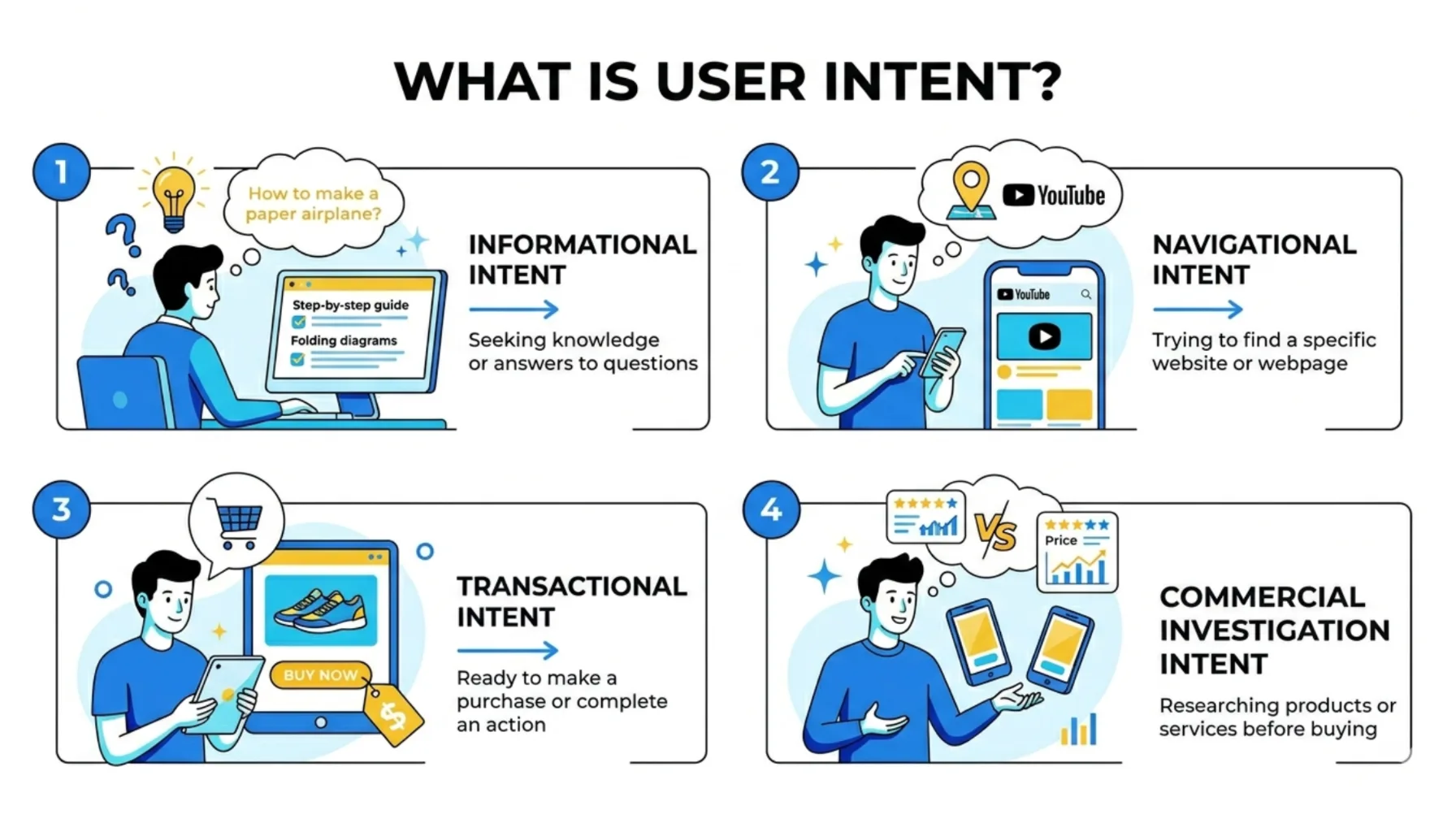
Key practices that help:
- Match your headlines and meta descriptions precisely to the search query so visitors know they landed in the right place.
- Create scannable, helpful content using short paragraphs, clear subheadings, and bullet points that let people find answers quickly.
- Place key value propositions and the most important information above the fold within the first few seconds of scrolling.
- Add relevant images or videos that support the message without slowing down the page.
When your content truly satisfies user intent, people feel understood. They stay, scroll, and engage, which naturally lowers your bounce rate.
5) Enhance Navigation and User Experience
A clean, intuitive navigation makes exploration effortless and keeps people moving through your site instead of bouncing.
Good UX feels natural. Visitors shouldn’t have to hunt for what they need; everything should guide them smoothly.
Focus on these elements:
- A clean, intuitive menu and layout that limits choices and reduces decision fatigue.
- Prominent, benefit-driven Calls to Action (CTAs) that clearly show the next helpful step.
- Logical pathways, such as breadcrumbs or related content sections, that gently guide users to other relevant pages.
Make your site easy to move around, and you’ll turn casual visitors into engaged ones.
6) Reduce Pop-Ups and Distracting Ads
Intrusive elements like aggressive ads or pop-ups often increase bounce rates by interrupting the experience.
Build credibility with:
- Testimonials, security badges, and a clean, professional design that signals reliability.
- Ads and pop-ups are used sparingly and non-intrusively, for example, subtle scroll-triggered banners instead of full-screen overlays that block content immediately.
When your site feels trustworthy and uninterrupted, visitors relax and engage more.
7) Craft Clear, Compelling CTAs
Clear, compelling CTAs solve this by giving people an easy, obvious reason to keep interacting with your site.
Best practices include:
- Place primary CTAs above the fold where they’re impossible to miss.
- Use action-oriented language such as ‘Get Your Free Guide’ or ‘Start Free Trial Today’ instead of vague buttons.
- Limit yourself to 1–2 strong CTAs per page to avoid overwhelming the reader.
Clear CTAs turn passive readers into active participants, helping lower bounce rates while moving people closer to your goals.
8) Incorporate Multimedia and Improve Readability
Well-formatted pages with visuals feel less intimidating, so people read more and stay longer.
Practical ways to improve:
- Add engaging images, short videos, or infographics always optimized for speed with compression and lazy loading.
- Keep paragraphs short (2–3 sentences maximum) and use subheadings, bullets, and simple language.
- Run your content through tools like Hemingway App or Grammarly to boost clarity and cut complex sentences.
Pages with relevant visuals and scannable formatting often see higher dwell time and lower bounce rates because visitors can quickly find and absorb what they need.
9) Personalize the User Experience
Personalization has become a major engagement booster because it makes visitors feel the site understands them.
Even simple tweaks can dramatically reduce bounce rates by showing relevant content at the right moment.
You can start with:
- Dynamic content based on location, behavior, or past visits (for example, showing Kenya-specific offers to local traffic).
- Tailored recommendations for products or related articles that match what the user has already shown interest in.
- Easy CMS features in platforms like WordPress to implement basic personalization without complex coding.
Even small personalization touches make the experience feel custom-built for the user, hence encouraging them to stay and explore.
10) Monitor, Test, and Iterate
Assumptions often fail; data-driven tweaks deliver consistent improvements.
Below is a screenshot I took from Google Analytics of a site showing a high bounce rate.
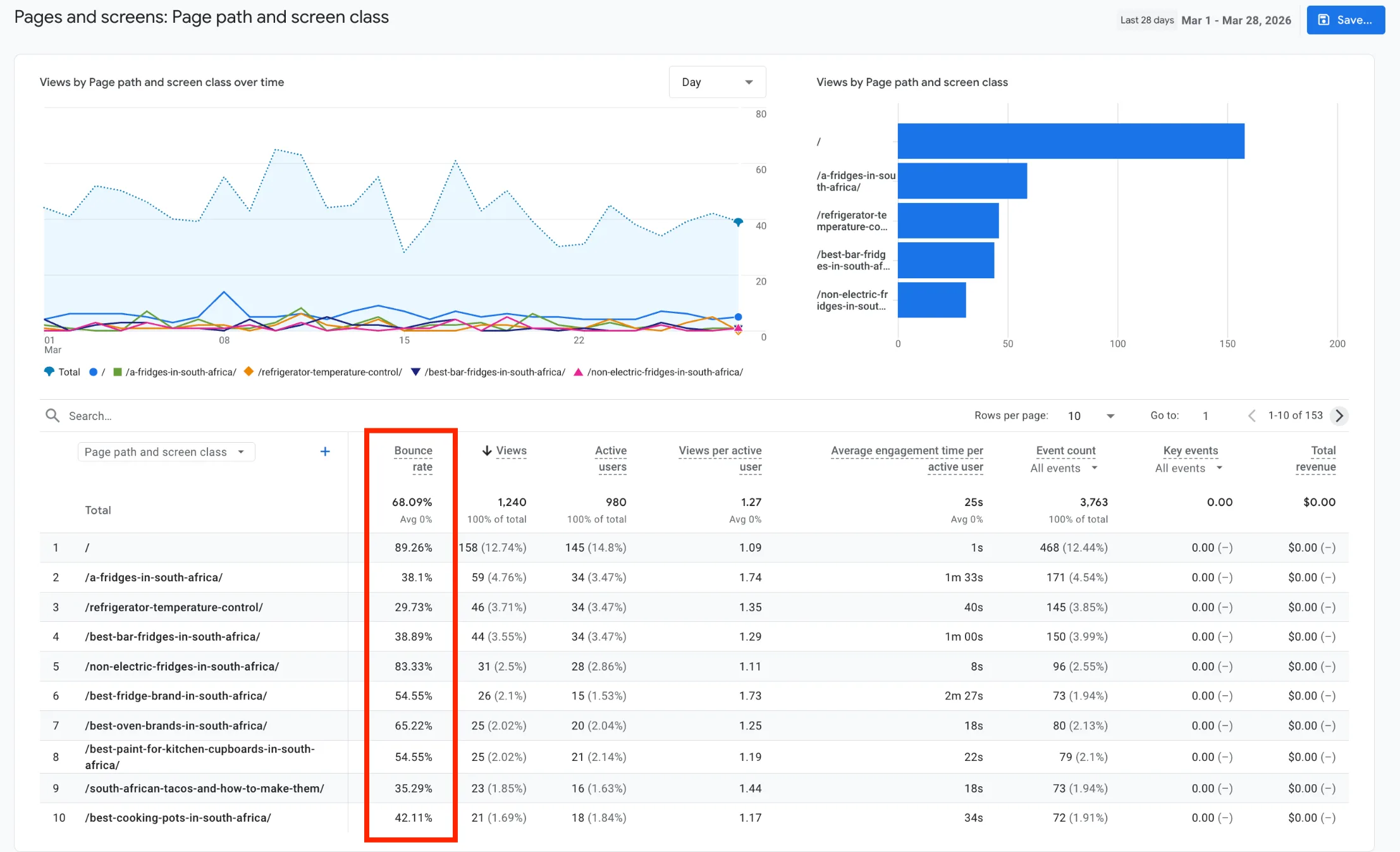
How to do it effectively:
- Use Google Analytics 4 to track bounce rates (and engagement metrics) for individual pages and segments.
- Run A/B tests on headings, layouts, CTAs, images, and content placement to see what actually resonates.
- Make incremental improvements based on what the numbers show, not guesses.
Even small changes like moving a CTA higher or testing a new headline can produce noticeable drops in bounce rates over time.
Final Thoughts on How to Reduce Bounce Rates
Reducing bounce rates in 2026 is simple: deliver what visitors want.
A fast, trustworthy, easy-to-navigate website that matches their expectations right away.
Start with speed, mobile optimization, and clear content. Then add better navigation, internal links, and trust signals. Track your progress in GA4 and keep refining.
Register or transfer your domain with Truehost for fast service, great pricing, and local Kenyan support.
It’s one of the quickest ways to build credibility and improve engagement from day one.
Your lower bounce rates and better results start with that solid foundation.