 Domain SearchInstantly check and register your preferred domain name
 Web Hosting
 cPanel HostingHosting powered by cPanel (Most user friendly)
 WordPress HostingHost your WordPress website with fast, secure, and affordable WordPress hosting in Kenya.
 KE Domains
 Reseller HostingStart your own hosting business without tech hustles
 Windows HostingOptimized for Windows-based applications and sites.
 Free Domain
 Affiliate ProgramEarn commissions by referring customers to our platforms
 Free HostingTest our SSD Hosting for free, for life (1GB storage)
 Domain TransferMove your domain to us with zero downtime and full control
 All DomainsBrowse and register domain extensions from around the world
 .Com Domain
 WhoisLook up domain ownership, expiry dates, and registrar information
 VPS Hosting
 Managed VPSNon techy? Opt for fully managed VPS server
 Dedicated ServersEnjoy unmatched power and control with your own physical server.
 Website Builder
 Online Store BuilderLaunch a professional e-commerce store without writing code.
 Web Design ServiceGet a custom-designed website tailored to your brand and goals. From just KES 15,600
 BlogRead our guides on web hosting, online business, digital marketing, and more
 SupportOur support guides cover everything you need to know about our services
 ContactContact us via chat or email
Your website can go offline without warning.
Emails stop working, and customers can’t reach you. In some cases, your domain name can even be taken by someone else.
That’s what happens when a domain isn’t renewed on time.
A domain name isn’t something you own permanently. It’s leased for a set period. Once it expires, everything connected to it is at risk. Your site becomes inaccessible, your brand loses visibility, and recovery can be costly or impossible if someone else registers it.
That’s why staying on top of domain renewal is essential for keeping your online presence stable, secure, and fully under your control.
Step-by-Step Guide to Renewing a Domain
Renewing your domain isn’t complicated, but small mistakes (like missing a step or ignoring a fee) can cost you. Here’s a clear, start-to-finish breakdown so you know exactly what to do in every situation.
How to Renew an Active Domain
If your domain hasn’t expired yet, this is the easiest and cheapest time to renew it.
1) Log in to your registrar account
Go to the platform where you originally purchased your domain, like Truehost.
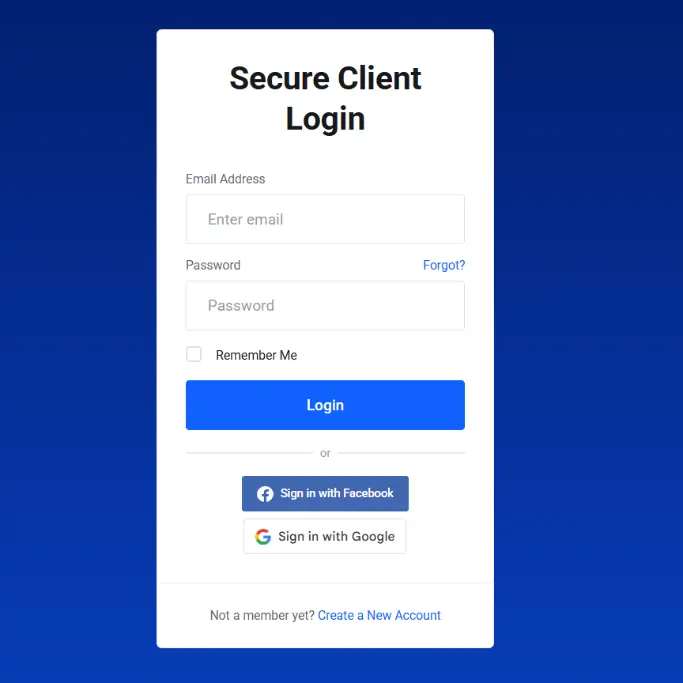
Use your login details to access your dashboard.
2) Go to your domain list
Look for sections labeled:
- My Domains
- Domain Management
- Portfolio
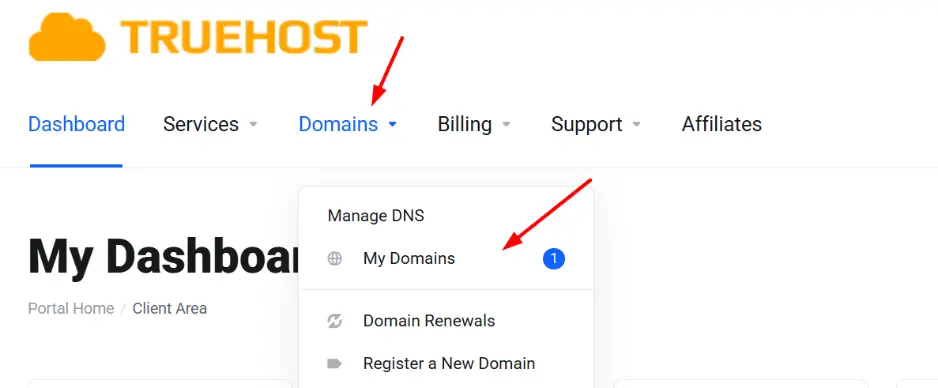
This is where all your registered domains are listed.
3) Select the domain you want to renew
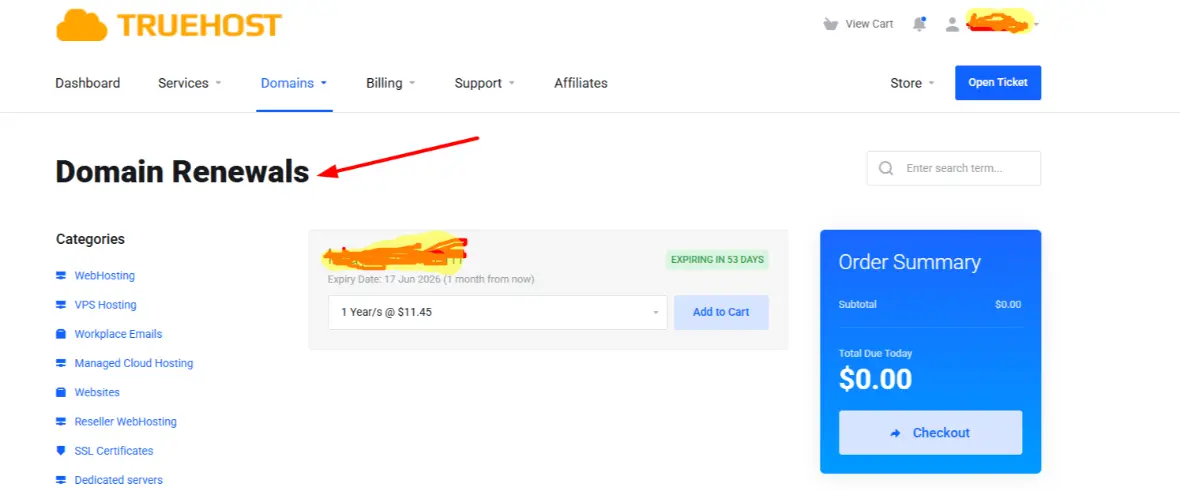
Find the specific domain name you want to extend. If you manage multiple domains, double-check you’re selecting the correct one.
4) Click the renewal option
Depending on your registrar, the button may appear as:
- Renew Now
- Add Years
- Renew (sometimes shown as a refresh/recycle icon)
- Or simply add to cart if you’re in the domain renewal section.
5) Choose how long to renew
You’ll usually be given options to renew for 1 to 10 years.
6) Review the total cost carefully
Before paying, take a moment to check what you’re being charged for:
- Base renewal fee
- Domain privacy protection (WHOIS protection)
- DNS or email add-ons
- Any bundled services
Some registrars automatically include extras; remove anything you don’t need.
7) Complete checkout and payment
Proceed to payment and confirm the transaction. Most platforms accept cards, mobile payments, or PayPal, depending on the provider.
8) Confirm the renewal
Once payment is successful:
- You’ll get a confirmation message on screen
- A receipt/confirmation email will be sent
Your domain expiry date should update immediately in your dashboard.
How to Renew an Expired Domain
If your domain has already expired, timing is critical. The longer you wait, the more expensive or impossible it becomes to recover.
Step 1: Log in to your registrar account
Use the same provider where the domain was registered.
Step 2: Check the domain status
Your domain will fall into one of these stages:
- Expired (Grace Period) → You can renew at the normal price
- Redemption Period → Recovery is still possible, but with extra fees
- Pending Delete → Too late to recover; it’s about to be released
Step 3: Click “Renew” or “Restore”
The option name depends on the stage:
- Renew (during grace period)
- Restore Domain (during redemption)
Step 4: Pay the required fees
Costs vary depending on timing:
- Grace period: Standard renewal fee
- Redemption period: Higher fee (can be significantly more expensive)
Step 5: Wait for reactivation
After payment:
- Some domains reactivate instantly
- Others may take up to 24–48 hours to fully restore
Your website and email should start working again once reactivation is complete.
How to Renew a Domain Automatically (Auto-Renew)
If you don’t want to track expiry dates manually, auto-renew handles everything in the background.
Step 1: Log in to your registrar account
Step 2: Go to domain settings
Select the domain, then open its settings or management page.
Step 3: Enable auto-renewal
Switch the auto-renewal option ON.
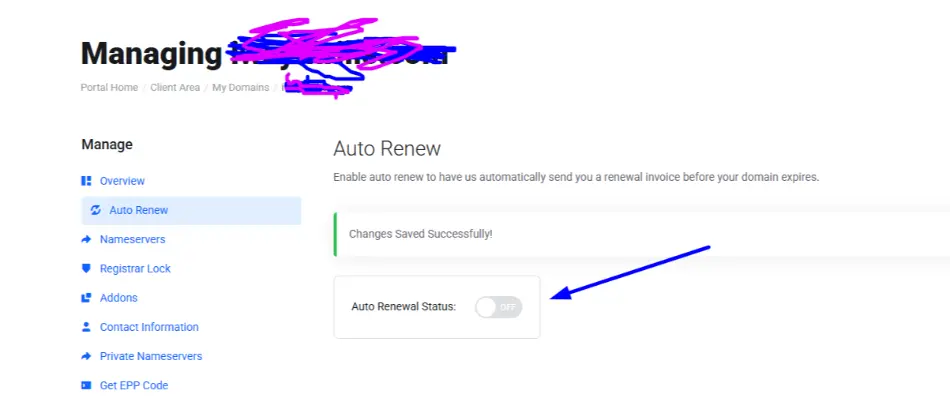
Once enabled, the system will renew your domain automatically before it expires.
Step 4: Add or confirm your payment method
Make sure you have:
- A valid debit/credit card
- Or an active payment option supported by your registrar
Step 5: Check renewal timing
Most registrars attempt renewal a few days before the expiry date, not on the exact day.
This gives time to fix issues if the payment fails.
Step 6: Keep your billing details updated
Auto-renewal only works if your payment method is valid.
Common issues include:
- Expired cards
- Insufficient funds
- Disabled payment methods
Domain Renewal Costs
Domain renewal prices vary more than most people expect.
Domain Renewal Prices by Registrar (As of April, 2026)
| Registrar | .com | ..ke | .org | .cloud |
| Truehost | Ksh 1,600 | Ksh 3,000 | Ksh 1,500 | Ksh 2,633 |
| Olitt | Ksh ~1,399 | Ksh ~3,876 | Ksh ~1,552 | Ksh ~2,588 |
| HostAfrica | Ksh 2,990 | Ksh 3,000 | Ksh 2,000 | Ksh 5,199 |
| HostPinnacle | Ksh 1,750 | Ksh 3,000 | Ksh 1,750 | Ksh 3,800 |
Factors Affecting Price:
- Domain extension (TLD)
Example: .com vs .co.ke vs .org - Registrar pricing
Different providers have different renewal rates - Renewal duration
Multi-year renewals may offer discounts - Promotions vs renewal rates
First-year prices are often lower than renewal prices
Extra Fees to Watch For:
- Domain privacy protection
- Redemption (late recovery) fees
- Premium domain renewal costs
- Add-ons like email or DNS services
Common Domain Renewal Issues
Even though renewing a domain is usually straightforward, a few small mistakes or oversights can lead to delays, extra costs, or even losing your domain.
Here are the most common issues to watch out for:
1) Expired payment method
Auto-renewal only works if your payment details are valid. If your card has expired or there are insufficient funds, the renewal fails silently in some cases. This is one of the most common reasons domains accidentally expire.
2) Outdated email address
Registrars send important expiry alerts via email. If your email address is outdated or you no longer check it, you might miss renewal reminders and only realize the domain has expired when your website goes offline.
3) High redemption fees
If you renew late (after expiry), your domain may enter a redemption period. At this stage, recovering it often costs much more than a normal renewal fee, sometimes several times higher.
4) Locked accounts or login issues
Sometimes users can’t access their registrar accounts due to forgotten passwords, account locks, or security checks. This can delay renewal at a critical time, especially if the domain is close to expiry.
5) Registrar price changes
Many people are surprised when renewal fees are higher than the first-year registration price. Registrars often increase renewal rates, and optional add-ons like privacy protection can also raise the final cost.
Renew Your Domain on Time
Renewing your domain is one of those small tasks that protects everything you’ve built online. Miss it, and you risk downtime, lost traffic, and even losing your brand name entirely.
The safest move?
- Enable auto-renew
- Keep your payment details updated
- Set reminders before expiry
If you’re looking for a reliable place to manage and renew your domain in Kenya, consider Truehost. We offer affordable domain renewals, local support, and easy management tools, perfect for beginners and established businesses alike.
Domain Renewal FAQs
Here are answers to the questions most people ask when dealing with domain renewals:
How early can I renew my domain?
You can renew your domain at any time before it expires; many registrars allow renewals months in advance.
What happens if I forget to renew my domain?
Your domain first enters a grace period where you can still renew it. After that, it moves to a redemption period with higher fees, and eventually becomes available for anyone to register.
Can I renew my domain after it expires?
Yes, but it depends on how long it’s been expired. The later you renew, the more it may cost.
How long does domain renewal take?
In most cases, renewal is instant. However, it can take up to 24–48 hours for everything (like DNS) to fully update.
Is auto-renewal safe?
Yes. It’s one of the safest ways to avoid losing your domain, just make sure your payment details are always up to date.
Why is renewal more expensive than the first year?
Most registrars offer discounted prices for the first year. Renewal fees return to the normal rate after that.
Can someone take my domain immediately after it expires?
Not immediately. There’s usually a buffer period, but once that ends, the domain can be registered by someone else.
Do I lose my website if my domain expires?
Your website will go offline, but your files are still stored on your hosting server. Once you renew the domain, your site can come back online.







