Domain SearchInstantly check and register your preferred domain name
 Web Hosting
 cPanel HostingHosting powered by cPanel (Most user friendly)
 WordPress HostingHost your WordPress website with fast, secure, and affordable WordPress hosting in Kenya.
 KE Domains
 Reseller HostingStart your own hosting business without tech hustles
 Windows HostingOptimized for Windows-based applications and sites.
 Free Domain
 Affiliate ProgramEarn commissions by referring customers to our platforms
 Free HostingTest our SSD Hosting for free, for life (1GB storage)
 Domain TransferMove your domain to us with zero downtime and full control
 All DomainsBrowse and register domain extensions from around the world
 .Com Domain
 WhoisLook up domain ownership, expiry dates, and registrar information
 VPS Hosting
 Managed VPSNon techy? Opt for fully managed VPS server
 Dedicated ServersEnjoy unmatched power and control with your own physical server.
 Website Builder
 Online Store BuilderLaunch a professional e-commerce store without writing code.
 Web Design ServiceGet a custom-designed website tailored to your brand and goals. From just KES 15,600
 BlogRead our guides on web hosting, online business, digital marketing, and more
 SupportOur support guides cover everything you need to know about our services
 ContactContact us via chat or email
Building a social networking website sounds like something only billion-dollar companies can do. Facebook reportedly spent over $1 million before it hit 1 million users, and today’s custom-built social platforms can run anywhere from $20,000 to well over $100,000, so it is easy to assume you need deep pockets just to get started.
But those figures tell only part of the story. The expensive route applies to platforms built from scratch by professional agencies with dedicated frontend engineers, backend architects, UX designers, QA teams, and project managers. That is the right approach if you are raising venture capital or building something with truly novel features that do not exist anywhere else.
If your goal is to launch a community, connect people around a shared interest, or test a social product idea, you do not need any of that. You can build a functional, attractive social networking website for under $1,000, and sometimes for far less, using open-source software, one-click installs, and affordable hosting.
The software itself is largely free. What you mostly pay for is hosting, a domain name, and the occasional premium theme or plugin.
This guide breaks down exactly how to do it, step by step, covering everything from defining your niche and choosing your platform to setting up hosting, launching your community, and growing it.
Step 1: Define Your Niche and Purpose
Before you spend a single shilling or dollar, you need to be specific about what your social network is for. Generic social networks (trying to be “the next Facebook”) fail because they cannot compete on scale. Niche networks succeed because they serve a specific community that existing platforms do not serve well.
Ask yourself:
- Who is my target audience? (e.g., Kenyan entrepreneurs, local artists, university students, farmers, gamers, expats)
- What will members do on this platform? (post updates, share photos, find jobs, discuss local issues, join interest-based groups)
- Why would someone choose my network over Facebook or WhatsApp groups?
- What is my long-term monetization plan? (ads, subscriptions, premium features, marketplace)
The more specific your niche, the lower your marketing costs and the stronger your community loyalty. A social network for Kenyan small business owners, for example, has a clearer value proposition than a general-purpose network.
Step 2: Choose Your Platform Strategy
This is where you can save the most money, since several powerful social networking platforms are available for free or at a low cost.
Option A: WordPress + BuddyPress (Best for Beginners)
BuddyPress turns a WordPress site into a social network with features like member profiles, activity feeds, groups, messaging, and notifications. It is beginner-friendly, highly customizable, and works with thousands of WordPress plugins and themes.
Estimated cost: Free software + hosting + domain
Best for: Community blogs, alumni groups, local communities, and professional networks
Option B: HumHub (Best for Teams and Organizations)
HumHub is a lightweight open-source platform designed for teams, schools, NGOs, and organizations. It offers modern layouts, group-style spaces, and flexible permissions.
Estimated cost: Free software + hosting + domain
Best for: Clubs, schools, NGOs, and workplace communities
Option C: OSSN (Open Source Social Network)
Open Source Social Network provides a Facebook-style experience with features like messaging, friend requests, groups, and media sharing. It also supports plugins and third-party integrations.
Estimated cost: Free basic version or one-time premium fee + hosting + domain
Best for: Social platforms that want a familiar Facebook-like layout
Option D: Elgg
Elgg is one of the oldest open-source social networking platforms. It is highly flexible and powerful, but requires more technical knowledge to set up and customize.
Best for: Developers or teams that want deeper control over their platform’s functionality
Step 3: Build Your Social Networking Website
There is no single right way to build a social network; the best approach depends on your technical comfort level, your timeline, and how much control you want over the final product. The two paths below cover the full spectrum, from the fastest possible launch to the most flexible long-term setup. Either one can get you live for under $1,000.
Path A: The No-Code Route
If you do not want to deal with coding, no-code website builders make it possible to launch a community platform quickly. Tools like Wix and Squarespace offer drag-and-drop editors, hosting, and community templates, but costs can rise quickly, and local support is limited.
For Kenyan and East African users, Truehost’s AI Website Builder is often a more practical choice. It includes hosting, free SSL, M-Pesa support, and local 24/7 customer support, making it easier to build and manage your community website without technical skills.
How to Launch with the Truehost AI Website Builder
i) Create your account
Sign up at Truehost and choose the Website Builder plan.
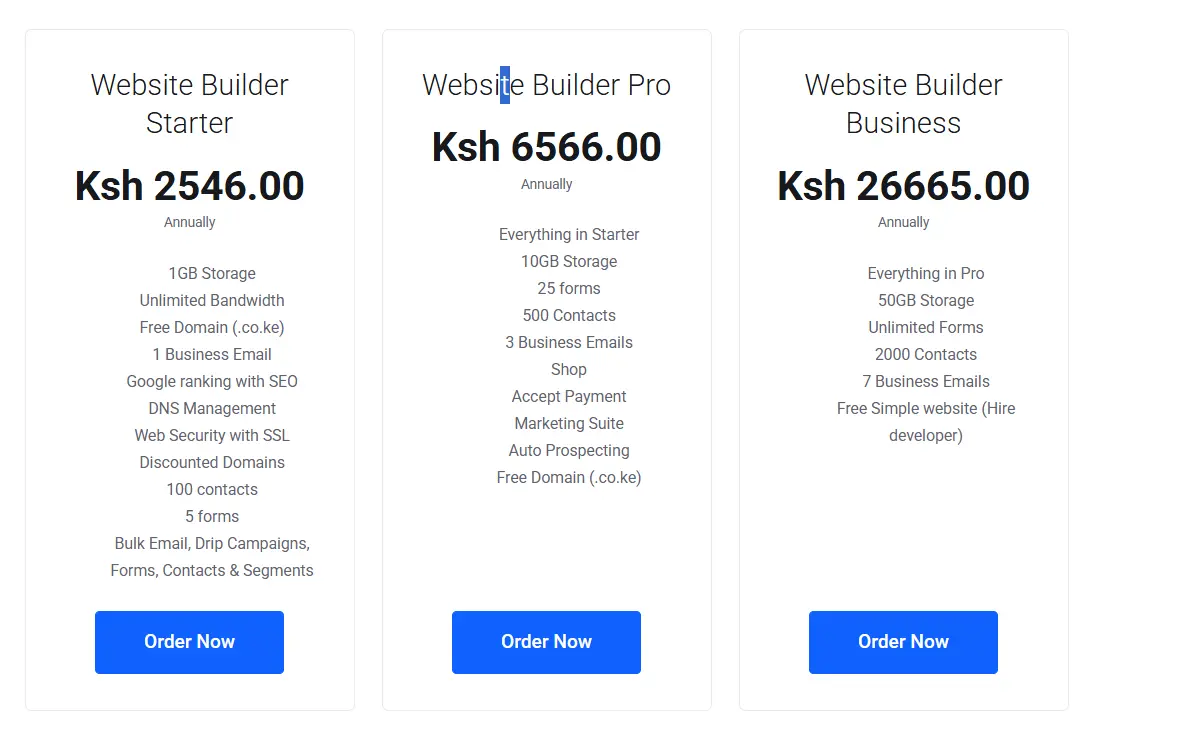
- Go to https://truehost.co.ke/cloud/store/web.
- Review the AI Website Builder plans (they often bundle domain + hosting + builder access).
- Select a suitable plan (Starter or higher for full features) and add it to your cart.
- Complete payment (supports M-Pesa for easy Kenya payments).
Create / Log Into Your Truehost Account
- After purchase, you’ll receive an email with login details.
- Log in to the Truehost Client Area at
https://truehost.co.ke/cloud/.
Access the AI Website Builder (Olitt)
- In your client area or dashboard, look for the Website Builder, AI Builder, or Olitt section (often a “Get Started” button).
- Click to launch the builder. You may be redirected to the Olitt dashboard.
ii) Describe your community
Enter a clear prompt explaining your platform, audience, and desired features. For example: “A social network for Kenyan entrepreneurs with member profiles, discussion groups, and paid memberships.”
iii) Review the AI-generated website
The builder creates a ready-made website structure in minutes. Edit the text, replace stock images, and customize the design to match your community.
iv) Set up key pages
At minimum, create a homepage, registration/login page, discussion or community section, About page, and pricing page if you plan to charge users.
v) Connect payments
The builder supports M-Pesa, PayPal, and card payments. For Kenyan audiences, M-Pesa is especially important for easier member payments.
vi) Publish your website
Once everything looks good, publish your site and go live with hosting, SSL, and your domain already included.
This option works best for beginners, non-technical founders, and anyone who wants to launch quickly.
The main tradeoff is flexibility; no-code builders are fast and simple, but they offer less customization than a self-hosted WordPress setup.
Path B: WordPress + BuddyPress
If you want full control over your social networking website without spending a fortune, WordPress combined with BuddyPress is one of the best options available. While it takes a bit more setup than a simple website builder, it gives you a platform you can fully customize and scale as your community grows.
BuddyPress is a free open-source WordPress plugin that adds social networking features like user profiles, activity feeds, private messaging, groups, notifications, and member connections. Together with WordPress plugins, it allows you to build a complete social platform without custom coding.
Here is the full setup process, step by step.
Step 1: Get Hosting and Install WordPress
Your hosting choice affects your website’s speed, reliability, and overall user experience. For a new social network, shared hosting is a good low-cost starting point, while a VPS becomes a better option as your community grows and needs more dedicated resources.
Truehost is a strong option for Kenyan users because its Nairobi-based servers help deliver faster local loading speeds. It also includes free SSL, daily backups, LiteSpeed technology for better performance, and convenient M-Pesa billing.
Once your hosting is ready, you can install WordPress in minutes through cPanel using the Softaculous installer, making it easy to get your social networking site online quickly.
Hosting costs to plan for:
- Shared hosting (suitable for early-stage launch): approximately KSh 188–1,632/month
- VPS hosting (recommended for growing communities): approximately KSh 1,400–5,600/month.
For most people reading this guide, starting on shared hosting and upgrading to VPS once you reach a few hundred active members is the sensible path.
Step 2: Install and Configure BuddyPress
With WordPress running, installing BuddyPress takes less than five minutes. In your WordPress dashboard, go to Plugins → Add New, search for “BuddyPress,” install it, and activate it. The setup wizard walks you through enabling the core components.
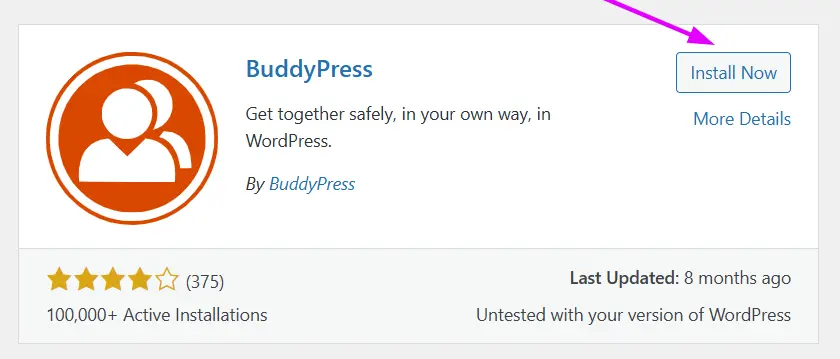
The components you should enable from the start:
- Extended Profiles: Let members build rich profiles with custom fields beyond just a name and email
- Friend Connections: The follow/friend system that builds your social graph
- Private Messaging: one-on-one direct messages between members
- Activity Streams: the central news feed where member activity appears
- User Groups: interest-based or topic-based communities within your platform
- Notifications: in-app and email alerts that bring members back
Each of these can be toggled on or off, so you can start with what you need and add more as your community grows.
Step 3: Choose and Install a Theme
The default WordPress themes are not designed for social networking. You need a BuddyPress-compatible theme that presents your community features clearly and looks professional on both desktop and mobile.
Free options worth considering:
- BuddyX: one of the most popular free BuddyPress themes, clean and fast with solid mobile support
- Reign: feature-rich free theme with good BuddyPress integration and multiple layout options
- Neve: a lightweight, multipurpose theme with BuddyPress compatibility and fast load times
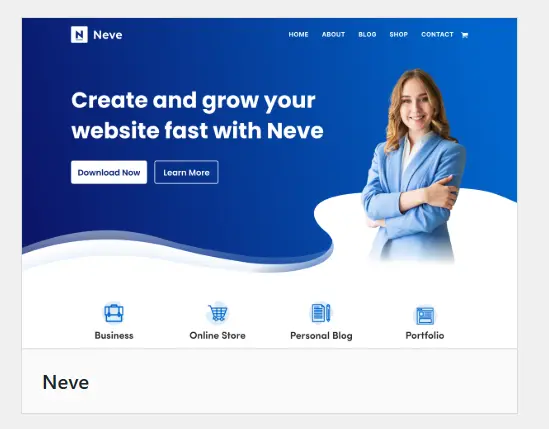
Premium themes ($39–$79 one-time): Premium BuddyPress themes generally offer a more polished design, better customization options, and dedicated support. If you want your platform to look distinctive rather than generic, a premium theme is worth the investment. Themes like Kleo and BuddyApp are well-regarded in this category.
Whatever you choose, prioritize two things above aesthetics: mobile responsiveness and loading speed. Over 80% of internet users in Kenya browse on smartphones. A theme that looks stunning on a desktop but loads slowly or breaks on mobile will cost you, members.
Step 4: Configure Your Community Settings
Before you invite anyone, spend time on your platform’s settings. This is where you shape the experience every member will have.
a) User registration: Decide whether your network is open to anyone, requires an invitation, or needs admin approval before new accounts become active. Open registration grows faster but requires more moderation. Invite-only or approval-based registration grows more slowly but tends to produce higher-quality, more engaged communities.
b) Profile fields: BuddyPress’s Extended Profiles feature allows you to add custom profile fields beyond the default options. Add details that fit your community, such as industry, location, and skills for a professional network, or county and neighborhood for a local community platform.
c) Privacy settings: Define who can see member profiles, who can message whom, and what content is visible to non-members. Being intentional about privacy from the start prevents issues later.
d) Groups: Set up a few starter groups before launch so the platform does not feel empty. If you are building a network for Kenyan entrepreneurs, you might create groups around sectors like agriculture, tech, retail, or finance.
e) Email notifications: Configure what triggers an email notification and what does not. Too many emails and members unsubscribe; too few and they forget the platform exists. Strike a balance, notify on direct messages, group mentions, and friend requests, but not on every activity stream update.
Step 5: Install Essential Plugins
WordPress’s plugin ecosystem is one of its greatest strengths. The right plugins fill the gaps that BuddyPress alone does not cover.
For performance:
- LiteSpeed Cache: If you are on Truehost (which runs LiteSpeed servers), this plugin is exceptionally effective. It handles page caching, image optimization, and lazy loading in one package. Install it first.
- Smush or ShortPixel: compresses images uploaded by you and your members, keeping your site fast even as media accumulates
For security:
- Wordfence Security: the free tier includes a firewall, malware scanner, and login protection. Essential for any site with user accounts.
- WP Cerber: adds spam protection, limits login attempts, and blocks suspicious registrations
For community features:
- bbPress: adds fully-featured discussion forums to your site, complementing BuddyPress’s activity stream
- BuddyPress Activity Plus: enriches the activity feed with image, video, and link previews
- BuddyPress Moderation: lets members report content and gives admins tools to review and act on reports
- GamiPress or BadgeOS: gamification through points, badges, and leaderboards; effective for encouraging participation in new communities
For SEO:
- Yoast SEO or Rank Math: helps your community pages get found in search engines, which counts for organic growth over time
Step 6: Set Up Monetization
Even if you are not charging members right now, it is worth thinking about monetization before you have hundreds of users; retrofitting a payment system onto an established community is more disruptive than building it in from the start.
Membership tiers are the most common model for community social networks. A free tier gets people in the door; a paid tier offers premium features like ad-free browsing, access to exclusive groups, advanced profile options, or priority visibility. Two plugins handle this well in the WordPress ecosystem:
- Paid Memberships Pro: free plugin with a straightforward membership setup, multiple tier support, and a wide range of payment gateway add-ons
- WooCommerce Memberships: more powerful and flexible, good if you also want to sell products or services alongside membership
For Kenyan payment gateways, the options have improved significantly:
- Pesapal: supports M-Pesa, Airtel Money, cards, and bank transfers; widely used by Kenyan businesses and has solid WordPress/WooCommerce integration
- IntaSend: built by a Kenyan team, supports M-Pesa STK Push and card payments, with a developer-friendly API and a WooCommerce plugin
- Daraja API (Safaricom): for developers who want direct M-Pesa integration; requires more technical setup but gives you the most control
For a first version, Pesapal is the most straightforward choice, setup is relatively simple, it handles the M-Pesa complexity for you, and it is trusted by Kenyan users.
Step 7: Customize Your Design and Test Thoroughly
Once your plugins are in place and your settings are configured, do a full visual pass of your platform before inviting anyone.
i) Use Elementor or the WordPress block editor to customize your homepage, about page, and landing pages. Your homepage in particular needs to do heavy lifting; it should immediately communicate who the platform is for, what makes it worth joining, and how to sign up. Do not leave this as a generic WordPress page.
ii) Test on multiple mobile devices if possible. Load your site on a low-end Android phone on a 3G connection, which approximates the experience a significant portion of your Kenyan audience will have. If it loads slowly or breaks, that needs to be fixed before launch, not after.
iii) Create test accounts. Register two or three test members and walk through the full experience, signing up, completing a profile, posting to the activity feed, joining a group, sending a message, and receiving a notification. Every friction point you find is one your real members will hit too.
iv) Add trust signals. Include a visible contact method (a WhatsApp button works extremely well for a Kenyan audience), a professional About page that explains who is behind the platform, and your Community Guidelines. These small things make a significant difference in whether a new visitor decides to register or leave.
Start Building Your Community Today
There has never been a better time to build a niche online community in Kenya. Millions of people are online every day, especially on mobile, and many are looking for platforms built around their specific interests, businesses, or local experiences. While global platforms are crowded and general-purpose, a focused community offers something more valuable: relevance and connection.
The good news is that building a social networking website no longer requires a huge budget or a large tech team. With affordable hosting, open-source tools, and simple website builders, you can launch your platform without spending thousands of dollars.
Whether you choose a quick AI-powered website builder or a more customizable WordPress setup, the tools are already available; you just need to start. Get started with Truehost for affordable hosting, free SSL, M-Pesa billing, and reliable support built for the Kenyan market.